A personal phone is worth considering when your child needs to communicate independently away from home; a tablet is more suited to learning and leisure at home, either as their own device or one shared with the family. Before choosing, check the school’s actual apps and sign-in process, the child-account controls available on the exact device, and any separate costs or setup involved.
Who this is for
Schoolwork-first households
You need homework sites, documents or school sign-in to work reliably alongside ordinary home entertainment. Check the school’s requirements before choosing an ecosystem; England’s Department for Education advises schools to consider how and where devices will be used and their technical requirements.
First-phone families
Your child needs to communicate independently away from home, and you need to consider how a personal account, permissions and the school’s phone policy will work together. Apple Support and Google’s Family Link guidance describe account and supervision arrangements to check.
Shared-device families
You want learning and leisure access at home without assuming each child needs a personal device. Samsung describes Samsung Kids for shared-device use; consider how family members will take turns and keep activity separate.
What to consider before buying
Decide whether your child needs independent communication or mainly home access, then check school compatibility and account controls on the exact device. A shared tablet can suit home use if turn-taking and separate sign-ins work for your household.
Personal smartphone
Consider when: Your child needs calls or messages away from home.
Trade-off: You will need to manage a personal account and mobile service, and check the school’s policy.
Child’s own tablet
Consider when: Your child mainly needs a device for schoolwork and leisure at home.
Trade-off: Controls depend on the account, device and software setup; a case or keyboard may be a separate purchase.
Shared household tablet
Consider when: Use is mainly at home and your household can organise turns and keep activity separate.
Trade-off: Sharing can be awkward when people need the device at the same time or require separate school sign-ins.
| Concern |
What to check when buying |
Who this matters to |
| School-service compatibility |
Ask the school for named apps, browser requirements, sign-in details and any device policy; test the required workflow on the intended device and child account. |
If assignments depend on particular school services, I want to know they work before choosing a device. Around 33% of consumers put school-service compatibility first. |
| Independent communication |
Decide whether calls or messages away from home are needed, what mobile service is required and what the school permits. |
If my child needs to contact family when away from home, a tablet may not meet that need on its own. Around 25% of consumers prioritise independent communication. |
| Child accounts and supervision |
Check the child-account requirements, the parent’s compatible management device, app-approval settings and the software version needed for controls. |
If managing apps and access is my main concern, I want controls that work with the account and device we plan to use. Around 25% of consumers put supervision first. |
| Sharing, durability and ongoing cost |
Check how users sign in and take turns, whether a case fits the exact model, and the repair and content-service terms. |
If the device will be shared or handled by more than one child, I want a workable routine and a clear picture of upkeep. Around 17% of consumers prioritise shared use and ongoing care. |
Buying pitfalls
-
Buying a tablet before checking the school’s services
General web access does not confirm that a particular app, school account or assignment-submission process will work. Amazon says Fire tablets do not support Google Play and that some apps may be unavailable.
Ask the school for its actual requirements and test them with the intended device and child sign-in before buying.
If the required service is unavailable, you may need another device or another way to complete assignments.
-
Assuming parental controls work without setup
Apple, Google and Samsung describe account or device requirements for their family controls; Samsung specifies One UI 6.1 or higher for its child-account controls.
Set up the intended family arrangement and check the controls on the exact device before handing it to your child.
-
Treating an included case or content period as the whole upkeep plan
A protective case and a content subscription address different needs; neither establishes what repair cover applies.
Check the exact bundle, any terms for continuing content access, and the seller’s repair process separately.
Continued content access may involve a subscription, while repairs may need to be arranged separately.
Brands and account ecosystems
Apple
iPad and iPhone options for households prepared to set up a separate child account through Family Sharing.
- Apple documents Screen Time and app approvals for family accounts.
- Apple says its updated controls depend on compatible software and family setup. Check the school’s apps and websites on the intended device.
Samsung
Galaxy tablets and phones offer different account-management approaches for a child’s own device and a shared adult device.
- Samsung describes Galaxy for Families for a child’s own Galaxy device and Samsung Kids for shared use.
- Samsung says child-account parental controls require One UI 6.1 or higher; check the software on the exact device.
Amazon
Fire Kids tablets are an option for households considering a bundled case and Amazon’s child-content controls.
- Amazon describes Parent Dashboard limits and, for the cited Fire HD 8 Kids package, an included case and a year of Kids+.
- Amazon says Fire tablets do not support Google Play, so check any required school app in the Fire environment before buying.
Google
Family Link and Google Play account controls are relevant to compatible Android devices, but device and school-account arrangements matter.
- Google documents child-device requirements for Family Link and app-purchase approval settings.
- For school-managed Google accounts, the school administrator determines which services are available; household Family Link settings may not control them.
Joybuy products
These options cover tablet-based learning and leisure, plus a smartphone for children who need independent communication away from home. Check school compatibility and the relevant account controls for the exact model before buying.
 No image available
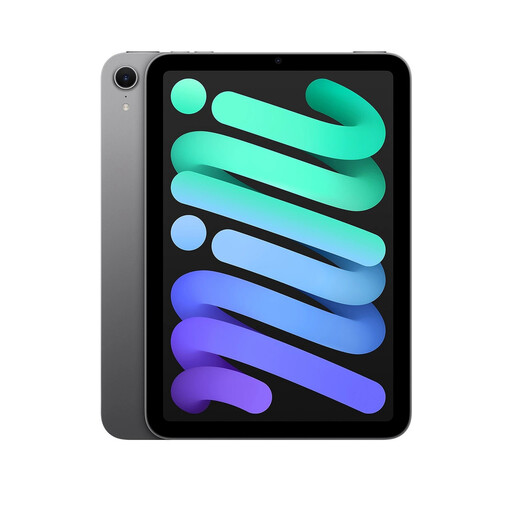
Apple iPad Mini 7 (A17 Pro), 512GB, Space Grey
A tablet option for home-based learning and leisure; Apple’s child-account setup is a separate consideration.
8.3-inch display; USB-C; compatible with Apple Pencil Pro, sold separately.
Joybuy
 No image available
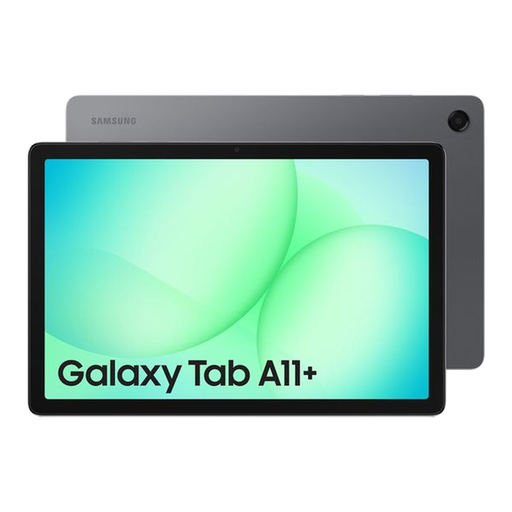
Samsung Galaxy Tab A11+, 8GB, 256GB, Wi-Fi, Gray
A Wi-Fi tablet option for schoolwork and home entertainment; check the exact model’s school-service compatibility and account controls.
11-inch display; 8GB RAM; 256GB storage; Wi-Fi connectivity.
Joybuy
 No image available
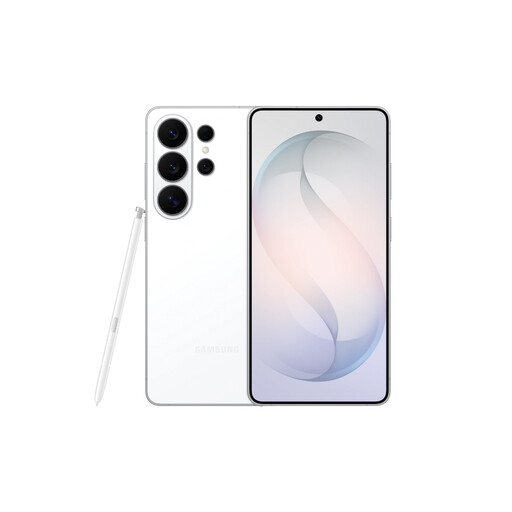
Samsung Galaxy S26 Ultra, 12GB, 256GB, White
A smartphone option when independent communication away from home is important. Check the child-account setup and the particular school’s phone policy.
5G connectivity; dual-SIM support; Android 16; 256GB storage.
Joybuy
 No image available
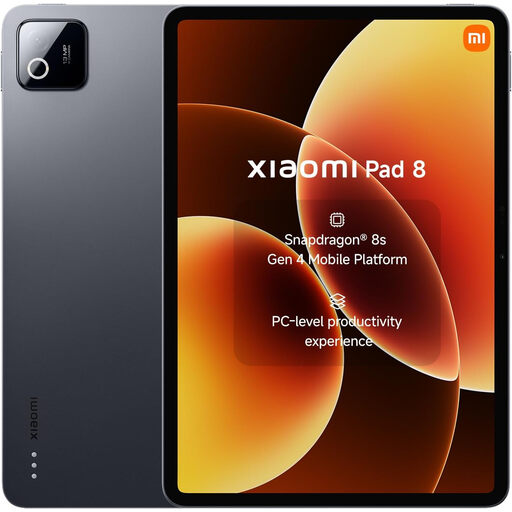
Xiaomi Pad 8, 8GB RAM, 128GB, Wi-Fi, Gray
A Wi-Fi tablet option for study and entertainment; check that the school’s services work with the intended device and account.
Android 16; 8GB RAM; 128GB storage; Bluetooth 5.4.
Joybuy
 No image available
Alldocube Kido Children’s Tablet, 8-inch, Android 15, 3GB RAM, 32GB, with blue case
A child-focused tablet option for home learning and leisure; check its app availability against the school’s requirements.
Child Lock; 8-inch screen; Android 15; 3GB RAM; 32GB storage; the AC adapter is sold separately.
Joybuy
Frequently asked questions
Can I set up a child’s iPad using my own Apple Account?
Apple recommends that a child has their own Apple Account through Family Sharing rather than sharing another family member’s account. Apple Support says a parent or guardian creates an account for a child under 13 in the UK; check the account setup and compatible software needed for the controls you plan to use.
Will Family Link work on any tablet or manage a school account?
No; check the exact device and account arrangement. Google lists supported child devices for Family Link and says school administrators determine the services available through school accounts and school-issued Chromebooks.
Can a child use a personal phone during the school day?
Ask the child’s school. The Department for Education’s guidance for England says schools should be mobile-phone-free by default and addresses exceptions; it does not establish a single rule for every school across the UK.
Will a Fire Kids tablet run a required school app?
Do not assume it will. Amazon says Fire tablets do not support Google Play and that some apps may be unavailable, so check the school’s named app or browser-based workflow on the intended Fire device before buying.
What should I do if a newly purchased device is faulty?
GOV.UK guidance says a seller must offer a full refund if an item is faulty, not as described or does not do what it is supposed to do, subject to the applicable circumstances. The guidance also covers online cancellation rights and repair or replacement; check the seller’s process separately from any manufacturer’s warranty.


