What matters when choosing?
Start with the hardest task you need to complete, then try the controls and connection it requires. AbilityNet advises choosing around individual accessibility needs rather than assuming one type of computer suits everyone.
Smartphone
Consider it when: Calls, messages, one-time codes and quick checks need to travel with you.
Keep in mind: A small touch screen may be difficult for lengthy forms or precise interactions; try your required controls on the exact phone.
Tablet
Consider it when: You prefer touch controls but want more screen space for reading and everyday communication.
Keep in mind: More screen space does not settle whether account setup, required apps or long forms will be manageable.
Laptop
Consider it when: Forms, job applications, documents or keyboard navigation are recurring tasks.
Keep in mind: Check the keyboard, weight, charging and any alternative input needed for the person using it.
| Priority | What to check | Your needs |
|---|
| Task and input |
Try a recurring form, document upload or message on the intended device. Check whether touch, a physical keyboard or alternative input lets you complete it. |
I need to finish applications or service forms without struggling with the way I enter information. |
| Accessibility |
Switch on the text, speech, caption, alert or navigation controls you need. Test them in the actual app or website; feature availability can differ by device and software version. |
Reading the screen or operating the controls needs to work for me, not just appear on a feature list. |
| Connection |
Confirm whether the device uses Wi-Fi, mobile data or both for the places you will use it. Check the connection arrangement separately from the device. |
I need to reach appointments, messages or applications where I will actually be using the device. |
| Setup and support |
Check who can help with accounts, accessibility settings and practising a real task. AbilityNet describes one-to-one Tech Volunteer support for older and disabled people. |
Help with first use and account access would make it easier for me to continue using the service. |
| Refurbished route |
Confirm the exact model, condition, charger, updates and local support before accepting a device. Good Things Foundation says its National Device Bank supplies devices through local organisations, not directly to individuals. |
If I consider a refurbished or donated device, I still need it to run my services and be ready to set up. |
Joybuy device options
These options include laptops for keyboard-based tasks, a phone for portable communication and a Wi-Fi tablet for touch-first use. Compare each with your required services, controls and connection arrangements.
 No image available
Lenovo IdeaPad Slim 3 83K7009MUK laptop
Consider this laptop if repeated forms or documents make a keyboard-based device worth trying. The product name specifies a 15.3-inch WUXGA display, AMD Ryzen 5 7535HS, 24GB DDR5 RAM, 512GB PCIe SSD, Windows 11 Home and Wi-Fi 6. Try your required accessibility controls and service tasks on the exact model.
View on Joybuy
 No image available
ASUS Vivobook 15 X1504VA laptop
Assess this laptop for forms and documents if keyboard-based work is important. The product name specifies a 15.6-inch display, Intel Core 5 120U, 24 GB memory and 1 TB SSD. Check the keyboard layout and test the accessibility settings and services you need.
View on Joybuy
 No image available
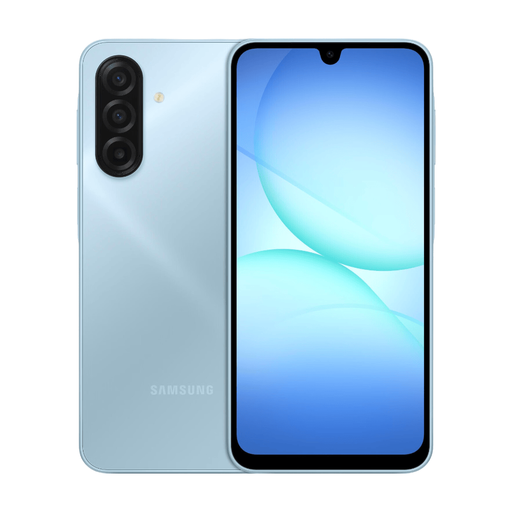
Samsung Galaxy A17 4G 128GB/4GB Light Blue
This phone is an option to try for portable calls, messages and short service checks. Its product name identifies the 4G variant with 128GB storage and 4GB memory. Test the controls and tasks you need, and confirm your mobile connection arrangement separately.
View on Joybuy
 No image available
Xiaomi Pad 8 tablet, 8G RAM, 128GB Wi-Fi, Gray
Try this tablet if touch-first use and more screen space than a phone matter to you. The product name identifies 8G RAM, 128GB storage and Wi-Fi. Check how you will connect away from Wi-Fi, and try the exact touchscreen, accessibility settings and services before choosing it.
View on Joybuy
Common questions
Should I choose a phone, tablet or laptop for online services?
Choose according to the task that would be hardest to complete: try a phone for portable communication and quick checks, a tablet for touch use with more screen space, or a laptop for recurring forms, documents and keyboard navigation. AbilityNet advises assessing individual accessibility needs rather than assuming one device type suits everyone.
How do I check whether a device is accessible for me?
Use the exact device to try your required controls and a real service task. Switch on relevant settings such as spoken feedback, text enlargement, captions or alternative input first; Google notes that Android feature names and navigation can vary by device and market.
Can I get a device directly from the National Device Bank?
No. Good Things Foundation says the National Device Bank currently works through local organisations rather than providing devices directly to individuals. Ask a participating local organisation about its available devices and process.
What should I check before accepting a refurbished device?
Confirm the exact model and condition, charger, updates, account reset, connection arrangements and whether it can run your required services. Ask how accessibility settings will be configured and what local setup help is available.
Is help available after I choose a device?
AbilityNet says its Tech Volunteers offer older and disabled people one-to-one help with choosing equipment, setup and adjustments. Ask AbilityNet about its support process and local availability, and bring the tasks you want to practise.


