
24/7 Customer Support

Free returns

Same-day & Next-day Delivery

Quality Guaranteed

Unlock Your Welcome Offers: FREE Delivery | Up to 80% OFF | Free 30-day JoyPlus trial
Download the APP
A phone tripod stand can make group photos, livestreams and video calls much easier—but the wrong design may become frustrating after only a few uses. A stand that looks versatile in a listing may wobble when fully extended, lose grip with a heavier phone case or rely on a remote that is inconvenient to recharge.
For UK shoppers, three common buying traps deserve attention:
The right choice depends on how you shoot, where you set up and how securely your phone is held.
A conventional phone holder tripod uses a spring-loaded clamp. This is generally the more flexible option for iPhone and Samsung users because it can accommodate phones of different widths, with or without a slim case. Check the stated maximum phone size and whether the clamp can hold your handset in both portrait and landscape orientation.
A MagSafe phone tripod or magnetic phone tripod is quicker to attach, particularly for compatible iPhones and magnetic cases. However, magnetic mounting should not be treated as a substitute for checking compatibility. Cases, rings and accessories can affect the connection. For fast movement, outdoor use or overhead positioning, an additional mechanical grip may be sensible where available.
Keep strong magnets away from pacemakers, defibrillators, credit cards, ID cards, hard drives and other magnetic-sensitive devices. Follow the product’s safety instructions, including any recommended separation distance.
A foldable phone stand is useful for commuting and travel, thanks to its small footprint, but folded size alone does not indicate stability. Look for:
A 1.9-metre extendable selfie stick can frame a large group or livestream from a distance, but it creates more leverage and needs a properly spread, stable base. Never exceed the manufacturer’s extension limit.
A Bluetooth remote can let you start a photo or video without touching the phone. Before buying, check the stated connection type, operating range and battery arrangement. Some compact models use a replaceable coin cell, while others use rechargeable power.
Built-in lighting can help in dim rooms, but a fill light may increase weight and battery demands. For UK travel, also consider whether the remote or light is protected from rain. A product described as portable is not necessarily waterproof.
For any model with a battery, inspect the supplied instructions and safety information. Stop using a device if it becomes unusually hot, swells or leaks, and avoid exposing it to liquids or extreme temperatures.
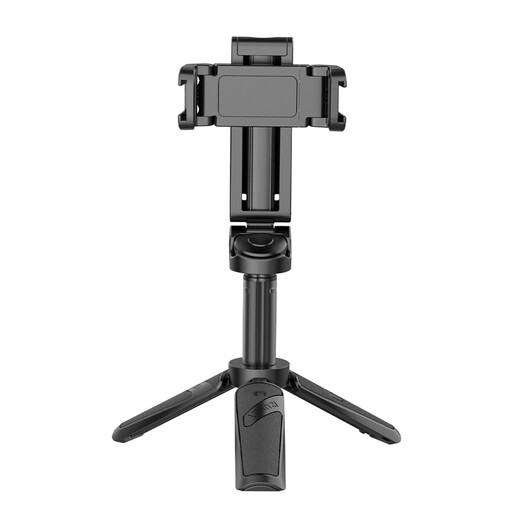
Why This Fits Their Persona: This compact 3-in-1 design suits beginners who want a phone grip, selfie stick and tabletop tripod without carrying separate accessories around the UK.
It provides a dedicated phone holder rather than relying solely on magnetic attachment, while its Bluetooth remote supports hands-free capture.
3-in-1 format; includes a remote control and two cold shoes for compatible accessories.
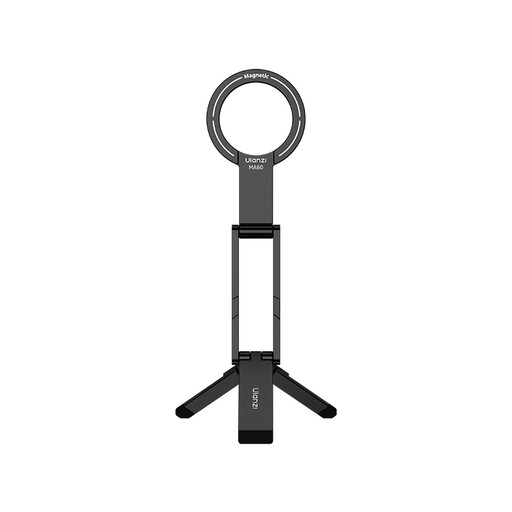
Why This Fits Their Persona: A suitable option for users who value an aluminium foldable design and quick magnetic attachment for compatible iPhone, Samsung and Android setups.
Its stated 14 N double-sided magnet and foldable format address quick set-up and portability, while compatibility still needs checking before purchase.
Aluminium construction; combines magnetic mounting, a mini selfie stick and a foldable phone stand.
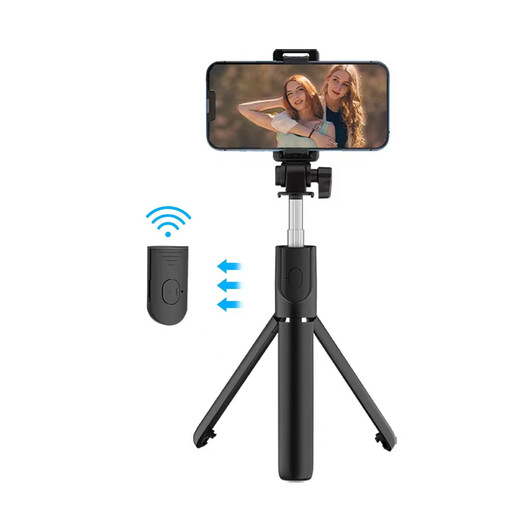
Why This Fits Their Persona: The extended format is designed for livestreamers, group photography and creators who need a taller floor stand rather than a desk-only tripod.
The stated maximum length is around 193 cm, while the instructions emphasise securing the phone and checking that all three legs are stable.
Dual fill lights; Bluetooth remote with an advertised range of about 10 metres.
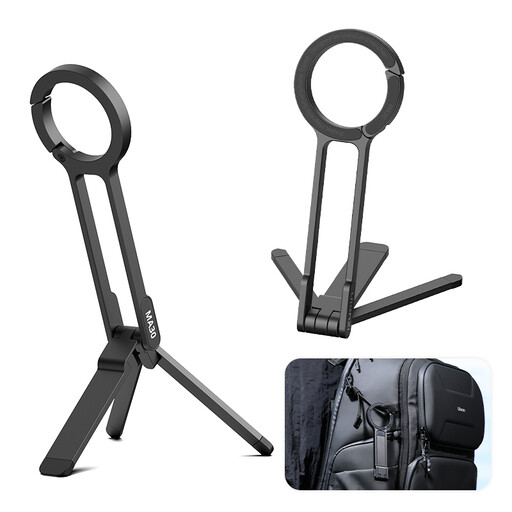
Why This Fits Their Persona: Its pocket-oriented, carabiner-mounted design suits travellers moving between cafés, hotel rooms and outdoor viewpoints.
The listing provides specific warnings about flat surfaces, secure carabiner attachment and keeping the strong magnets away from sensitive items.
Aluminium mini format; foldable stand with a quick-release carabiner mounting design.
Many clamp-style models are designed for a range of smartphone widths, while magnetic models require a compatible magnetic phone or case. Check the product listing for supported devices, maximum width and case guidance before ordering.
Yes, provided the base is placed on firm, level ground and protected from wind, rain and accidental knocks. A lightweight mini phone tripod is more suitable for sheltered locations than exposed coastal or hilltop settings. A heavier base or shorter extension can improve stability.
Usually, the main ongoing requirement is charging or replacing the remote’s battery. Some models also include lights that need power. Check whether the remote uses a coin cell or rechargeable battery, and keep spare power available for longer filming sessions.
We have compiled a complete, real-time list of products that fully satisfy these strict selection criteria and UK safety regulations.