
24/7 Customer Support

Free returns

Same-day & Next-day Delivery

Quality Guaranteed

Unlock Your Welcome Offers: FREE Delivery | Up to 80% OFF | Free 30-day JoyPlus trial
Download the APP
A phone tripod stand can make filming, video calls, family photos and hands-free viewing much easier. However, listings often combine several products under one description: a mini tripod, selfie stick, magnetic phone stand, phone gimbal stabiliser or camera tripod mount may look similar but serve very different purposes.
The main buying pitfalls are usually:
A magnetic phone tripod is quick to attach, but magnetic strength alone does not guarantee a secure setup. Check whether your phone has built-in MagSafe compatibility, requires a magnetic case or needs an included ring.
For phones without a suitable magnetic surface, a spring-loaded clip is generally more flexible. Look for a clearly stated width range and padded contact points. A phone tripod adapter with a standard 1/4-inch thread can also connect a smartphone to many existing camera tripods, light stands and travel tripods.
If you use a camera as well as a phone, a mount with a standard screw interface offers more flexibility than a phone-only holder.
A mini phone tripod is suitable for desks, shelves and low-angle shots. A taller stand gives a more natural filming height but needs a wider, properly locked base. The higher the phone sits, the more movement can be caused by tapping the screen, extending the pole or placing the tripod on a narrow surface.
For example, a stand adjustable from 60 cm to 160 cm can cover tabletop and floor use, but it should be placed on a flat, stable surface. Always check that the legs are fully opened and that each locking section is secure before mounting your device.
A Bluetooth selfie stick or selfie stick tripod can let you take photos without touching the phone. Check whether the remote needs charging or a replaceable battery, and confirm compatibility with your phone’s operating system.
A phone gimbal stabiliser is designed for moving footage rather than simple static support. Two-axis or three-axis stabilisation, tracking, app integration and built-in lighting can be useful for vloggers, livestreamers and creators, but these features may require charging, pairing or a dedicated app.
For static videos, a conventional stand with a rotating head may be easier to set up and maintain.
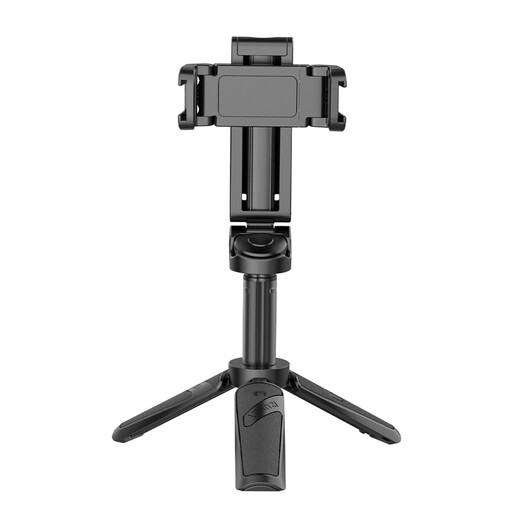
Why This Fits Their Persona: A practical option for everyday photos, video calls and occasional social media filming without moving to a separate gimbal.
The 3-in-1 design combines a phone grip, extendable selfie stick and mini tripod, reducing the need to buy separate accessories.
Bluetooth remote control and two cold shoes support hands-free shooting with additional accessories.
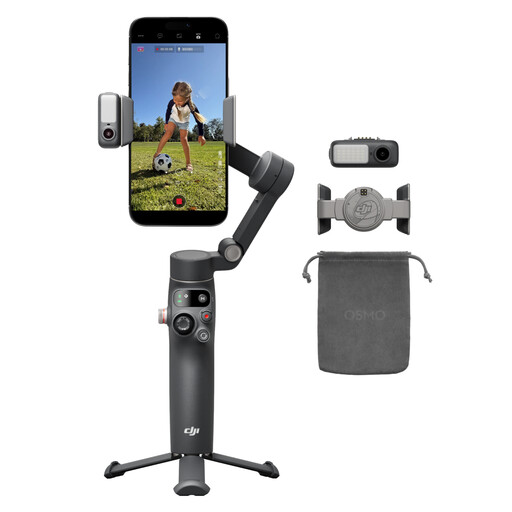
Why This Fits Their Persona: Suitable for creators who want a more controlled filming setup for vlogging, livestreaming, travel clips and moving subjects.
It is a dedicated moving-video tool rather than a basic stand marketed with stabilisation language; the listing specifies a 3-axis gimbal, built-in extension rod and tripod.
Includes native tracking, audio and lighting functions, 360° pan rotation and a stated 10-hour battery.
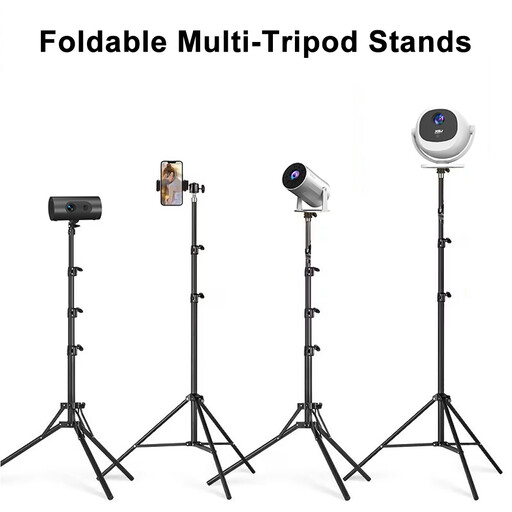
Why This Fits Their Persona: Designed for users who need floor-to-table height adjustment for projection, photography, ring lights, livestreaming or multi-device setups.
Its 1/4-inch interface and included phone clip and adapter make the supported device types clearer than a phone-only listing.
Height adjusts from 60 cm to 160 cm, with a 360° rotating universal joint and foldable aluminium construction.
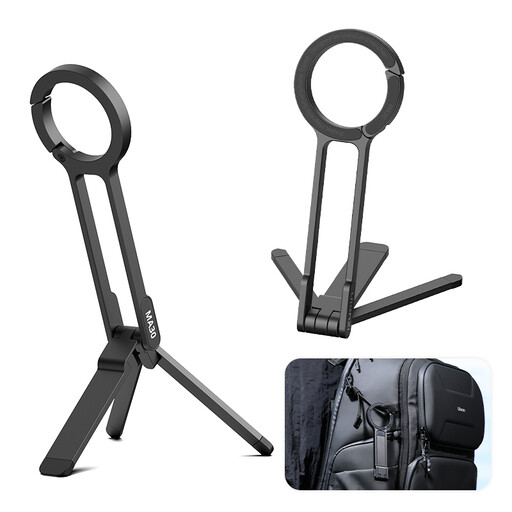
Why This Fits Their Persona: A pocket-friendly choice for travellers, commuters and users who want a quick phone stand for cafés, hotel rooms or short filming sessions.
The foldable pocket design and carabiner-mounted quick release focus on portability rather than unnecessary electronic features.
Aluminium construction, dual-sided magnetic mounting and a compact mini selfie-stick format.
We have compiled a complete, real-time list of products that fully satisfy these strict selection criteria and UK safety regulations.
It depends on the attachment system. A spring clamp with a stated width range is usually suitable for multiple smartphones. A MagSafe phone stand is intended for compatible magnetic phones or cases, while Android users may need a compatible magnetic case or ring. Always compare the product’s dimensions with your phone and case before purchase.
Yes, but stability and weather protection matter. Use a low, wide setup on firm ground, avoid strong wind and secure the legs before mounting your phone. Bluetooth remotes and electronic gimbals should be kept dry unless the product information specifically states otherwise.
A basic foldable phone stand or manual smartphone tripod holder does not normally need power. Bluetooth selfie sticks, remote shutters and phone gimbal stabilisers do require batteries or charging. If you want fewer running costs and a quick setup, a manual tripod may be the more suitable format.