Long-distance navigation drivers
If the screen, location services and mobile data stay active for much of a journey, the useful test is whether the phone’s charge holds or rises with your own navigation setup.


Choose a 12V-socket USB-C charger and a cable suited to your phone when keeping its charge up during navigation is the priority; check the phone’s charging protocol and the output of the port you will use. A compatible magnetic wireless mount may make positioning the screen tidier, but its charging output depends on the phone, case and power input, and it must not obstruct your view or vehicle control. Neither a USB-C connector nor a charger’s headline wattage guarantees faster charging.
If the screen, location services and mobile data stay active for much of a journey, the useful test is whether the phone’s charge holds or rises with your own navigation setup.
A magnetic charging mount may reduce cable movement around the phone. Check the phone and case against the mount’s compatibility requirements, as well as its power input and position in the vehicle.
When a passenger’s device charges alongside the navigation phone, compare the outputs stated for both ports in use rather than relying on the charger’s total rating alone.
Choose when: Keeping the phone charged through extended navigation matters more than avoiding a cable.
Trade-off: The phone still needs a separate, safely positioned mount; extra charger wattage cannot make it accept more than its supported charging method allows.
Choose when: A mounted navigation display and less cable movement around the phone are priorities, provided the phone and case fit the mount’s charging system.
Trade-off: The mount may need a separate car adapter with sufficient output, and its advertised wireless output is conditional on compatibility and alignment.
Choose when: The vehicle handbook identifies suitable charging capability or a journey with your own phone shows that its charge holds during navigation.
Trade-off: A socket that accepts the cable does not, by itself, establish the available charging output.
For car or campervan navigation, decide which need would determine your choice if a charger cannot satisfy every preference at once.
| Concern | What to check | Who this matters to |
|---|---|---|
| Charge during navigation | Match the phone’s charging protocol and cable to the charger’s output for the port in use. Apple specifies USB-C Power Delivery and a USB-C cable for faster wired charging on iPhone 15 and later. | On a long journey, I want the battery level to hold or rise while navigation is running. Around 33% of consumers put that charging headroom first. |
| Secure screen position | Check the mount’s fit, phone-and-case compatibility and required power input; assess its position from the driving seat before setting off. | I want to see directions without holding the phone or losing a clear view ahead. For around 25% of consumers, safe, tidy positioning is the primary need. |
| Connector and protocol fit | Identify the exact phone model and the required cable ends before choosing a charging protocol. A USB-C connector alone does not establish the charging rate. | If my phone and charger use different fast-charging methods, a higher rating on the box will not settle the mismatch. Around 25% of consumers put compatibility first. |
| Charging another device | Check the number and type of ports, then the stated output allocation with the intended devices connected. | When travelling with a passenger, I need to know what the navigation phone receives while another device is plugged in. Multi-device flexibility comes first for around 17% of consumers. |
A cable can fit while the phone still loses charge during navigation. One MoneySavingExpert Forum user described different results from a car USB-C port, a 12V charger and a wireless charger; that experience does not establish a general ranking of the three.
Check the vehicle handbook for the port’s charging capability, or see whether your own phone holds charge during a typical navigation journey.
A multi-port charger’s total rating need not be the output available to one phone, while USB-C describes the connector rather than a guaranteed fast-charging method.
Match the phone’s protocol and cable first, then check the stated output of its chosen port when the intended number of devices is connected.
A convenient screen position can obstruct the driver’s view or encourage phone handling. GOV.UK says holding and using a phone or sat nav while driving is illegal; UK vehicle regulations require a full view of the road and traffic ahead.
Position and assess the mount from the driving seat before travelling, set the route before moving off and do not hold the phone while driving.
The phone, case, alignment and adapter input affect whether a compatible mount can reach its advertised output. UGREEN specifies a single-port adapter output of at least 45W for optimal speed and air-cooling operation on its MagFlow Pro model; that requirement is specific to that model.
Read the exact mount’s compatibility and input requirements. If maintaining charge during navigation is the deciding need, check the result with your phone rather than relying on the mount’s headline rating.
Belkin lists both wired car chargers and magnetic wireless mounts, so its ranges illustrate the different connections involved in these two setups.
Anker lists compact wired car chargers, including separate-port and retractable-cable designs.
UGREEN lists multi-port wired car chargers and magnetic wireless charging mounts.
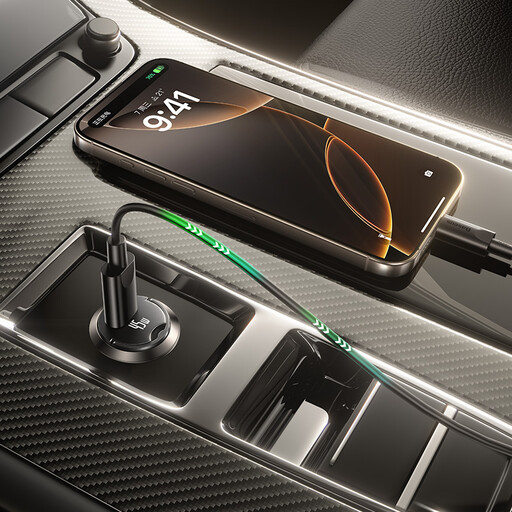
These wired vehicle-socket chargers are relevant if you plan to power a navigation phone from a 12V socket. Choose a compatible cable and assess a separate mount for safe screen positioning; check your phone’s charging requirements before relying on a wattage rating.
 No image available
Consider this arrangement if the navigation phone needs a USB-C connection while other travel devices also need ports.
Its listed connections are two USB-C ports and one USB-A port. Check the output available to your phone when the other ports are in use.
 No image available
Its two USB-C connections may suit a navigation phone and a second USB-C device.
Match the cable and charging method to your phone, and check the output allocation when both ports are occupied.
 No image available
The two different port types may be useful when the navigation phone and another device need different cable connections.
Check your phone’s charging method and the output available when both ports are used; the 67W figure alone does not establish what the phone will receive.
 No image available
This bundle is worth considering for one USB-C phone if a matching USB-C-to-USB-C cable is needed.
The included black cable is 1m long and rated 60W (20V/3A). Check whether the charger’s charging method suits your exact phone.
 No image available
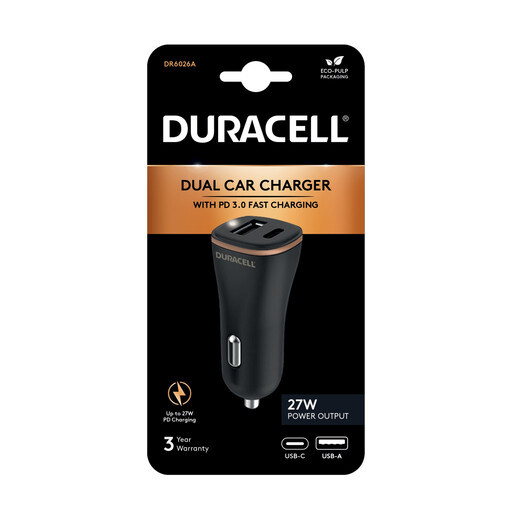
The dual-port layout may suit a navigation phone alongside another device if their cable connections and charging requirements match.
Check the USB-C port’s output with the intended devices connected rather than treating the charger’s 27W rating as a per-port figure.
A mounted phone can provide navigation, but you must not hold and use it while driving, and its position must preserve your view and control. GOV.UK says holding and using a phone or sat nav while driving is illegal; set the route and charging connection before moving off.
No. The phone’s supported charging method, the charger’s protocol and output, and the cable all matter. For iPhone 15 and later, Apple specifies a USB-C Power Delivery charger and USB-C cable for faster wired charging.
No; check the exact phone and case against the mount’s Qi2 or MagSafe-compatible requirements. Belkin specifies up to 15W for compatible devices on its Qi2 car mount, subject to the charging setup meeting the mount’s requirements.
Check the vehicle handbook for the port’s capability and test whether your phone holds charge during normal navigation use. If it does not, compare a 12V-socket charger that supports your phone’s charging method, using a suitable cable; a connector that fits is not enough to establish charging performance.