Choose cloud storage if you need phone photos to back up automatically and remain accessible when setting up a replacement, provided you can still access the account. Choose an external drive if you want a local copy and will update and store it separately; a NAS suits a household prepared to manage a shared home device and its permissions. For photos you cannot replace, keeping separate local and cloud copies gives you another route to recovery, but both copies and your account access need checking before the old phone is gone.
Who needs which arrangement?
Households replacing a phone
If a phone is lost, damaged or replaced, the important question is whether a current copy can be retrieved without the old device. The National Cyber Security Centre recommends keeping important data in a separate safe location; check both the backup and the way you will access it on the new phone.
Families sharing selected memories
Sharing an album with relatives need not mean opening every personal file. The Information Commissioner's Office describes different cloud-sharing settings, while Apple says members sharing an iCloud+ plan retain their own private photos and files.
People maintaining a local archive
A physical copy can suit a growing photo and video library if someone will connect the storage, update the copy and keep it safely apart from the original. The National Cyber Security Centre advises against leaving a removable backup drive permanently connected.
What matters when choosing?
For family photos during a phone change, decide how you will recover files first, then consider who needs access and where a separate copy will live.
Cloud storage
Choose it when: You want supported phone backups and access to photos from another device or location.
Allow for: Restoring files depends on a current backup, sufficient storage and continued account access.
External HDD or SSD
Choose it when: You can manage a physical copy of the library and its transfer between devices.
Allow for: Files will not stay current unless you repeat the backup and store the drive separately.
Home NAS
Choose it when: Several household members need a central library with managed access.
Allow for: A network-attached storage device needs setup, maintenance and its own separate backup.
Cloud and local copies
Choose it when: You want another recovery route if either an account or a local device becomes unavailable.
Allow for: Both copies need updating and a workable restoration method; neither is a guarantee against every loss.
| Concern | What to check | Who this matters to |
|---|
| Recovery on a new phone |
Confirm what backs up automatically and how to restore those files on the intended replacement phone. |
If my old phone disappears before I transfer its latest photos, I need a usable copy I can reach from the new one. About 27% of consumers put recovery with minimal manual transfer first. |
| Controlled family sharing |
Check whether storage sharing differs from album sharing, and whether access to links or folders can be restricted. |
I want relatives to see selected pictures without opening my entire library. Controlled household access is the primary need for about 20% of consumers. |
| Room for a growing library |
Compare your current photo and video library with available capacity, allowing for further growth. |
With videos taking up more room, I need enough space for the archive rather than discovering that the next backup cannot finish. About 27% of consumers chiefly prioritise capacity for a growing library. |
| Separate, recoverable copies |
Identify where each copy is kept and test restoring a small selection; keep a removable backup disconnected between updates. |
If a device fails or files are deleted, I want another copy that I can actually restore. Keeping separate recoverable copies comes first for about 26% of consumers. |
Backup mistakes to avoid
-
Calling the only copy a backup
Photos held only on a phone, drive or NAS may be lost with that device. The National Cyber Security Centre defines a backup as a copy kept in a separate safe location.
Make a separate copy and restore a small set of photos to check that it works before relying on it.
-
Keeping the backup drive connected
A drive left attached to a computer can be exposed if that computer is affected by ransomware. The National Cyber Security Centre advises against permanently connecting a removable backup device.
Once an update has finished, safely eject the drive and store it separately.
-
Assuming shared storage means shared photos
Sharing plan capacity, an album and a public link are different actions. Apple says iCloud+ family members retain their own private photos and files; visibility still matters for anything deliberately shared.
Review each album, folder or link and restrict access to the people who should see it.
-
Making the old phone the only sign-in route
If verification depends entirely on a missing or damaged phone, access to a cloud backup may be difficult. Apple and Google both describe additional account-verification options.
Before changing phones, set up and check an approved recovery method that does not depend solely on the old device.
Brands and services to consider
These services illustrate different ways to store and share photos; their presence here does not imply that a particular service or device is among the products below.
Apple
iCloud is a cloud route for households using Apple accounts and wanting photos and files available across supported devices.
- Apple says iCloud+ family sharing lets members share storage while keeping their own photos and files private.
- Account access remains important during a phone change; Apple recommends an additional trusted number that is not tied to the iPhone where possible.
Google
Google Photos and Drive offer a cloud route for people using a Google Account across devices.
- Google states that a standard account includes up to 15 GB shared across Drive, Gmail and Photos.
- Because those services draw on the same storage pool, check their combined usage and set up account-recovery options before replacing a phone.
Synology
Synology offers a home NAS route for households prepared to manage central photo storage and access permissions.
- Synology says its Photos software supports mobile photo backup and restricted sharing.
- The NAS needs setup and maintenance, and Synology advises backing up the NAS to another location.
Joybuy options for local copies
These portable drives and USB storage devices suit a separately managed local photo copy. Before choosing one for a phone change, check how your particular phone will connect and how you will copy and retrieve its files.
 No image available
SanDisk Portable SSD 2TB
A portable choice for a local photo and video copy that you will update yourself. The stated capacity is 2TB; check your phone connection and transfer method before relying on it during a phone change.
View on Joybuy
 No image available
Western Digital Elements Port. 4TB Black
Consider this external drive if the local archive needs 4TB of stated capacity. Its name specifies USB 3.0; check the connection and file-transfer route for your devices, particularly if photos are still on a phone.
View on Joybuy
 No image available
Samsung T7 Shield Portable SSD 1 TB Blue
A portable SSD option for a manually maintained local copy. The name specifies 1 TB and USB 3.2 Gen 2; compare that capacity with your library and confirm the transfer process for your phone.
View on Joybuy
 No image available
Samsung Portable SSD T7 1 TB Blue
This is another 1 TB local-copy option, distinguished from the T7 Shield above by its T7 model name. Its title specifies USB Type-C and USB 3.2 Gen 2; check your device connection and keep a separate copy of important files.
View on Joybuy
 No image available
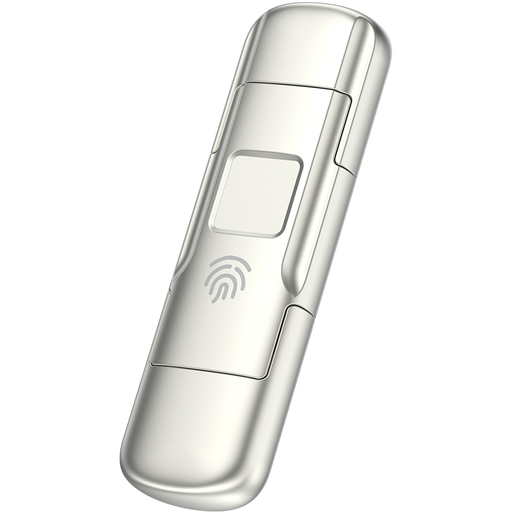
MOVESPEED YSUYC-256GSN 256GB fingerprint USB drive, Silver
Consider this for selected files rather than assuming it has room for a growing family archive. Its name specifies USB-A and Type-C connections, fingerprint access and 256GB capacity; confirm phone compatibility and how access can be recovered if fingerprint authentication fails.
View on Joybuy
Questions about changing phones
Is cloud storage enough when I change phones?
It can provide a separate copy if the photos you need have backed up and you can access the account on the replacement phone. The National Cyber Security Centre describes cloud storage as a backup location; a separately kept local copy gives you another recovery route if account access becomes a problem.
Should I use an external HDD or SSD for family photos?
Choose according to how often you will transfer the library and how much capacity you need. Which? describes external HDDs as suited to long-term file backup and SSDs as generally faster; actual transfer results depend on the model and connection. Either drive still needs regular updates and separate storage.
Does sharing cloud storage expose everyone's photos?
Not necessarily: sharing storage capacity and sharing a photo album are separate choices. Apple says members of an iCloud+ family plan retain private photos and files, while the Information Commissioner's Office describes private, public and invitation-only cloud-sharing settings. Check the setting on each album, folder or link you share.
What should I check before erasing the old phone?
Confirm that the photos you need are in a usable backup and that you can sign in and retrieve a small selection from another device. Set up a recovery option independent of the old phone: Apple recommends an additional trusted number where possible, and Google describes several backup verification and recovery options.


