What matters when choosing a backup?
For personal photos and important files, decide how you need to recover them, whether you need a separate second copy, and how much local space your library requires.
| Concern | What to check | Who this matters to |
|---|
| Automatic recovery |
Check whether photos sync separately from device backups, what data can be restored to a replacement device, and how much account storage is available. |
If I replace or lose my phone, I want recent photos and device data ready to recover without remembering a manual copy. Around 42% of consumers put automatic recovery first. |
| Separate copies |
Keep a backup apart from the original device, and test a file restore from each recovery route you intend to rely on. |
For family photos or essential documents, I do not want one lost device or unavailable copy to be my only recovery path. Roughly 33% of consumers make separate copies their primary concern. |
| Local capacity and transfer |
Allow space for the current library and growth; check the connector, cable and device support before choosing a drive. |
With a large photo or video library, I need room for a local copy and a practical way to move files between devices. About 25% of consumers prioritise local capacity and transfer. |
Local backup and transfer products on Joybuy
These external drives and USB storage devices are options for local copies or file transfers. If you choose a combined approach, pair a suitable local device with a separately maintained cloud backup rather than treating either copy as the whole arrangement.
 No image available
Western Digital My Passport 2TB Portable External Hard Drive, Black
Consider this for a local copy of a computer photo and document library.
2TB portable external hard drive. If you need recurring backups, check that its backup software and your intended computer setup support the schedule you want.
View on Joybuy
 No image available
SanDisk Portable SSD 2TB
Consider this when you want to carry a local copy of a photo or video library.
2TB portable SSD. Confirm the connector and compatibility with your intended device, and check the backup workflow if you need scheduled copies.
View on Joybuy
 No image available
Western Digital Elements Port. 4TB USB 3.0, Black
Consider this for a larger local collection of computer photos, videos and documents.
4TB external drive with USB 3.0 stated in the product name. Check the drive's format before using it with a Mac or another operating system, and set up a repeatable backup routine.
View on Joybuy
 No image available
Samsung T7 Shield 1TB Portable SSD, Blue
Consider this for a portable local copy when the drive will be moved between compatible devices.
1TB portable SSD with USB 3.2 Gen 2 stated in the product name. Check the device and cable requirements before relying on a rated transfer speed, and keep a separate copy of important files.
View on Joybuy
 No image available
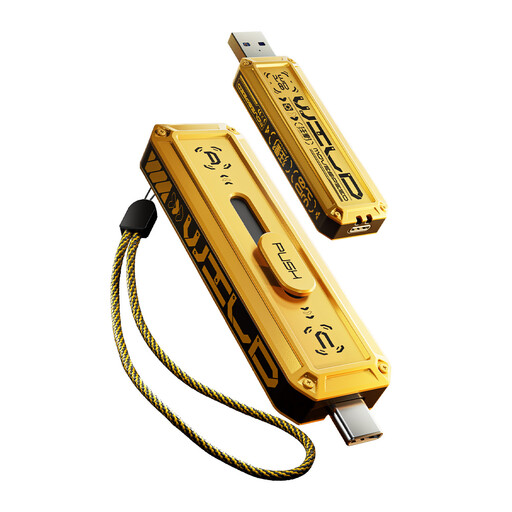
MOVESPEED YSUWD10-1TSY 1TB USB-A and Type-C Flash Drive, Yellow
Consider this for carrying a selected set of files between devices with suitable connections.
1TB flash drive with USB-A and Type-C interfaces stated in the product name. Check your phone or tablet's file-management support and the connection specification before relying on it for backups.
View on Joybuy
Personal backup questions
Is iCloud Photos the same as an iPhone iCloud Backup?
No. Apple Support says that when iCloud Photos is in use, photos and videos sync through that service rather than being included in the daily iCloud Backup. Check both settings and the recovery path for the data you want to keep.
Can I restore an Android backup to a different phone?
Google Help says backed-up data can be restored to the original phone or some other Android phones. What restores varies by device and Android version; a backup from a higher Android version cannot be restored to a phone running a lower version.
What happens when my Google account storage is full?
Google One Help says reaching the shared storage limit can stop new Google Photos backups, among other account activities. Check total usage across Drive, Gmail, WhatsApp backups and Photos rather than measuring the photo library alone.
Can an external drive back up Windows folders automatically?
Yes, Microsoft Support says File History can regularly back up files in included libraries to an external drive or network location. Add other folders to a library if needed, and make sure the destination is available when backups run.


