Choose automatic cloud backup if you want new files copied with little routine effort and access after losing or replacing a device. Choose an external drive for a separate local copy, particularly for a large library or unreliable internet; for irreplaceable files, using both gives you two recovery paths. Whichever route you take, check what is actually copied, whether you can restore it and how you will protect the account or store the drive.
Who needs which kind of backup?
People who want automatic phone copies
If you rely on a phone for photos, videos and essential device data, check which items its automatic backup covers before you need to replace the phone. Apple Support and Google Photos Help describe different arrangements for device data and photo libraries.
People with large local libraries
A separate drive may suit a substantial photo or video collection, especially when uploading it is impractical. The copy still needs a regular routine and a way to open the files on a replacement device.
People protecting irreplaceable files
Family photos and important documents warrant more than one way back to the files. The National Cyber Security Centre advises considering both online and storage-device backups in case one is lost, stolen or fails.
What matters when choosing a backup?
For photos and documents, decide whether your main need is automatic coverage, a large local copy, independent recovery paths or a portable copy of selected files. A service that synchronises files needs a separate check: changes and deletions may also synchronise.
Automatic cloud backup
Consider it when: you want new files copied without a manual drive routine and need access after a lost or replacement device.
Trade-off: coverage depends on the service settings, available account storage, internet access and continued account access.
External hard drive or SSD
Consider it when: you want a separate local copy of a large library or cannot depend on a reliable upload connection.
Trade-off: the drive needs a copying routine and safe storage away from the original device.
USB flash drive or SD card
Consider it when: you need a portable copy or transfer of selected files between compatible devices.
Trade-off: a small removable device is easy to misplace and should not be assumed to cover a growing household library.
Cloud and removable storage
Consider it when: important files need a recovery path beyond either one account or one physical drive.
Trade-off: both copies need checking, and the removable one should be disconnected when it is not in use, as the National Cyber Security Centre advises.
| Concern |
What to check |
Who this matters to |
| Automatic coverage |
Check which photos, documents and device data are included, and the conditions for automatic copying and restoration. |
If I lose or replace my phone, I want recent files ready to restore without having remembered a manual copy. Around 33% of consumers put automatic coverage first. |
| Large-library local copy |
Compare your current library and expected growth with drive capacity; check connector compatibility and how you will copy files. |
With a substantial photo and video library, I need a separate copy that I can make and retrieve locally. For around 27% of consumers, local capacity and transfer practicality are the primary concern. |
| Independent recovery |
Check that copies remain in separate locations, enable 2-step verification for cloud access and try restoring a file. |
If one account, device or location becomes inaccessible, I still need another route to important files. Independent recovery is the main priority for around 27% of consumers. |
| Selected portable files |
Confirm the connector or card-reader fit, capacity for the chosen files and a safe place to keep the device. |
When I only need to carry or transfer particular documents and photos, a compact copy matters more than a full-library routine. Around 13% of consumers put that limited portable use first. |
Backup mistakes to avoid
-
Relying on the original device or a synced folder alone
A backup needs to remain recoverable after the original device is lost or damaged. Microsoft Support says deleting a synced online-only OneDrive file removes it from devices and the cloud, subject to its recovery options.
Keep a separate copy and test that you can locate and open a few photos and documents from it.
-
Choosing cloud capacity without checking upload quality
Google Photos Help says Original-quality uploads use account storage, while its Storage saver setting can reduce photo or video resolution. Capacity and quality settings therefore affect what you retain.
Check your library size, the selected backup quality and which data the account must hold before choosing a storage allowance.
-
Leaving the only external copy attached
Connected storage can be affected during the same malware incident as the computer. The National Cyber Security Centre advises disconnecting an external backup device when it is not in use.
After copying, check some files, eject the drive safely and store it separately where practical.
-
Planning around every unit of labelled drive capacity
SanDisk Support explains that a drive's labelled decimal capacity can appear as a lower figure when a system reports capacity using binary units.
Allow room for library growth rather than choosing a drive that only just matches the size of your files.
Relevant brands and services
Apple
An iPhone and iPad route involving iCloud Backup, iCloud Photos and iCloud Drive.
- Apple Support says iCloud Backup can run automatically when an iPhone or iPad is connected to power and Wi-Fi.
- iCloud Photos synchronises separately from the device backup. Check which data is covered and whether the account has enough capacity.
Google
A Google Account route for Android device data and Google Photos media.
- Google Photos Help says photo and video copying can run automatically when Backup is enabled.
- Original-quality uploads use account storage; Storage saver can reduce resolution. Check the selected setting and the separate scope of Android device backup.
Microsoft
Windows options include OneDrive synchronisation and File History copies to an external drive or network location.
- Microsoft Support says File History can save regular file copies for restoration.
- OneDrive synchronises changes and deletions. Check its recovery options rather than treating synchronisation alone as an independent historical copy.
Samsung
Portable SSDs are a local-storage option for making a separate file copy.
- Samsung UK lists T7 variants in 500GB, 1TB, 2TB and 4TB capacities.
- Samsung's stated transfer speeds are manufacturer figures; actual transfers depend on the host device, cable and workload. A drive also needs a backup routine.
SanDisk
USB flash storage can serve selected-file copies and transfers where the connector fits.
- SanDisk lists USB-C Extreme Fit variants from 64GB to 1TB.
- Check the intended device's connector and keep the removable copy safely; a flash drive alone does not establish a full backup routine.
Local storage options on Joybuy
These removable drives can hold separate local copies of personal files. The SSDs and hard drive suit a drive-based backup routine; the flash drive is more suited to selected-file copies. Check capacity against your own library and confirm how your device will copy and restore files.
 No image available
Samsung MU-PG4T0B 4TB USB-C SSD, black
A removable local-copy option to consider for a large photo and video library.
The product name specifies 4TB and USB 3.2 Gen 2x2. Check the intended device connection and your copying and restore routine.
View on Joybuy
 No image available
Samsung T7 Shield 1TB Portable SSD, blue
A portable drive for a separate local copy when its capacity fits the files you need to protect.
The product name specifies USB 3.2 Gen 2. Check connection and file-system compatibility with the device you will use to restore files.
View on Joybuy
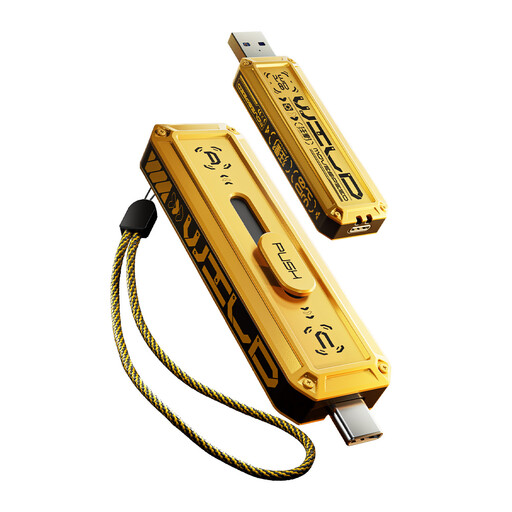 No image available
MOVESPEED YSUWD10-1TSY 1TB dual-interface flash drive, yellow
A compact option for copying selected files between compatible devices, rather than assuming a complete automatic backup.
The product name specifies USB 3.2 Gen 2×1 and Type-C interfaces. Confirm that the intended devices can read the copied files.
View on Joybuy
 No image available
SanDisk Portable SSD 2TB
A separate local-copy option for photos, videos and documents if 2TB leaves enough room for your library.
Confirm the connection and file-system fit with your intended device, then plan how you will make and check copies.
View on Joybuy
 No image available
Western Digital Elements Portable 4TB hard drive, black
A local-drive option for a larger collection of household files when you can maintain a regular backup routine.
The product name specifies USB 3.0. Check its connection and formatting requirements for the computer you will use, particularly if you need to move files between operating systems.
View on Joybuy
Common backup questions
Is cloud synchronisation enough to recover deleted photos?
Not on its own: synchronisation can carry a deletion to other locations. Microsoft Support says deleting a synced online-only OneDrive file removes it from devices and the cloud, subject to recycle-bin restoration. Check the service's deletion-recovery options and keep an independent copy of irreplaceable files.
How much cloud storage should I allow for photos and videos?
Start with the size of your current files, then allow room for growth and any device data you also intend to back up. Google Photos Help says Original-quality uploads count towards account storage, while Storage saver can reduce resolution; check the quality setting before choosing an allowance.
Should I leave an external backup drive plugged in?
Disconnect it when it is not being used for backup. The National Cyber Security Centre warns that connected storage can also be affected by viruses; after copying, open a few files from the drive, eject it safely and store it securely.
How should I secure a cloud backup account?
Use a strong, unique password and enable 2-step verification. The National Cyber Security Centre recommends that extra check for important accounts, including cloud storage; make sure you can also regain access to the account used for recovery.


