Choose built-in device backup and cloud storage when restoring a replacement phone or computer is your priority, but check storage, account access and which app data can actually be restored. Choose an external drive for a separate local copy or direct file transfers, or consider a NAS for a shared home archive if you can manage its setup. For important files, combining cloud and local copies reduces reliance on one location or account; whichever route you use, check that the copy is current and can be opened or restored.
Who needs which backup?
People preparing to replace a phone
If you need contacts, photos, settings and supported app data on a replacement phone, start with its built-in backup and check photo syncing separately. Apple and Google describe different backup coverage, so confirm that your important apps and available storage are included before resetting the old device.
People with growing photo and video libraries
A large collection makes capacity, original-file quality and a separate local copy more important to check. Cloud storage can make files available on signed-in devices, while an external drive offers a copy you can keep apart from the computer.
Households using several devices
If files need to move among phones and computers, check how each device accesses the chosen cloud account or local storage. A shared NAS may suit a household willing to configure and maintain it; Synology also recommends backing up a NAS to another destination.
What matters when choosing?
Start with the data you need to recover and the device you would restore it to. Then choose a route you can keep up to date and check by opening a copied file or using its restore process.
| Concern |
What to check |
Who this matters to |
| Restoring a device |
Check the backup account, available storage, last successful backup and coverage of important apps. |
If a phone is lost or replaced, I need my supported settings and data ready without relying on a last-minute manual copy. About 36% of consumers put straightforward device restoration first. |
| Capacity and file quality |
Check storage use and growth, shared cloud allowances and whether photo settings preserve the quality you need. |
As my photo and video library grows, I need room for the files without changing their quality unintentionally. For about 29% of consumers, capacity and file quality are the primary concern. |
| Local copies and transfers |
Check connectors and device compatibility, then plan when to copy files and where to keep the drive. |
If I move files directly between devices, I want a copy I can connect and access locally. Direct transfer and local access come first for about 21% of consumers. |
| Shared archive and versions |
Check NAS setup, permissions, versioned restore options and a separate backup destination. |
When several devices feed one home archive, I want to recover an earlier version and manage where copies go. About 14% of consumers prioritise that shared-archive control. |
Backup mistakes to avoid
-
Treating one synced account or connected drive as the whole plan
A useful backup is a copy kept in a separate safe location, as the National Cyber Security Centre advises. A drive kept with the computer may not provide that separation.
Check that another copy exists, is current and can be opened or restored. Consider both cloud and separate local copies for files you cannot replace.
-
Assuming a phone backup contains every app and message
Google warns that not all Android apps can back up or restore all settings and data. Apple distinguishes information synced to iCloud from information included in iCloud Backup.
Before resetting or replacing a phone, check how your important messaging, authentication and other apps handle their data.
-
Overlooking shared storage and photo quality settings
Google says account storage is shared across Drive, Gmail and Photos. Its Original quality uploads use that storage, while Storage saver can reduce the resolution of larger photos and videos.
Review current storage use and decide whether you need original-quality copies before choosing a cloud storage allowance.
-
Buying a drive without a copying routine
A removable drive cannot restore files that were never copied to it. Connection and software requirements also affect whether your intended devices can use it.
Check the ports and file-copying method, make a copy, then open a file from the drive to check it.
Relevant brands and services
Apple
Relevant to iPhone and iPad owners planning a restore through iCloud Backup or a computer backup.
- Apple says iCloud Backup copies device information that is not already synced to iCloud.
- Apple includes 5 GB of iCloud storage. Check space and the handling of individual apps; an Apple device backup is not a backup for a non-Apple device.
Google
Relevant to Android backup and to people using Google Photos or Drive across signed-in devices.
- Google Photos can upload photos automatically when backup is turned on.
- Google says a standard account has up to 15 GB shared across Drive, Gmail and Photos. It also warns that Android app backup and restore coverage varies.
Microsoft
Relevant to Windows users considering Windows Backup or File History for personal files and device replacement.
- Microsoft describes Windows Backup as covering selected files, settings and many installed apps; File History saves copies of personal files and folders.
- Check which features and folders are enabled rather than assuming a complete copy of the PC or every app's data.
Seagate
Relevant to shoppers considering a One Touch external drive for a local file copy.
- Seagate describes manual file copying and Toolkit backup functions for its One Touch range.
- Check the exact drive's compatibility and the Toolkit function available on your computer, then keep the backup separate from the source device.
Synology
Relevant to households considering a managed, shared NAS archive.
- Synology says Hyper Backup can use destinations including attached storage, remote servers and cloud services.
- A NAS requires configuration and maintenance. Synology recommends another backup destination rather than relying on the NAS alone.
Joybuy removable-storage options
These external drives and USB flash storage options suit local file copies and manual transfers. Choose a connection and copying routine that work with your devices; the drive itself does not replace a phone's built-in restore service.
 No image available
Western Digital My Passport Ultra for Mac 5TB hard drive
Consider this portable drive for a local copy of a growing photo or document library. Its listed capacity is 5TB; if you also use Windows computers, check the required file-system and driver setup before relying on access from both systems.
View on Joybuy
 No image available
Samsung Portable SSD T7 4TB, grey
Consider this portable SSD for a local library you also want to move between compatible devices. The title specifies 4TB and USB 3.2 Gen 2; check your device connection, file-system needs and intended manual or automated backup routine.
View on Joybuy
 No image available
Western Digital Elements Port. 4TB, black
This 4TB drive is an option for regularly copying files from a compatible computer. For a Mac or another non-Windows device, check the file-system setup before copying files; a manual copy also needs updating whenever the originals change.
View on Joybuy
 No image available
Samsung MU-PE1T0S 1TB USB-C portable SSD
Consider this 1TB portable SSD for carrying a selected set of files between compatible devices. Check the USB-C connection and file-system requirements, and decide how you will keep the copy up to date.
View on Joybuy
 No image available
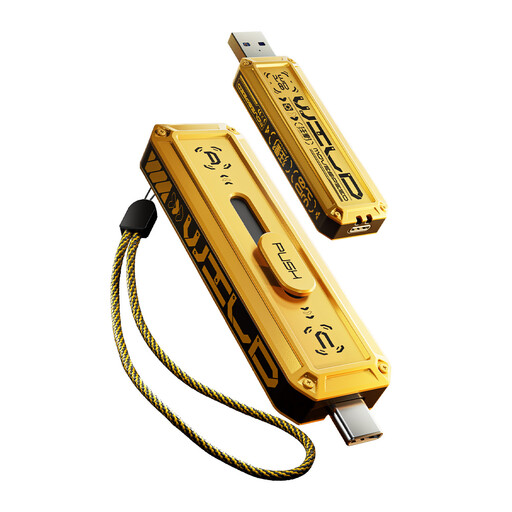
MOVESPEED YSUWD10-1TSY 1TB USB flash drive
This 1TB flash drive suits selected files you intend to transfer manually. Its listed USB-A and USB-C interfaces offer two connection options; check that the intended phone or computer can use the drive and open the copied files. Do not make a single flash drive the only copy of an irreplaceable archive.
View on Joybuy
Common questions
Is cloud syncing the same as backing up?
Not necessarily. Apple distinguishes information already synced to iCloud from information copied by iCloud Backup. Check the service's restore options and keep a separate copy of important files where practical.
Will a phone backup restore every app and message?
Do not assume it will. Google says not all Android apps can back up or restore all settings and data, while Apple distinguishes synced iCloud information from iCloud Backup contents. Before replacing or resetting a phone, check the backup and the settings for critical messaging and authentication apps.
Should I keep photos in original quality?
Choose original quality if retaining the captured resolution matters to you. Google says its Photos Storage saver setting can resize photos above 16 MP and videos above 1080p; check how either setting affects your available account storage.
How can I check that an external-drive backup will help?
Copy the intended files or configure compatible backup software, then open a copied file or test the restore process. Keep the drive in a separate safe location when it is not in use, in line with the National Cyber Security Centre's guidance on backup copies.


