Families with growing phone-photo libraries
Automatic uploads can help capture photos from several phones. Check how much storage each account or shared plan provides, who can see the files and how you would retrieve them if a phone were lost.


Choose an external hard disk drive for a large local photo archive that you can back up regularly and store separately; consider a portable SSD if you frequently move large files, after checking its connection and your device’s capabilities. Cloud storage can provide automatic uploads and access away from home, but check its capacity, account security and how it handles deletions. For irreplaceable photos, keeping both a local copy and a separately managed cloud copy avoids relying on one device or a synchronised library alone.
Automatic uploads can help capture photos from several phones. Check how much storage each account or shared plan provides, who can see the files and how you would retrieve them if a phone were lost.
Measure the existing library before choosing drive capacity. If you move files regularly, check the drive’s connector and your computer’s USB support: Samsung says the quoted maximum speeds of its T7 Shield require compatible hardware and a cable.
The National Cyber Security Centre describes a backup as a copy kept in a separate safe location. Plan how to restore that copy, and protect any cloud account with two-step verification.
Start with the size of the library and where a recoverable copy will live, then check access, compatibility and the routine each route requires.
| Priority | What to check | Your needs |
|---|---|---|
| Separate copies | Decide where the copy will be stored and try restoring a few files. The National Cyber Security Centre recognises both removable drives and cloud storage as separate backup locations. | I want photos I can recover if the original phone or computer becomes inaccessible. For irreplaceable files, I would keep another copy beyond a single drive or synchronised library. |
| Capacity | Measure the photo and video library and allow room for growth. Check whether a cloud quota also covers other files: Google says its account storage is shared across Gmail, Drive and Google Photos. | Our library is growing, so I need enough room for new photos without assuming that a drive label or cloud plan will cover future uploads. |
| Access and deletion | Check automatic uploads, which devices can access the files and what happens when a photo is deleted. Apple says deletions in iCloud Photos synchronise across devices and advises keeping backup copies. | I want photos available on more than one device, but I also need a separate copy that does not disappear with a synchronised deletion. |
| Drive connection | Match the connector, cable, file-system setup and USB capability to the devices used for backup. Samsung says its T7 Shield’s quoted maximum speeds require USB 3.2 Gen 2, a compatible cable and UASP. | For regular transfers of large camera files, I would check whether my computer can use the drive’s stated interface before choosing it for speed. |
| Storage location | A local drive needs a connection and a safe place to store it between backups. The Information Commissioner’s Office notes that a cloud copy can remain accessible after a fire, flood or theft at home; check the service’s access and security settings too. | If a household incident could affect my computer and backup drive together, I want a copy kept elsewhere as well. |
| Account security | Review sharing permissions, recovery methods and storage alerts. The National Cyber Security Centre recommends two-step verification for important accounts, including cloud storage. | Anyone using our cloud library should know which files are shared, while the account owner can still regain access and check that uploads continue. |
A full cloud quota can interrupt new uploads. Microsoft says OneDrive cannot upload, edit or sync new files when its quota is exceeded; Google storage is shared across Gmail, Drive and Google Photos.
Check current library size, other storage using the account and expected growth. Review quota alerts after setting up backups.
Apple says deleting an image from a device using iCloud Photos also deletes it from iCloud and the other devices using that library.
Keep a separately managed copy of irreplaceable photos, and check that you can open files from it.
Samsung’s maximum sequential speed figures for the T7 Shield depend on USB 3.2 Gen 2 host support, a compatible cable and UASP.
Check the exact drive and the device used for transfers, rather than treating a maximum figure as the speed of your backup setup.
Access to the account also affects access to its backups. The National Cyber Security Centre says two-step verification makes account access harder for someone who knows the password.
Set up two-step verification where available, check recovery methods and sharing permissions, then try restoring a small selection of files.
These references cover particular drives or cloud services; check the exact model or account plan rather than applying one feature across a brand.
Its external HDD lines are relevant to a household planning a local archive. In its September 2026 external-drive roundup, PCMag UK selected the WD My Passport and WD My Book for its portable and desktop HDD categories respectively.
The T7 Shield is a portable SSD to consider when a photo library travels between locations.
iCloud Photos is relevant to households using iPhone, iPad and Mac devices for access to a shared photo library.
Google Photos supports automatic photo and video backup to a Google Account, with access from signed-in devices.
OneDrive is relevant when household files are already kept on Windows PCs or in a Microsoft account.
These portable SSDs and external HDDs are options for keeping a local photo copy. A separately managed cloud copy can address the off-site part of a household backup arrangement.
 No image available
A portable local-copy option if a growing photo library calls for the stated 4 TB capacity. The product name specifies USB Type-C 3.2 Gen 2; check the backup device and cable for compatibility, and measure the library before deciding whether 4 TB is sufficient.
 No image available
Consider this portable local copy if files are moved regularly and 1 TB leaves enough room for the household library. Samsung specifies USB 3.2 Gen 2 and up to 1,050/1,000 MB/s sequential read/write for this model, with those maxima requiring a compatible host, cable and UASP. Its stated IP65 and drop protection are subject to controlled test conditions; keep another separate copy of irreplaceable files.
 No image available
This portable HDD offers a stated 5 TB for a local photo archive; compare that capacity with the files you intend to keep. Joybuy identifies USB-C connectivity, a USB-C cable and USB-C to USB-A adapter, with macOS 11+ support. Its stated Windows 10+ compatibility uses a downloadable HFS+ driver, so check that setup before relying on it.
 No image available
A 2 TB portable SSD is another local-copy option for photos and videos. Check that its connector and file-system setup work with the devices you will use, and compare its capacity with the size and expected growth of your library.
 No image available
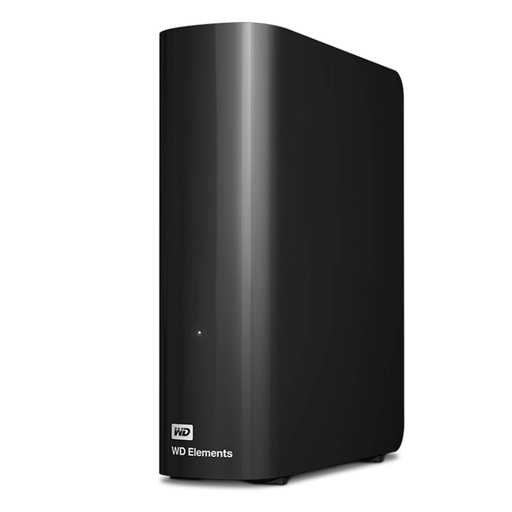
This desktop HDD is a local archive option when a stationary setup and the stated 10 TB capacity suit the household library. Check its connection and operating-system setup before use, and keep another copy elsewhere rather than treating a drive at home as protection against every loss.
Not by itself if deletions synchronise. Apple says a photo deleted from one device using iCloud Photos is also deleted from iCloud and the other devices using it, and advises keeping a backup copy of the library. Keep irreplaceable files in another separately managed location.
Measure the existing photo and video library, then allow room for new files and anything else using the quota. Google says its included account storage is shared across Drive, Gmail and Google Photos; Microsoft says OneDrive cannot upload, edit or sync new files when it is over quota.
Do not make a permanently connected drive the only backup of irreplaceable photos. The National Cyber Security Centre identifies malware and ransomware among reasons people can lose access to data. Back up on a deliberate schedule, disconnect the drive safely when practical and try restoring files from it.
Check the ports on the device used for backups, the drive’s connector and cable, and file-system compatibility. If speed matters, check host support too: Samsung says the T7 Shield’s quoted maximum speeds require USB 3.2 Gen 2, a compatible cable and UASP.
Use a unique password, enable two-step verification where available and check account recovery and sharing settings. The National Cyber Security Centre recommends two-step verification for important accounts, including cloud storage.