For a growing household photo library, keep more than one independently recoverable copy rather than relying on a single drive, account or NAS. An external HDD suits a mainly at-home archive, while a portable SSD suits frequent transfers; cloud storage can provide automatic, off-site access, and NAS suits a shared library when someone can maintain it. Whichever route you choose, check capacity, device compatibility and how you would restore the files.
Who is this for?
Household archive keepers
If photos, videos and documents are accumulating, a mainly at-home copy needs enough room for the files you have now and those you expect to add. Which? describes external HDDs as an option for longer-term computer-file backup.
Frequent photo and video movers
If you regularly move large libraries between computers or locations, transfer conditions and how the drive handles being carried matter alongside capacity. Check the ports and cables you will actually use.
Multi-device family organisers
If several devices contribute to the library, check which photos and files upload automatically and how each person can recover them. The National Cyber Security Centre advises considering both online storage and a storage device for separate backups.
What matters when choosing?
Choose the backup arrangement around the job it must do: hold a growing archive, move files frequently, maintain an off-site copy or manage a shared home library. Each priority calls for different checks before you commit.
| Concern |
What to check |
Who this matters to |
| Room for a growing archive |
Add up the files to protect and allow for growth and retained versions. Check whether a cloud allowance is shared with other files or household members. |
If my family's photos and videos keep accumulating, I need a destination that will still have room for future copies. About 33% of consumers would put capacity first. |
| Transfers and carrying |
Check the drive's connector, your device ports and the cable needed for the stated USB mode. Read any drop-protection conditions. |
When I move a large library between places, copying time and the risk of knocks shape my choice. Fast, portable copying would be the primary need for about 25% of consumers. |
| Automatic, off-site recovery |
Confirm which devices and folders upload, how account recovery works and whether you can restore original files. Set up two-step verification. |
If a phone or computer is lost, I want a recent copy I can reach from another device. About 25% of consumers would prioritise automatic backup and off-site recovery. |
| Shared home storage |
Check NAS backup destinations, version history, device support and who will maintain the system. |
With several people adding files, I may want one managed home library, provided someone can look after it. Shared storage and workflow control would come first for about 17% of consumers. |
Backup mistakes to avoid
-
Treating one synced location as a complete backup
If that location becomes inaccessible, the household may have no independently recoverable copy. The National Cyber Security Centre advises considering both online storage and a storage device.
Keep a separate copy and try restoring a few files from it. Disconnect a local backup drive when it is not in use, and protect an online account with two-step verification.
-
Choosing an SSD by its headline speed alone
The speed you can use depends on the host device and connection. Samsung says its T7 Shield's stated maximum speeds require USB 3.2 Gen 2 and UASP support.
Check the ports and cables on every device that will use the drive before making transfer speed the deciding factor.
-
Assuming a rugged rating covers every accident
Drop and ingress claims apply under defined conditions. Samsung says liquid, dust and drop damage to its T7 Shield are not covered by its warranty.
Read the conditions for the exact model and keep another copy of photos that you cannot replace.
-
Passing on an old drive with personal files still on it
A retired backup drive can still contain private photos and documents.
Remove personal data before passing on the drive. For disposal, check the available electrical-equipment recycling route.
Relevant brands and services
Seagate
Seagate's Basic portable HDD range is a reference point for a simple, USB-connected home archive.
- Seagate lists Basic models in 1TB, 2TB, 4TB and 5TB capacities and describes them as plug-and-play for Windows and Mac.
- USB 3.0 transfer speeds require a USB 3.0 port. Check the exact model's format and backup-software fit.
Samsung
The T7 Shield is a portable SSD to examine when a backup drive will be carried and used for repeated transfers.
- Samsung specifies USB 3.2 Gen 2, IP65 protection and a drop test under stated conditions for the T7 Shield.
- Samsung says its stated maximum speeds depend on the host, cable and UASP support; its warranty excludes liquid, dust and drop damage.
Apple
iCloud+ is a cloud-storage option for an Apple-centred household seeking photo and file access across devices.
- Apple says an iCloud+ plan can be shared with up to five family members.
- Check the plan's available capacity, sharing setup and which data each device actually backs up.
Microsoft
OneDrive is a cloud-storage option for households using Windows, Microsoft 365 and other supported devices.
- Microsoft lists cloud-storage allowances with its Microsoft 365 plans.
- Features vary by platform. Confirm which folders and photos will be backed up and secure the account.
Synology
Synology NAS products are relevant when a household wants shared local storage and is prepared to manage backup jobs.
- Synology describes backup arrangements using a separate destination, including an off-site copy.
- Synology warns that RAID or a NAS alone can still leave data at risk. Available features depend on the model and configuration.
Joybuy external-drive selections
These HDDs and portable SSDs are options for a local copy of a household photo library. Choose capacity against your own files and growth, check each device's connection requirements, and maintain a separate recoverable copy.
 Image unavailable
Samsung Portable SSD T7 4TB, grey
Consider this portable SSD if you frequently move a large local photo library. The listing specifies USB 3.2 Gen 2 and sequential read and write speeds up to 1,050 and 1,000 MB/s; the speed you can use depends on the host connection. USB-C-to-C and USB-C-to-A cables are listed as included. This T7 is not listed as water-resistant, so keep it away from moisture and maintain another copy.
View on Joybuy
 Image unavailable
Western Digital My Passport Ultra for Mac 5TB, silver
This portable HDD is an option for a mainly at-home, Mac-centred archive needing 5TB of stated capacity. The listing specifies USB-C and macOS 11+ support; Windows 10+ use requires a downloadable HFS+ driver. Check that arrangement before relying on the drive to move files between systems, and handle the HDD carefully.
View on Joybuy
 Image unavailable
SanDisk Portable SSD 2TB
Consider this SSD for a local copy you intend to carry between locations. The listing states read speeds up to 800 MB/s and drop protection up to 2 metres. Confirm the connector, cable and operating-system fit for your devices, and do not treat drop protection as a substitute for another backup.
View on Joybuy
 Image unavailable
Western Digital Elements portable HDD 4TB, black
This 4TB portable HDD is an option for a computer-connected copy of photos and videos. The listing specifies USB 3.2 Gen 1, an included USB-A cable and Windows 10+ recognition. Mac use may require reformatting, so check the format before copying files to the drive; protect it from shocks and moisture.
View on Joybuy
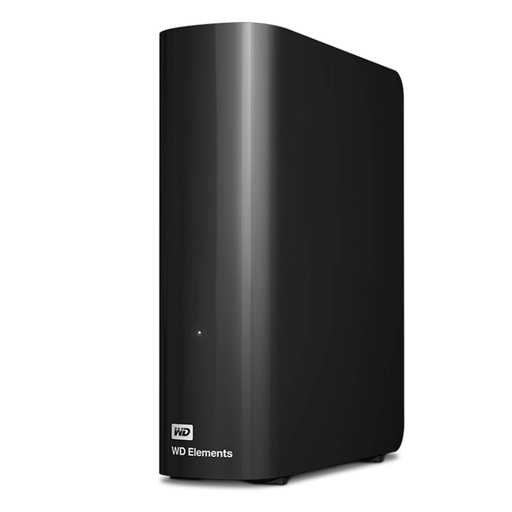 Image unavailable
Western Digital Elements Desktop external HDD 10TB
Consider this desktop HDD for a large, stationary home archive rather than a drive to carry around. It has 10TB of stated capacity and comes with an AC power adapter and USB-A cable. The listing describes Windows 10+ use and says macOS use requires reformatting; plan a separate recoverable copy as well.
View on Joybuy
Common questions
Can cloud storage replace an external backup drive?
Cloud storage can provide an off-site copy, but it need not be your only backup. The National Cyber Security Centre advises considering both online storage and a storage device for two backups. Check that the intended files upload and can be restored, and protect the account with two-step verification.
Should I use an HDD or SSD for family photos?
An HDD suits a mainly at-home archive when capacity matters more than frequent transfers; a portable SSD suits repeated copying and carrying. Which? describes HDDs as suited to longer-term computer-file backup and notes that they are typically slower than SSDs. Whichever you choose, verify that its capacity and connection suit your devices.
How much backup capacity do I need?
Start with the storage used by every photo library and folder you intend to protect, then allow room for growth and any versions you plan to retain. Check whether a cloud allowance also holds other files or whether several computers will share a local drive.
Is a NAS with RAID a complete photo backup?
No: shared storage and RAID do not, on their own, provide a separate recoverable copy. Synology warns that a RAID crash or drive failure can still cause data loss. Arrange another destination, preferably away from the NAS, and test a file restore.


