What should you check before choosing?
Start with the files you need to recover and the events you want the backup to survive. Then check whether a local drive, cloud service or combination can hold those files and restore them in practice.
| Priority | What to check | Your needs |
|---|
| Separate copies |
Confirm where each copy is stored, which folders it includes and how to restore files. The National Cyber Security Centre defines a backup as a copy kept in a separate safe location. |
I want my photos and documents back if the computer is lost or fails. A removable drive provides a local destination; a separate cloud copy can also cover loss affecting the drive or its location. |
| Earlier versions |
Check version history, deleted-file retention and whether a restore can undo an unwanted change. Microsoft Support says edits and deletions synchronise between a OneDrive folder and its website. |
If a file is overwritten or deleted, I need a recoverable earlier copy, not just the same change repeated on every device. |
| Capacity |
Measure the selected library, then allow for new files and any versions you intend to retain. Check shared cloud allowances: Google One Help says up to 15 GB is shared across Google Drive, Gmail and Google Photos. |
My full collection needs to fit, including the folders that are easy to overlook. If I use cloud storage, I also need to know whether the required capacity involves an ongoing subscription. |
| Transfer and access |
For a drive, check its connector, cable, computer compatibility and where you will store it. For cloud storage, assess your connection and how you would retrieve a large library. For several household computers, check whether a network-attached storage device can schedule their backups. |
I may need to copy large batches locally, reach files from several devices or back up multiple computers. A network-attached storage device can serve as a central destination, but it still needs a separate backup destination. |
| Security and upkeep |
Check cloud account protection, local-drive security and whether recent files appear in both copies. The National Cyber Security Centre advises disconnecting removable backup media when it is not in use because malware can affect attached devices. |
I need to be able to access my backup without leaving sensitive files exposed. With a local-and-cloud arrangement, I would check both copies and periodically restore a file from each. |
Relevant brand references
These brands illustrate different backup equipment and software; check the exact product or service rather than treating a brand name as a backup plan.
Seagate
Seagate’s external hard-drive range is relevant when you want a local destination for a large library.
- Seagate UK lists external hard drives with capacities up to 24 TB across its range.
- Check the chosen model’s capacity, connector, power needs and compatibility. Disconnect a removable backup drive between sessions, as the National Cyber Security Centre advises.
Samsung
Samsung’s portable SSD range is relevant if you want to carry a local copy or regularly transfer large batches of files.
- Samsung UK specifies up to 1,050 MB/s read and 1,000 MB/s write for the T7 Shield model.
- Samsung says those maximum speeds require a compatible USB 3.2 Gen 2 host and cable with UASP enabled. The figures are for the T7 Shield, not every Samsung SSD.
Synology
Synology’s NAS software is relevant when several computers need a central backup destination.
- Synology says Hyper Backup supports manual or scheduled backups to destinations including local folders, remote servers and public clouds.
- A NAS kept at home is not, by itself, an off-site copy. Configure a separate destination and check how to restore the versions you retain.
Local-drive options on Joybuy
These external SSD and hard-drive options provide local destinations for a photo and document library. Choose capacity against the files you will copy, check the connection and computer you will use, and plan a separate copy if the local drive could be lost with the original files.
 No image available
Samsung Portable SSD T7 2 TB, Blue
A portable local destination for photos and documents, with 2 TB stated capacity and a USB Type-C 3.2 Gen 2 connection. Check that your library fits and that your computer has a suitable connection; keep another copy separately if you need protection beyond this drive.
View on Joybuy
 No image available
Western Digital My Passport Ultra for Mac 5 TB, Silver
A portable hard drive to consider for a Mac-based local backup, with 5 TB stated capacity. Measure the folders you want to protect and check compatibility with the computer and backup routine you intend to use, particularly if you also use Windows.
View on Joybuy
 No image available
Western Digital My Passport 2 TB, Black
A portable external hard drive for a local copy of selected photos and documents, with 2 TB stated capacity. Check the size of the complete selection, computer compatibility and how you will make and restore backups before relying on it.
View on Joybuy
 No image available
Western Digital Elements Portable 4 TB, Black
This USB 3.0 external hard drive offers 4 TB of stated capacity for a local library copy. Check that your computer can use the drive, that the files fit with room for additions, and that you have a separate destination for losses affecting the local copy.
View on Joybuy
 No image available
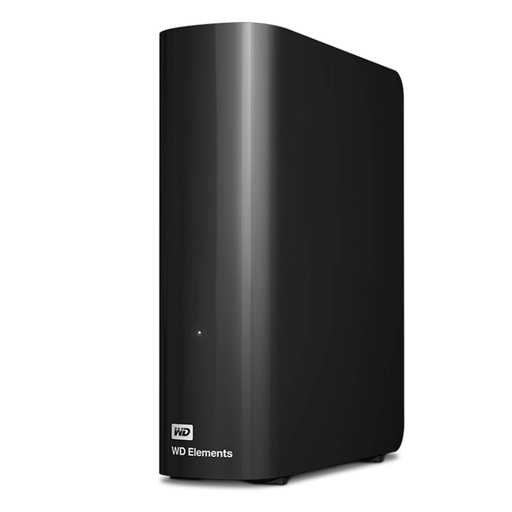
Western Digital Elements Desktop 10 TB
A desktop external hard drive with 10 TB stated capacity to consider for a large local library. Check its connection, power and computer requirements, and measure how much space your files and intended retained versions need. A drive kept alongside the original files is not an off-site copy.
View on Joybuy
Backup questions answered
Is OneDrive synchronisation an independent backup?
Not necessarily. Microsoft Support says adding, changing or deleting a file in a synchronised OneDrive folder applies the change on the website too. Check its version history and deleted-file retention, and keep a separate recoverable copy of files you cannot afford to lose.
How much backup capacity do I need for a large library?
Measure the photos, documents and folders you will protect, then allow space for new files and any earlier versions you plan to retain. For cloud storage, check what shares the account’s allowance: Google One Help says its up-to-15 GB standard storage is shared across Drive, Gmail and Google Photos.
Should I leave an external backup drive connected?
Disconnect a removable backup drive when it is not in use. The National Cyber Security Centre warns that malware can affect devices attached to an infected computer. Connect the drive for your backup, check that the copy was made, then eject and store it securely.
What should I test after setting up a backup?
Restore a few individual photos and documents, including recently added files, and check that they open as expected. Also confirm that every intended folder or photo library is included; the National Cyber Security Centre advises checking backup contents and that recent files appear in cloud storage.


