Cloud backup suits people who need automatic phone backup and access across devices, while an external drive or portable SSD gives you a local copy that can be stored separately after each backup. NAS can suit a household with several devices and the willingness to manage its setup; a USB drive is more appropriate for a small, selected secondary copy than a full automatic backup system.
Who this is for
Phone-first photo keepers
People whose important photos and messages are mainly on an iPhone, iPad or Android phone and who need an automatic restore route after loss, replacement or damage. Apple Support and Google One Help document their respective device-backup options.
Computer users with growing personal archives
People storing documents, photos and videos on Windows or macOS computers who need a separate local copy and a clear way to restore files. The National Cyber Security Centre and Microsoft Support describe separate backups and File History workflows.
Multi-device households wanting local control
Households with several computers and phones that may benefit from a shared NAS destination, scheduled backups and mobile photo upload, while being prepared to manage the system and its protection.
What to check before buying
Start with the files and devices you need to restore, then choose a route that creates a separate copy and fits the amount of management you are prepared to do.
| Priority |
What to check |
Your needs |
| Separate, restorable copy |
Confirm the backup is stored away from the original device or account location. Check how to locate and restore a file or an earlier version. |
I want photos and documents to remain recoverable if the original phone or computer is lost, damaged, deleted from or affected by malware. The National Cyber Security Centre defines a backup as a separate copy that can be restored. |
| Device coverage and automation |
Check the exact operating systems, folders and apps covered. For automatic backup, confirm the conditions that must be met, such as a connected drive, power, Wi-Fi or account sign-in. |
I use more than one device and need to know that the files I rely on are actually included, rather than assuming all content is covered. |
| Capacity and future growth |
Compare the current collection with usable drive or service capacity. Allow for future photos, videos and any retained backup versions; check whether a cloud allowance requires a paid plan. |
My archive may grow, so I need room for the files I have now without relying on an upgrade I have not planned for. |
| Local media handling |
For an external drive, SSD or USB device, confirm the connector, file-system compatibility and intended backup software. Disconnect removable media after backup and store it separately. |
I want a physical copy under my control that is not left attached to the same computer or network. The National Cyber Security Centre warns that connected removable media may also be affected by ransomware. |
| Restore scope |
Decide whether you need selected files, phone backup, a whole-computer image or a shared household destination. Check that the chosen software and device support that specific restore task. |
I need the backup method to match what I may have to recover, not simply to provide spare storage space. |
Backup mistakes to avoid
-
Treating extra device storage as a backup
More capacity in the same phone or computer does not create a separate copy that can be restored after loss, theft, hardware failure, accidental deletion or malware.
Make sure the chosen route creates a distinct copy in another location, then practise finding and restoring at least one file.
-
Leaving an external drive or USB stick connected all the time
A removable copy left attached to a computer or network may be exposed to the same ransomware attack as the original files.
After a completed local backup, safely disconnect the media and keep it separately. For irreplaceable files, use more than one backup route.
-
Assuming cloud content is retained indefinitely
Google says Android backup data other than photos or videos is erased after 57 days of device inactivity, and synchronised services can pass deletions between devices.
Check retention, deletion recovery, account access and storage limits for the exact service, then keep another independent copy of files you cannot replace.
-
Assuming NAS automatically backs up every part of a computer
NAS applications differ in what they protect. Synology says its Drive application is well suited to file collections but may not suit a computer system partition or wider backup requirements.
Decide whether you need selected files, photo upload, whole-PC imaging or NAS-to-second-destination protection, then check the NAS model and software for that restore requirement.
Relevant backup platforms and brands
Apple
An integrated cloud and device-backup route for iPhone and iPad users, with iCloud access also available on Windows and the web.
- Apple Support states that iCloud can store photos, files and other data across devices, and iCloud Backup can automatically back up an iPhone or iPad.
- iCloud includes 5 GB of free storage; more storage requires iCloud+. Automatic iPhone and iPad backup requires power, Wi-Fi and a locked screen.
- iCloud Photos synchronises changes, including deletions, across devices using it, so check recovery behaviour before relying on sync alone.
Google
An account-based route for Android device backups and Google Photos, useful for people already using a Google Account across devices.
- Google One Help documents automatic Android device backup and restoration while setting up another Android device.
- Google states that Android backup data other than Google Photos content is erased after 57 days of device inactivity.
- Check available storage and the applicable Google One plan for the account you intend to use.
Microsoft
A Windows-focused route using File History, Windows Backup and OneDrive-based services.
- Microsoft Support says File History can regularly back up Windows libraries and added folders to an external drive or network location, with earlier versions available for restore.
- This is primarily a file-backup workflow, so check the applicable Windows version, folders and destination drive.
Synology
A NAS ecosystem for households wanting a shared local destination for computers and mobile photo libraries.
- According to Synology’s own documentation, its NAS systems can support scheduled or real-time computer backup, Time Machine support and mobile photo backup.
- Synology says its Drive application suits file collections such as photos and documents, but may not suit system-partition or broader backup requirements without another tool.
Seagate
An external-drive brand with portable and desktop backup-drive lines and optional Toolkit and DiscWizard software.
- For its Backup Plus Portable line, Seagate UK lists Toolkit computer-to-drive automatic backup and DiscWizard for backing up operating systems, applications, settings and data.
- Confirm that the exact model, operating system and supplied software support the workflow you need.
Joybuy product options
Joybuy product options for creating a removable local backup of personal photos and documents, including external hard drives, portable SSDs and a USB drive for selected files.
 No image available
Western Digital My Passport Portable External Hard Drive, 2TB, Black
A removable local destination for computer photo and document archives, with scheduled backup support stated in the listing.
2TB capacity, USB 3.2 Gen 1 connection and Windows 10+ support are listed. macOS 11+ use requires the stated downloadable driver for read/write access.
Check that 2TB accommodates the collection, retained versions and future growth. Disconnect and store the drive separately when it is not backing up.
Joybuy
 No image available
Samsung MU-PG4T0B 4TB Portable External SSD
A high-capacity removable local destination for larger photo, video and document collections.
The listing states 4TB capacity, USB 3.2 Gen 2x2, USB-C-to-C and USB-C-to-A cables, and compatibility with Windows, macOS and Android.
Check that the computer supports the required connection and confirm the intended automatic backup and restore workflow. Store the SSD separately after copying files.
Joybuy
 No image available
Samsung MU-PE1T0S 1TB Portable External SSD
A portable local copy option for selected personal files moved between compatible Macs, PCs and Android devices.
The listing states 1TB capacity, USB Type-C with USB 3.2 Gen 2 connectivity, Mac, PC and Android compatibility, plus password software and IP65 resistance.
Check whether 1TB is sufficient for the archive and backup versions. Confirm the backup and restore process, as the listed software is described for password setup and firmware updates.
Joybuy
 No image available
Western Digital Elements Portable 4TB External Hard Drive
A removable drive for manual backups of growing photo, video and document libraries from a computer.
The listing states 4TB capacity, a USB 3.2 Gen 1 connection, Windows 10+ recognition and an included USB-A cable.
For Mac and other operating systems, reformatting may be required. Plan how every required folder will be copied and restored, then disconnect the drive when finished.
Joybuy
 No image available
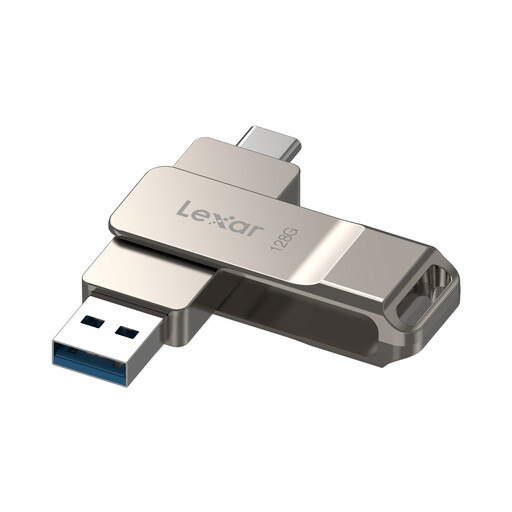
Lexar D40E 128GB Dual USB Type-C Flash Drive
A portable secondary manual copy for a small, deliberately selected set of photos or documents.
The listing states 128GB capacity, USB-A and USB-C connectors, and compatibility with Windows, macOS, Android and Linux.
It is not presented as a complete-device or automatic backup workflow. Check selected-file capacity and Android USB OTG support, then keep the drive disconnected when not copying files.
Joybuy
Frequently asked questions
Is cloud synchronisation alone the same as a separate backup?
Not necessarily. Apple Support states that iCloud Photos keeps changes up to date across devices, including deletions made on one device. Check version history, deletion recovery and restore behaviour, and retain a separate copy for files you cannot replace.
Can an iPhone or iPad back up automatically to iCloud?
Yes, if iCloud Backup is enabled and the device is connected to power and Wi-Fi with its screen locked. Check the last backup date and whether enough iCloud storage is available.
Can Android data be restored to a replacement phone?
Google states that backed-up Android data can be restored during first-time setup or through the device’s copy-data workflow after setup. Check which data is included for the phone and Android version you use before relying on it.
Can Windows back up files to an external drive automatically?
Windows File History can continuously save copies of files in libraries such as Documents, Pictures, Videos and Music to an external drive or network location. Add folders to a library if you want File History to include them.


