Who needs which backup?

Households protecting irreplaceable memories

If family photos, scans and personal records would be difficult to recreate, keep a recoverable copy apart from the computer or phone used every day. The National Cyber Security Centre advises backing up important files and checking that they can be restored.

Households using several devices

When new photos arrive on phones and documents live on computers, automatic copying can reduce reliance on a manual routine. Check which files each device backs up and which are synchronised separately.

Households planning for account recovery

Before keeping personal records in a cloud account, establish who can access it and how access can be regained after a lost phone or forgotten password. Stronger encryption options may place more recovery responsibility on you.

What matters when choosing?

Separate local copy

Choose it when: A computer holds the photo and document library; use a drive for the library or removable USB storage for a smaller selection.

The trade-off: You must make the copy, disconnect it after use, store it safely and check that it restores. A drive kept at home does not by itself protect against loss at that location.

Cloud copy and automatic phone backup

Choose it when: Phones regularly create new files or household devices need an off-device copy without carrying a drive between them.

The trade-off: Recovery requires access to the right account, enough available storage and an understanding of what is backed up rather than only synchronised.

Concern What to check Who this matters to
Recoverable copies Restore a representative folder to another location. For a local copy, plan where the disconnected device will be stored. If my computer is damaged or its files are affected by ransomware, I need a separate copy I can actually open. Around 31% of consumers put recoverability first.
Automatic coverage Check which phones, computers and file types are covered, and whether photos are backed up or synchronised through another service. New photos appear on our phones while documents sit on a computer, so I need copying that does not depend on remembering every transfer. For around 25% of consumers, automatic coverage is the primary need.
Capacity and plan terms Compare the size of the current library with available capacity and room for growth; check shared cloud quotas and what happens after a plan change. Our collection keeps growing, and I do not want new files to stop uploading when storage fills. Capacity and its ongoing limits come first for around 19% of consumers.
Privacy and account recovery Review the service’s encryption and recovery options, including who holds any recovery key and how access would be regained after losing a device. Personal records need controlled access, but I also need a way back into the account if my phone is lost. Around 25% of consumers make privacy and account recovery their main concern.

Backup mistakes to avoid

  • Leaving the backup drive connected all the time

    If malware affects the computer, it can affect an attached backup device too. Drive capacity alone does not make a copy independent.

    Follow the National Cyber Security Centre’s advice: disconnect the device after copying, store it safely and periodically restore sample files.

  • Assuming cloud synchronisation is a complete device backup

    Apple says an iCloud device backup does not include data already stored and synchronised in iCloud, including photos when iCloud Photos is enabled.

    Check where photos and documents are stored, what the device backup includes and which irreplaceable files need another copy.

  • Ignoring shared storage limits

    Google storage is shared across services including Drive, Gmail and Photos. Apple says iCloud backups will not complete if stored data exceeds the capacity of a downgraded plan.

    Check current use, allow room for new files and make another copy of critical data before reducing a cloud plan.

  • Enabling stronger encryption without a recovery method

    With Apple’s optional Advanced Data Protection, trusted devices retain the encryption keys for most covered iCloud data; Apple cannot recover that end-to-end encrypted data for you.

    Set up and safeguard the required recovery contact or recovery key before enabling the feature, and consider whether it will remain accessible if a device is lost.

Relevant brands and services

Western Digital

The My Passport portable HDD line is relevant to households making a separate local copy of a computer-based archive.

  • Western Digital lists a 1 TB My Passport model and says the line includes capacities up to 5 TB; check the capacity of the particular variant.
  • A portable drive still needs to be disconnected, stored safely and restore-tested. It is not automatically protected from an incident affecting the connected computer.

Samsung

The T7 Shield portable SSD line is relevant when a compact local copy is carried between compatible devices.

  • Samsung lists T7 Shield variants in 1 TB, 2 TB and 4 TB capacities.
  • Samsung’s stated maximum transfer speeds require compatible hardware and cables. Its T7 Shield resistance claims apply to that line, not to every Samsung portable SSD.

Apple

iCloud Backup and iCloud Photos are relevant to households using iPhone, iPad or Mac devices.

  • Apple distinguishes device backups from data already synchronised to iCloud, helping users check where their photos are kept.
  • Apple’s optional Advanced Data Protection requires a viable recovery contact or recovery key; losing recovery access can prevent access to protected data.

Google

Google’s device backup, Photos and Drive services are relevant to households using Android phones or Google accounts.

  • Google says a personal account includes up to 15 GB of storage shared across its services.
  • A full shared quota can interrupt new uploads and photo backups. Check what the device backup covers separately from Google Photos.

Microsoft

OneDrive is relevant to households keeping documents and photos in a Microsoft account, particularly alongside Windows or Microsoft 365.

  • Microsoft says eligible deleted files in personal OneDrive accounts can be restored within 30 days; Microsoft 365 subscribers also have an entire-OneDrive restore option covering up to 30 days.
  • Microsoft says over-quota OneDrive files become read-only, so available capacity matters to ongoing copying and recovery plans.

Local storage choices on Joybuy

These drives and removable USB storage can hold a separate copy of household photos and documents. Choose capacity for the files you intend to copy, then plan how you will disconnect, store and restore that copy; these products do not replace automatic cloud backup for phones.
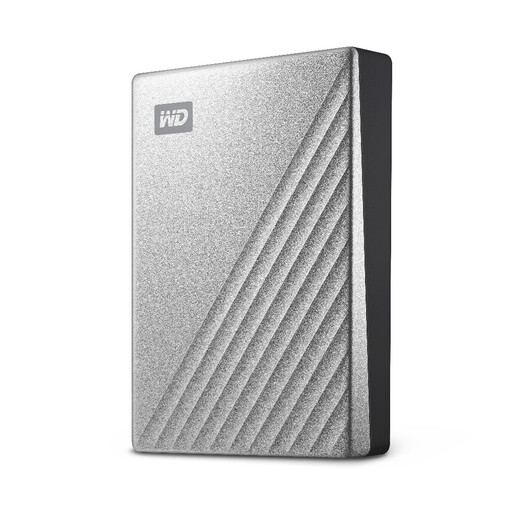
Western Digital My Passport Ultra 4 TB portable hard drive in silver

Western Digital My Passport Ultra 4 TB portable hard drive, Silver

For a computer-based photo and document library that needs a separate local copy.

4 TB portable external hard drive. Check compatibility with the computer you will use for backups, and disconnect and store the drive after copying.

View on Joybuy

Samsung Portable SSD T7 2 TB in blue

Samsung Portable SSD T7 2 TB USB Type-C 3.2 Gen 2 (3.1 Gen 2), Blue

For a portable local copy that may need to move between compatible devices.

2 TB external SSD with the stated USB Type-C interface. Check the intended devices and file system before transferring files, and test a restore from the copy you keep.

View on Joybuy
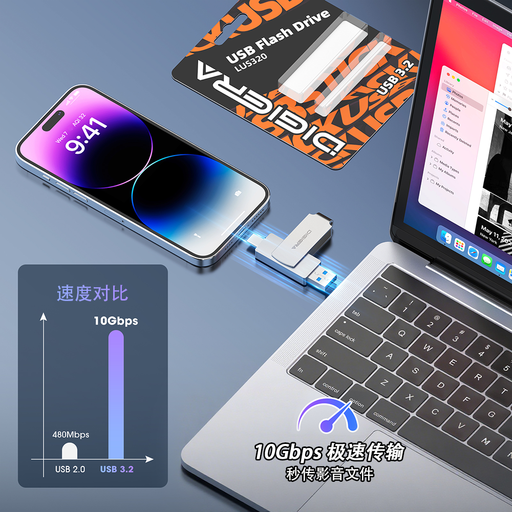
DigiEra LUS320 128 GB USB flash drive with USB-A and USB-C connectors

DigiEra LUS320 128 GB USB 3.2 flash drive, USB-A and USB-C

For a selected set of important documents or photos kept apart from a computer, provided they fit within its capacity.

128 GB removable storage with USB-A and USB-C connectors. Check device and file-system compatibility, then disconnect the drive and confirm that copied files open.

View on Joybuy

Questions about household backups

What should I restore-test before trusting a household backup?

Restore a photo, a document and a folder to a different location, then open them and check that the expected versions are present. For a phone, make sure you know which account and restore process you would use on a replacement device. The National Cyber Security Centre advises checking that you know how to restore files, not merely that a backup has run.

Which files need a copy away from an always-connected drive?

Prioritise irreplaceable photos, scans of personal records and documents that would be difficult to recreate. Keep a separate copy on removable storage that is disconnected after use: the National Cyber Security Centre warns that an attached backup device can be affected when the computer is infected.

Does iCloud Backup include my iCloud Photos library?

No, when iCloud Photos is enabled, Apple says those synchronised photos are not included in the iCloud device backup. Check both the iCloud Photos sync status and what the device backup covers, and keep another copy of photos you cannot replace.

What should I check before changing a cloud-storage plan?

Compare your stored data with the capacity you will retain, and copy critical files elsewhere before reducing the plan. Apple says an iCloud account over its new capacity will not sync or complete backups; Google also documents restrictions when an account exceeds its storage quota.