What matters when choosing storage?
Decide how you would recover important files before choosing a device for capacity or transfers. Then check the files you need to store, the devices you use and whether account access or offline availability matters.
| Concern | What to check | Who this matters to |
|---|
| Recoverable copies |
Where each copy is kept, whether one is off-site and whether you can restore a file. |
If my photos cannot be recreated, I need a way back after a drive failure or local incident. Around 33% of consumers put recovery across separate copies first. |
| Capacity growth |
The size of your current library, room for growth and the storage allowance of any cloud plan. |
As my video and photo library grows, I need space for the files I intend to keep. Capacity is the primary concern for roughly 25% of consumers. |
| Portable transfers |
Device ports, cable capability and the conditions attached to rated transfer speeds. |
When I move large projects between devices, waiting for transfers affects my work. Around 17% of consumers make portable transfer speed their main priority. |
| Moving selected files |
Whether the intended devices need USB-A, USB-C or both, and whether they can read the files. |
I may only need to carry a few files between devices with different ports, not move my whole archive. For about 8% of consumers, that file-carrying need comes first. |
| Privacy and account access |
Protection on a portable drive and recovery options for any cloud account you rely on. |
If a drive goes missing or I lose access to my account, I want to protect personal files without losing my route back to them. This is the leading concern for around 17% of consumers. |
Joybuy products for local storage
These options cover external HDDs for local copies, portable SSDs for moving larger files and a USB flash drive for carrying selected files. Keep a separate off-site copy of files you cannot replace.
 No image available
Samsung T7 Shield portable SSD, 1 TB, blue
A portable SSD to consider when you regularly move large photo or video files. The named variant has 1 TB capacity and a USB 3.2 Gen 2 connection; check that your device and cable support the connection you need. Keep another copy of important files.
View on Joybuy
 No image available
Western Digital My Passport Ultra for Mac, 5 TB, silver
A portable HDD to consider for a sizeable local archive. This is the 5 TB Mac variant; if you also use Windows, confirm file-system compatibility and whether additional software is needed. A second, separate copy remains important for recovery.
View on Joybuy
 No image available
Samsung T7 portable SSD, 2 TB, blue
A portable SSD to consider for moving a larger working library between devices. This variant has 2 TB capacity and a USB 3.2 Gen 2 connection; check the intended ports and cable against Samsung’s conditions for its rated transfer speeds. It is not a separate-copy backup on its own.
View on Joybuy
 No image available
Western Digital Elements portable HDD, 4 TB, black
A 4 TB local-drive option for a growing home file library. The product name specifies USB 3.0; check connection and file-system compatibility with the computer you intend to back up, and keep an off-site copy of important files.
View on Joybuy
 No image available
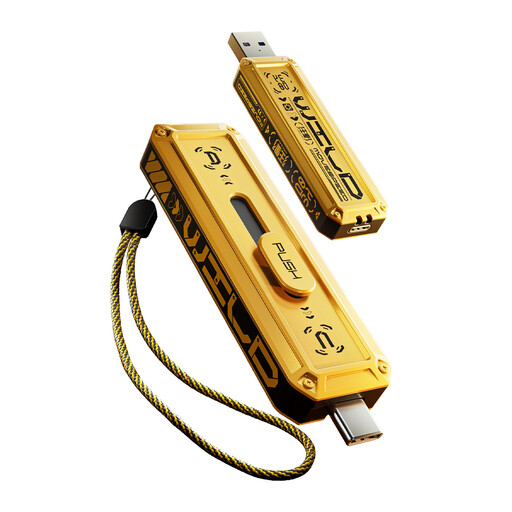
MOVESPEED YSUWD10-512GSY USB flash drive, 512 GB, yellow
A 512 GB option for carrying selected files between devices with USB-A and USB-C ports. Check that the intended devices can read the files, and keep a separate backup rather than using a small transfer drive as the only copy.
View on Joybuy
Frequently asked questions
Is cloud sync a complete backup for my photos?
Not by itself if it leaves you dependent on one account or one recoverable copy. The National Cyber Security Centre advises at least three copies on two devices, with one off-site; check what your cloud service retains after deletion and try restoring a file.
How much storage do I need for photos and video?
Start with the size of the files you intend to keep, then allow room for future photos, video and edited copies. Check that each backup destination can hold the files you will need to restore, rather than choosing on capacity alone.
Will a portable SSD reach its advertised speed?
Not on every setup. Samsung says its T7 maximum rated speeds require a USB 3.2 Gen 2-compatible host and cable with UASP enabled, so check the connection on each device you plan to use.
What should I set up before relying on cloud backup?
Check which files are included, set up account recovery and make sure you can restore an essential file. Apple says users of its Advanced Data Protection need a Recovery Contact or Recovery Key because Apple does not hold the decryption keys.
Should I encrypt a portable drive with personal files?
Consider encryption when a drive carrying personal files could be lost or stolen. The Information Commissioner’s Office says encryption is especially effective against unauthorised access in that situation; keep any recovery credentials safe and maintain another copy of the files.


