For a large photo library, consider a portable hard drive when capacity matters most, or a portable SSD when you expect frequent transfers and have compatible ports. A USB flash drive can help with a smaller move between devices, while cloud storage can keep copies accessible across devices; for photos you cannot replace, keep a separate local copy as well. Whichever route you choose, download the originals, allow enough space for them and test that you can open copied files before wiping the old device.
Who needs which backup?
People moving a large library
If you are replacing or wiping a device, compare the space used by your photos and videos with the destination capacity. Check how your current service lets you download the whole library before relying on a drive to hold it.
Households using different devices
A move between a Mac, Windows computer, phone or tablet calls for a connector and file system that the intended devices can use. Confirm that original files, rather than cloud-only placeholders, have reached the backup destination.
People protecting irreplaceable photos
Keep a recoverable copy separate from the device being replaced. The National Cyber Security Centre advises storing important backups in a separate safe location and checking that restoration works.
What should you check before buying?
Start with the size and export method for your library, then choose a destination your devices can use. A local drive or flash drive handles a physical copy; cloud storage offers an account-based route, and using both avoids relying on just one location.
| Concern | What to check | Who this matters to |
|---|
| Recoverability |
Keep a copy apart from the old device; open sample photos and play a copied video before erasing anything. |
If I am about to wipe or trade in a device, I need to know the copied files will open without it. Around 27% of consumers put this recovery check first. |
| Library capacity |
Compare the library’s storage use with the destination’s usable space, leaving room for export files and later additions. |
With a large or video-heavy library, I need the complete collection to fit rather than choosing storage by photo count. Roughly 27% of consumers make capacity their primary concern. |
| Transfer and compatibility |
Check the source device’s port, the supplied or required cable, file-system access and the service’s download method. |
If I am moving between different devices, I want a transfer I can complete with the ports and files I have. About 20% of consumers prioritise that practical fit. |
| Protection after the move |
Decide how you will keep copies current and whether a local copy will remain separate from the cloud account. |
Once the new device is set up, I do not want the migration copy to become my last recoverable version. Around 26% of consumers put ongoing protection first. |
Mistakes to avoid
-
Assuming cloud sync is a tested backup
Access to a cloud library does not tell you whether a separate copy can be restored if you lose access to the old device or account. The National Cyber Security Centre describes a backup as a copy kept in a separate safe location.
Before retiring the device, open representative photos, videos and documents from the separate copy.
-
Choosing storage by photo count alone
Videos and downloaded archives can take substantial space, so the number of pictures is not enough to size a destination.
Check the library’s reported storage use against the capacity of the exact drive or plan, with room for the export and future files.
-
Expecting a USB speed label to guarantee a fast copy
Samsung’s stated maximum transfer rates for its T7 Shield depend on a compatible host, cable and transfer mode; the drive alone cannot determine the speed.
Check the ports and cable on the devices you will actually use before choosing a drive for its speed rating.
-
Reformatting a drive after copying files to it
Formatting removes files already on the drive, even when the aim is simply to make it usable with another device.
Decide which devices must read and write to the drive before copying. If you must reformat it later, make and check another copy of its contents first.
Relevant brands and services
Samsung
Portable SSDs for a compact local copy, particularly when transfers are frequent.
- Samsung rates the UK T7 Shield 2TB at up to 1,050 MB/s read and 1,000 MB/s write under its stated host, cable and transfer-mode conditions.
- Those are conditional manufacturer ratings, not a speed to expect from every device. Samsung’s stated resistance ratings are not a guarantee against damage or lost files.
Seagate
Portable hard drives to consider when a substantial library needs a local destination.
- Seagate lists a 5TB Expansion Portable hard-drive option with USB 3.0; check the capacity of the particular model you choose.
- A USB interface describes the connection, not SSD-level transfer performance.
Apple
iCloud Photos download and export methods for an Apple-device library.
- Apple explains how to download originals to a Mac or export unmodified originals from an iPhone or iPad to external storage.
- Apple limits iCloud.com download selections to 1,000 items at a time, which matters if you plan to move a large library through a browser.
Google
Google Takeout provides an account-export route that includes Google Photos.
- Google Account Help describes creating an archive of selected Google product data for download.
- Google warns that changes made between requesting an export and creation of the archive might not be included. Inspect the archive before relying on it.
Joybuy options for local copies
These portable SSDs, a flash drive and a hard drive are options for making a local photo-library copy before changing devices. Match the stated capacity and connection to your library and devices; a drive does not replace checking that the exported files open.
 No image available
Samsung Portable SSD T7 2 TB, grey
Consider this portable SSD for a local copy if its 2 TB capacity fits your library and export files. The product name specifies a USB Type-C 3.2 Gen 2 connection; check your device’s port and file-system access before copying.
 No image available
Samsung MU-PE1T0S 1TB SSD, black
This portable SSD is a local-copy option where 1TB leaves enough space for the complete library. Its product name specifies USB Type-C 3.2 Gen 2; confirm the intended connection and file-system access.
 No image available
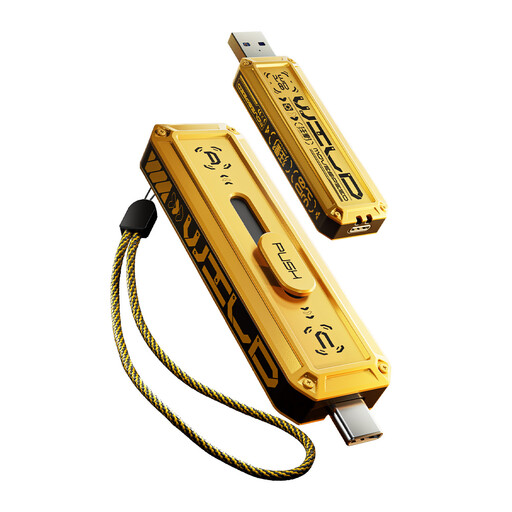
MOVESPEED YSUWD10-1TSY 1TB USB flash drive, yellow
For a hand-carried transfer between devices, this model’s product name specifies USB and Type-C connectors and a USB 3.2 Gen 2×1 interface. Check that the intended devices can access the drive and that 1TB covers the files you need to move.
 No image available
Western Digital My Passport Ultra 5TB, blue
This portable hard drive offers a 5TB local destination to consider for a large library. Check the library size and the file system needed by each computer before copying or reformatting the drive.
 No image available
SanDisk Portable SSD 2TB
This portable SSD is another 2TB option for a local photo-library copy. Confirm that the capacity leaves room for the export and that your intended device can connect to and read the drive.
Common questions
Can I download an entire Amazon Photos album at once?
Amazon Customer Service says entire albums cannot be downloaded in one action through its described browser method. Select the pictures you need and check that the downloaded files open before removing the old copy; for a large library, check the current selection workflow before starting.
How do I export Google Photos before changing devices?
Google Takeout can create an archive that includes Google Photos. Google Account Help warns that changes made after you request the export might not be included, so inspect the finished archive and account for any newer files before relying on it.
How can I copy the originals from iCloud Photos?
Apple says you can choose “Download Originals to this Mac” for an iCloud library, or export unmodified originals from an iPhone or iPad to external storage. If using iCloud.com instead, Apple limits each download selection to 1,000 items; check the resulting files before deleting anything.
Is one new drive enough to protect my photos during a device change?
A drive can hold a separate local copy, but do not remove the old version until you have opened representative files from the new one. For an additional recovery route, keep another copy in a separate safe location; the National Cyber Security Centre also advises testing that backups can be restored.


