Desk-based portfolio presenters
You show photographs across a small desk and need a stable landscape angle without giving up too much working space.


For a small desk, start with a tablet around 11–12 inches and make secure landscape positioning as important as the display. An integrated kickstand suits repeated presentations at one workstation; a separate stand gives you more choice of position but adds something to carry. Consider a 13-inch-class screen when shared viewing matters enough to justify its larger footprint.
You show photographs across a small desk and need a stable landscape angle without giving up too much working space.
You want photographs to look clear in the room where you present them. Display specifications can help you shortlist tablets, but they do not establish colour accuracy for your own workflow.
You move between a desk and client meetings, so a larger viewing area has to be weighed against carrying the tablet and its stand or case.
Settle the desk footprint and viewing angle before choosing a screen size. Then check how your photographs look in the intended lighting and how you will bring the portfolio to a meeting.
| Concern | What to check | Who this matters to |
|---|---|---|
| Desk fit and stability | Measure the space available with the stand open; check its landscape angle and charging-cable clearance. | I need to show work repeatedly without the tablet crowding the desk or shifting as someone views it. Around 42% of consumers put desk fit and a stable setup first. |
| Image presentation | Compare screen size and resolution, then view familiar photographs under lighting like yours; note any brightness-mode conditions. | If clients need to inspect photographs, I care most about image scale and visibility, rather than a brightness figure alone. For around 33% of consumers, presenting the images clearly is the primary concern. |
| Portability and photo library | Check the tablet and case weight, where your images will be stored, and whether your photo app can use that storage. | I take my portfolio to meetings and need dependable access to the selected images away from my desk. Portability and the library workflow come first for around 25% of consumers. |
A larger display gives photographs more room, but it also needs more space and adds weight. Apple specifies 616 g for the 13-inch iPad Air Wi-Fi model against 464 g for its 11-inch model; Samsung specifies 664 g for the 13.1-inch Galaxy Tab S10 FE+ Wi-Fi against 497 g for the 10.9-inch Tab S10 FE Wi-Fi.
Mark out the tablet and stand footprint, leaving room for any charger, keyboard or mouse you use.
A larger setup may also mean changing your existing stand or rearranging the workspace.
A stated brightness figure does not tell you how your edited images will render or how distracting reflections will be. Samsung's figure of up to 800 nits for the Galaxy Tab S10 FE applies specifically in High Brightness Mode.
Where possible, inspect representative photographs in person and consider the lighting at your desk.
Lenovo specifies integrated kickstands for the Tab Plus and Tab Plus Gen 2, but the support arrangement for another tablet needs checking separately.
Confirm that a stand or case fits the exact model and supports your preferred landscape angle without obstructing charging.
If you choose a separate stand or case, it becomes another item to obtain and carry.
Space for a photo library does not provide a second copy if files are lost. Apple offers different iPad Air storage configurations, while Samsung specifies microSD expansion for the cited Galaxy Tab S10 FE models; neither approach replaces a backup.
Keep a separate copy of your portfolio and check that your chosen photo app works with the storage method you intend to use.
The iPad Air range is relevant if an iPadOS photo workflow and a choice between close-up and larger shared viewing matter to you.
The cited Galaxy Tab S10 FE range offers 10.9-inch and 13.1-inch Android options for different viewing distances.
The cited Tab Plus models are worth considering when the tablet will often remain positioned on a desk.
These tablets offer different ways to show a portfolio at close range. The Lenovo Tab Plus has an integrated kickstand; for the others, choose a compatible landscape stand or folio as part of the desk setup.
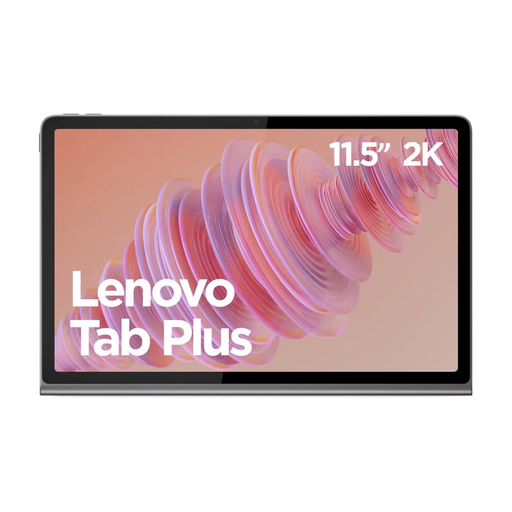 Image unavailable
Consider this model if the portfolio will be shown repeatedly at one desk and you want an integrated support option. Lenovo specifies an 11.5-inch display and a 175-degree kickstand for Tab Plus; check that its landscape position leaves enough room on your desk.
The listed configuration has 128GB of storage. Check whether you have a compatible charger for your setup.
 Image unavailable
The 256GB configuration is an option if you intend to keep portfolio images on the tablet. Check its display in your intended room lighting and select a stand or folio that holds this exact model securely in landscape orientation.
 Image unavailable
The 11-inch format suits a portfolio viewed close to a small desk. This is the 256GB WiFi configuration with Standard Glass; check how your own photographs look in the room and confirm a compatible landscape stand.
 Image unavailable
The 512G ROM configuration may appeal if you keep a substantial portfolio on the device. Before using it for desk presentations, check the screen in your lighting and find a compatible stand that remains stable in landscape orientation.
 Image unavailable
This 11-inch configuration is a close-viewing option if 128GB suits the portfolio you plan to keep locally. Check the display with representative images and confirm that a stand or folio supports a stable landscape angle on your desk.
Around 11–12 inches is a useful starting point for close viewing when desk space is tight; consider a 13-inch-class tablet when people regularly view photographs together from farther away. Measure the space needed with the stand open before choosing the larger screen.
It can simplify repeated presentations at one desk, provided its landscape angle and footprint suit your workspace. Lenovo specifies kickstands for Tab Plus and Tab Plus Gen 2; a separate stand may suit you better if you want to change the viewing height or use the tablet handheld frequently.
Usually not if you have dependable Wi-Fi at the desk or keep the selected images on the device. Consider cellular when presentations regularly depend on online files away from Wi-Fi, and check the connectivity options for the exact tablet configuration.
Check the seller's process for faulty goods separately from any manufacturer warranty. Samsung describes a 24-month manufacturer warranty for its tablets beginning on the first purchase date; statutory rights against the trader are distinct, and the Consumer Rights Act 2015 provides a short-term right to reject where its conditions apply.
Use an appropriate electrical-equipment reuse or recycling route rather than putting it in ordinary household waste. UK Government guidance identifies the Waste Electrical and Electronic Equipment Regulations 2013, as amended, as the framework for recovery, reuse and recycling; remove your personal data before handing the tablet over.