Wall-display collage makers
If you want to see each family photo clearly in a frame or on a pinboard, postcard-size prints and a place to use the printer matter more than carrying it in a pocket.


Choose by the size and arrangement of the finished collage: postcard-size prints suit prominent individual family photos, wide prints suit horizontal group shots, and pocket-size sticky prints suit smaller pieces. Before choosing a printer, check its exact print dimensions, the devices it prints from, its required media and your accommodation’s rules.
If you want to see each family photo clearly in a frame or on a pinboard, postcard-size prints and a place to use the printer matter more than carrying it in a pocket.
If group shots or a designed multi-image print will sit on a shelf or photo ledge, a wide format may suit the layout without producing a conventional 4 × 6-inch photograph.
If your collage is made of small pieces for a notebook or personal display, compact printers and sticky-back media may matter more than a large finished image.
Decide where the finished photos will go before comparing printer sizes; then check how you will send files to the printer and obtain the right media.
| Concern | What to check | Who this matters to |
|---|---|---|
| Print area | Compare finished dimensions: postcard-size photos, 99 × 62 mm instax WIDE prints and 54 × 86 mm Polaroid Hi-Print 2x3 sheets serve different layouts. | If family faces need to stand out on a wall, I would make print area my deciding factor. Around 36% of consumers put a prominent collage photo first. |
| Space and attachment | Check the printer’s footprint and whether its media has an adhesive backing; confirm that your accommodation permits the intended mounting method. | With little room to store a printer, I would favour small pieces I can place individually. About 29% of consumers prioritise compact, attachable collage prints. |
| Printing workflow | Check support for the phone or computer holding your photos and whether printing requires an app, Bluetooth or another connection. | If I arrange photos on my phone or move the printer around the flat, an easy mobile workflow matters most. Roughly 21% of consumers make phone-first, portable use their primary concern. |
| Media and compatibility | Identify the exact paper or cartridge, check what comes with the printer, and confirm support for the device you normally use. | If I plan to make many collage pieces, I want to know which refills fit and whether my usual device can print to them. Around 14% of consumers put these continuing-use checks first. |
A pocket-size print can work well as one of many collage pieces but may be too small for the main family portrait on a wall.
Sketch the display and compare finished print dimensions before choosing the printer.
Polaroid says the Hi-Print 2x3 uses its dedicated paper cartridges. Choosing a different sheet size or media system changes what you will need for later collage sessions.
Confirm the exact refill name, pack contents and availability for the model you intend to buy.
Connection options differ by model. HP Support UK lists iOS and Android app use for the Sprocket Select but says it is not compatible with macOS.
Check the supported device and printing method for the printer you choose, especially if you assemble collages on a computer.
The SELPHY range includes postcard-size photo printing as well as smaller square and card formats. Choose by the print you intend to display, not the shared SELPHY name.
The instax Link WIDE 2 is relevant when horizontal group photos or a designed multi-image print matter more than a conventional postcard-size photograph.
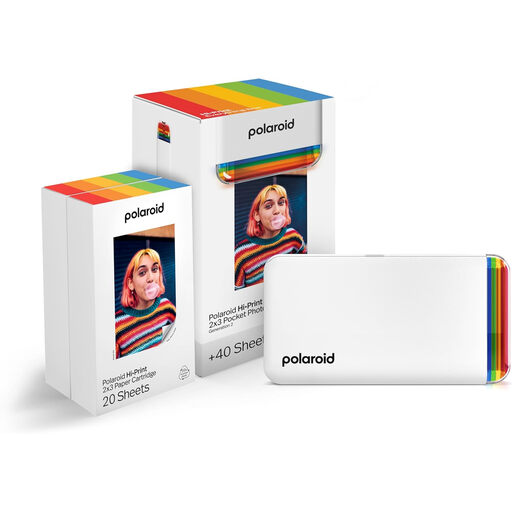
Hi-Print 2x3 suits small, sticky-back elements for notebooks and modular family-photo layouts.
The Sprocket Select is a compact, phone-led option for small sticky prints.
These choices cover a 4 × 6-inch format for larger individual photos and portable formats for smaller collage pieces. Compare the finished print you want before choosing between them.
 No image available
Consider the 4 × 6-inch format when individual family photos need to be prominent in a collage.
This is the white Bluetooth variant. Check the compatible media, bundle contents and support for the device you use to prepare photos.
 No image available
Choose this smaller format for individual collage pieces rather than a prominent main portrait.
The named bundle includes a 40-sheet paper cartridge. Polaroid specifies dedicated Hi-Print 2x3 media; check the exact refill before adding more prints to your layout.
 No image available
Consider a portable printer if you want to make smaller collage pieces and have limited space to store the device.
The product is described as using zero-ink printing. Check its finished print dimensions, compatible paper and device requirements against your intended layout.
Postcard-size prints suit a collage where each family photo needs to stand out. For horizontal group shots, instax by FUJIFILM specifies 99 × 62 mm WIDE prints; Polaroid’s 54 × 86 mm Hi-Print 2x3 sheets suit many smaller sticky-back pieces instead.
Yes, with a model that supports computer printing, but do not assume every portable printer does. Canon lists computer printing for the SELPHY CP1500, while HP Support UK says the Sprocket Select is not compatible with macOS; check the exact model against your computer before buying.
Check your tenancy or licence and your accommodation provider’s written appliance rules before using one. Citizens Advice notes that standards in halls cover electrical safety, but those standards do not establish whether your provider permits a particular printer.