What matters when choosing a photo printer?
Start with where the finished photos will go: a shared album or display calls for a different size from a notebook page. Then check how the group will send images to the printer and whether it can run where the activity takes place.
| Concern |
What to check |
Who this matters to |
| Room for a group photo |
Compare finished image dimensions with paper dimensions. Canon UK lists 100 × 148 mm postcard media for the SELPHY CP1500; Fujifilm lists a 62 × 99 mm image area for instax Link WIDE. |
If several friends need to remain visible in one album or display print, image area comes before pocket size. Around 33% of consumers put larger keepsake output first. |
| Format for personal keepsakes |
Check whether the specified media is adhesive or instant film, its finished image size, and whether paper or film must be bought separately. |
For a memory book, I may want a print I can stick straight onto a page or arrange in a square layout. Around 27% of consumers prioritise that creative format. |
| Access from the group’s devices |
Check supported phones, apps and connection methods, plus how people will take turns sending prints. Canon UK lists Wi-Fi, USB-C and card inputs for the CP1500; HP lists an app-led Bluetooth workflow for Sprocket Select. |
When photos are spread across several phones or a camera card, I need a workable way to collect and print them without holding up the activity. Easy device access is the first concern for around 27% of consumers. |
| Use away from a socket |
Check whether a battery is built in or optional, along with the printer’s size and charging requirements. Canon describes the CP1500 as AC-powered with an optional battery pack. |
If the activity moves between desks or rooms, I need to know whether the printer can come along without a nearby socket. Portability leads the decision for around 13% of consumers. |
Photo-printer brands to consider
These product lines illustrate different print sizes and ways of supplying images; a brand name alone does not establish which format suits the desk.
Canon
Canon’s UK SELPHY CP1500 is relevant when a shared desk needs postcard-size photos as well as smaller supported media formats.
- Canon UK lists 100 × 148 mm postcard media and Wi-Fi, USB-C and compatible card inputs for the CP1500.
- Its maximum stated format is 100 × 148 mm. It uses AC power; the optional battery pack is not included.
Fujifilm instax
The instax Link WIDE and SQUARE lines suit phone-led activities where the instant-film presentation is part of the keepsake.
- Fujifilm lists a 62 × 99 mm image area for Link WIDE and a 62 × 62 mm image area for SQUARE Link.
- The cited printers use separately sold film. Fujifilm states that development takes approximately 90 seconds, varying with ambient temperature.
HP
HP’s Sprocket Select is relevant when small adhesive prints for notebooks matter more than postcard-size photos.
- HP lists ZINK media, a 10-sheet tray, Bluetooth 5.0 and iOS and Android app use for Sprocket Select.
- HP says Sprocket Select is not compatible with macOS; it does not offer the direct memory-card workflow described for Canon’s CP1500.
Joybuy photo printers for shared-desk memories
These models offer small personal prints and a larger 4x6 photo option for a shared school-memory desk. Choose by the intended finished format, then check each model’s connection method, compatible media and box contents.
 No image available
Xiaomi Portable Photo Printer 1S
Consider this portable model for individual school-memory prints rather than a larger group photo.
Its product title describes zero-ink printing. Check the finished print size, compatible replacement media and how the group will take turns printing.
View on Joybuy
 No image available
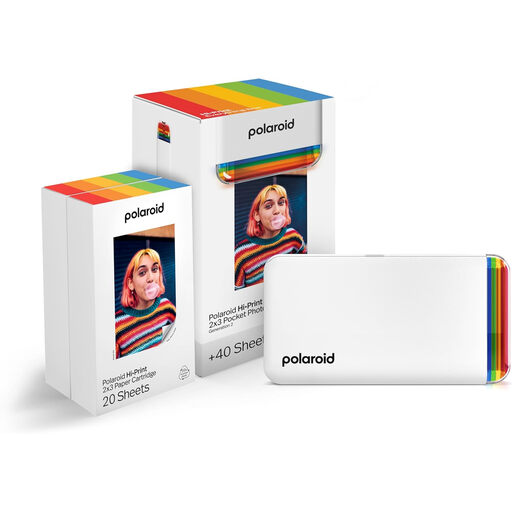
Polaroid Hi-Print 2x3 Gen 2, white, 40-sheet cartridge bundle
The 2x3 format suits individual notebook or scrapbook keepsakes rather than a postcard-size class photo.
The named bundle includes a 40-sheet cartridge. Check compatible replacement cartridges and how participants will share printing access.
View on Joybuy
 No image available
Polaroid Hi-Print Bluetooth 4x6 Photo Printer, white
The 4x6 format is worth considering when the shared desk is making larger album or display keepsakes.
The title specifies Bluetooth printing. Check the compatible paper cartridge, whether one is in the box and how the group will manage print requests.
View on Joybuy
 No image available
Polaroid Hi-Print 2x3 Printer Gen 2, white
This 2x3 model is a choice for small personal keepsakes at the desk, not larger class-photo prints.
Check the finished image dimensions, whether a starter cartridge is included, compatible replacement media and how participants will take turns printing.
View on Joybuy
Questions about shared-desk photo printing
Should we choose postcard, sticker or instant-film prints?
Choose postcard-size output for a larger group keepsake, a small adhesive format for notebook pages, or INSTAX film when its presentation is part of the activity. Canon UK lists 100 × 148 mm postcard media for the SELPHY CP1500; Fujifilm lists 62 × 99 mm images for Link WIDE and 62 × 62 mm images for SQUARE Link. Compare the image area you will actually get, not just the printer’s size.
Can everyone print from their own phone?
Check the particular printer and each phone before planning on that workflow. HP’s Sprocket Select and the cited Fujifilm Link models use phone-led app connections, while Canon’s SELPHY CP1500 also offers Wi-Fi, USB-C and compatible card inputs. Agree who will send each print, rather than assuming several people can print simultaneously.
Which paper, cartridges or film will we need?
Buy consumables specified for the exact printer model, and check what the chosen bundle includes. Canon lists compatible paper and cartridge combinations for the CP1500, HP specifies ZINK paper for Sprocket Select, and Fujifilm says film for the cited INSTAX Link printers is sold separately. Do not assume media can be shared between these systems.
What should we do with an unwanted photo printer?
Use an appropriate electrical-recycling route rather than putting the printer in general waste. UK waste electrical and electronic equipment guidance addresses recovery, reuse and recycling; check your local authority or an appropriate retailer scheme for the available route and any battery-handling instructions.


