Choose a compact postcard-size printer if school photos are mainly going into conventional albums or frames; Canon’s SELPHY CP1500, for example, produces 100 × 148 mm prints, but needs mains power and compatible media. If putting the printer away matters more than print size, consider a portable small-format printer; an A4 photo inkjet makes more sense when photos are only part of broader, regular home printing.
Who is each format for?
School-memory album makers
If school events, trips and performances end up in albums or frames, start with the print size those spaces require. Canon’s SELPHY CP1500 supports 100 × 148 mm postcard prints, provided you have room to use a mains-powered printer.
Cramped-desk scrapbookers
If the desk has to be cleared for homework, a printer you can put away and small, sticker-backed prints may suit journals or memory books better than postcard prints. Canon’s battery-powered SELPHY QX20 is one example of that format.
Shareable instant-print fans
If you mainly want physical phone photos to hand out or display, choose the instax film format before choosing a printer. Fujifilm instax offers mini, SQUARE and WIDE formats, and a printer for one film family cannot make prints on another.
What matters when choosing?
Decide where the finished school photos will go, then check the printer’s space requirements while it is being used—not just its stored size.
| Concern |
What to check |
Who this matters to |
| Album-sized keepsakes |
Check the finished print size against your albums or frames, and confirm which media and cassette that size needs. |
For school-event photos going into ordinary albums or frames, a mini print may be too small for the intended space; around 31% of consumers put conventional keepsake prints first. |
| Desk space and storage |
Compare body dimensions with the space needed for loaded paper, print exit and power or charging. |
If homework uses the same desk, being able to put the printer away between sessions is the main need; around 31% of consumers prioritise easy storage. |
| Scrapbook prints |
Confirm whether the chosen media is sticker-backed and whether its finished size suits your pages. |
For journals and memory books, small photos that can be attached to a page matter more than frame-sized output; roughly 25% of consumers put creative sticker use first. |
| Broader A4 printing |
Check the room available for an A4 printer and whether you need scanning or copying as well as photos. |
When school photos are only part of regular household printing, project sheets and scans may drive the choice; around 13% of consumers prioritise broader A4 use. |
Buying mistakes to avoid
-
Choosing by printer size alone
A printer that stores easily may make only mini or card-size photos, which may not fit the album or frame you had in mind.
Choose the finished print format first, then compare the size and working space of printers that produce it.
-
Overlooking replacement media
Dedicated photo printers use model-specific paper, cartridges, film or ZINK media. The format you choose determines which supplies you will need repeatedly.
Check that replacement media matches the exact printer and print size, and compare the stated number of prints per pack.
-
Assuming every compact printer works with a computer
Connections differ by model. HP specifies that the Sprocket Select is not compatible with macOS, while Canon lists computer-printing options for the SELPHY CP1500.
Check support for the phone, computer, camera or memory card you actually plan to print from.
-
Putting an unwanted printer or battery in household rubbish
GOV.UK advises that unwanted electrical products and batteries should not go in household rubbish.
Use an appropriate electrical-waste collection point and follow its instructions for any removable battery.
Brands to consider
Canon
Canon’s SELPHY range includes postcard-size CP models and smaller, battery-powered QX models.
- The SELPHY CP1500 supports 100 × 148 mm postcard prints and smaller media; the QX20 offers two sticker-backed formats.
- The models use different consumables, and some CP1500 print sizes require an additional cassette. Check the exact format before choosing supplies.
Fujifilm instax
instax smartphone printers are an option for shareable instant-film photos.
- The mini, SQUARE and WIDE film families offer different physical print formats.
- Film formats are printer-specific: choose the size you want before comparing app features.
Epson
The EcoTank ET-8500 is relevant when school photos sit alongside wider A4 household printing.
- Epson describes the ET-8500 as an A4 photo printer with scanning, copying and a six-colour refillable ink system.
- Its multifunction design calls for more permanent desk space than a small dedicated photo printer.
HP
The Sprocket Select is a small, phone-led ZINK photo-printer option.
- HP lists Bluetooth printing and body dimensions of 88.0 × 130.4 × 17.5 mm for the Sprocket Select.
- HP specifies that this model is not compatible with macOS; check your intended printing device before choosing it.
Joybuy photo printers for school memories
These choices include portable small-format printers and a 4x6 model. Match the finished print format to your album, frame or scrapbook before deciding how much desk space to reserve.
 No image available
Xiaomi Portable Photo Printer 1S
Consider this portable model if you need to clear the desk between uses and want small photos for a memory book. Its name specifies Zero-Ink printing; check the finished print size and compatible media against the keepsakes you plan to make.
View on Joybuy
 No image available
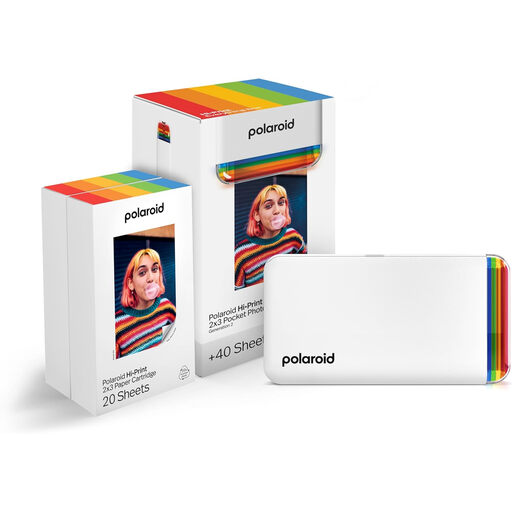
Polaroid Hi-Print 2x3 Gen 2 White bundle with 40-sheet paper cartridge
Consider the 2x3 format for school-memory journals rather than a conventional photo frame. This White bundle names a 40-sheet paper cartridge; check its finished print size and the compatible replacement cartridge before choosing it.
View on Joybuy
 No image available
Polaroid Hi-Print Bluetooth 4x6 Photo Printer, White
Consider this 4x6 model if school photos are intended for a conventional album or frame and you can reserve space for printing. Bluetooth is specified in its name; confirm the working clearance and compatible paper cartridge before buying.
View on Joybuy
 No image available
Polaroid Hi-Print 2x3 Printer Gen 2, White
Consider this 2x3 model if a small school-memory print suits your journal better than a framed photograph. Check the finished print dimensions, storage fit and required paper-cartridge type before choosing it.
View on Joybuy
Frequently asked questions
What print size should I choose for school memories?
Choose 100 × 148 mm postcard prints for conventional albums and frames, or smaller prints if you mainly make journals and scrapbooks. If you prefer instax film, choose between mini, SQUARE and WIDE by the space you want the finished photo to fill; each format needs a compatible printer.
Can I print school photos directly from my phone?
Yes, with a compatible model and phone: Canon lists iOS and Android printing via Wi-Fi and the SELPHY Photo Layout app for the CP1500, while it describes the QX20 as Wi-Fi connected. Fujifilm says its instax smartphone printers use an app and Bluetooth. Check the current app and operating-system requirements for the exact printer you choose.
What should I do with an unwanted photo printer or battery in the UK?
Keep unwanted electrical products and batteries out of household rubbish, as GOV.UK advises. Use an appropriate recycling collection point and follow its instructions for removable batteries.


