Small-desk diary makers
You want to clear the desk after a short session without giving up small photos that leave space for captions. Canon UK lists the compact SELPHY QX20 as a battery-powered option.


Choose a small, battery-powered sticker printer such as the Canon SELPHY QX20 if you need to put it away between diary sessions and leave room to write beside each photo. A postcard-capable printer such as the Canon SELPHY CP1500 suits larger pages, while an INSTAX printer suits a diary designed around its fixed film format. Check the space needed while printing, not just the printer’s stored size, and make sure the media and phone app fit your plans.
You want to clear the desk after a short session without giving up small photos that leave space for captions. Canon UK lists the compact SELPHY QX20 as a battery-powered option.
You expect to print regularly and have diary pages large enough for postcard-size photos. Canon UK Store lists a 108-print, 100 × 148 mm media pack for compatible SELPHY printers.
You want the INSTAX film format to shape the diary’s appearance and are prepared to arrange each page around the size chosen. Fujifilm’s UK guidance distinguishes mini, SQUARE and WIDE formats.
Choose when: A printer you can put away and small photos with room for captions matter most.
Trade-off: The Canon SELPHY QX20 uses its own small-format media rather than postcard-size paper.
Choose when: Your diary has room for larger photos and you plan to print regularly.
Trade-off: Check the Canon SELPHY CP1500’s power setup and the space needed for its paper cassette and output.
Choose when: A mini, SQUARE or WIDE instant-film layout is central to the diary.
Trade-off: The printer’s film format is fixed, so choose the page layout before the device.
| Concern | What to check | Who this matters to |
|---|---|---|
| Storage and small prints | Measure both storage and working space; check the print size and whether the printer needs mains power. | If I clear my desk after each entry, I need a printer I can put away and photos that leave room for writing. Around 42% of consumers put compact storage and diary-scale prints first. |
| Regular printing | Check compatible media-pack print counts and whether the photo size fits your diary pages. | For frequent entries, I want a print size that works on larger pages without changing media packs too often; around 33% of consumers prioritise regular printing and larger photos. |
| Instant-film layout | Mock up a page using the chosen INSTAX format: mini 54 × 85 mm, SQUARE 86 × 72 mm or WIDE 108 × 85 mm, as listed by Fujifilm UK. | When the film look defines my diary, I need to arrange writing around that fixed format. For around 25% of consumers, instant-film presentation comes first. |
A printer that fits in a drawer may still need more room during printing for media loading, output and the diary itself.
Measure the temporary working area as well as the storage space, and check whether published dimensions include any trays.
Small photo printers use model-specific paper, film or combined ink-and-paper sets; a media pack for one format should not be assumed to fit another.
Check the exact printer compatibility, print dimensions and stated print count of the media you intend to use.
Fujifilm UK lists different fixed print sizes for INSTAX mini, SQUARE and WIDE. The format determines how much diary space remains for writing.
Make a paper mock-up at the relevant size before committing to a printer and film format.
Phone-based printing still depends on the printer’s connection method and a compatible app.
Check current app compatibility for your phone and operating-system version before choosing a printer.
Canon’s SELPHY QX20 and CP1500 represent different diary-printing formats: small sticker media or larger postcard-capable output.
INSTAX printers suit diary layouts built around mini, SQUARE or WIDE instant-film prints.
The Sprocket Select is a compact, phone-connected option for sticky-backed photos.
These choices cover small portable prints and a larger 4 × 6-inch format. Compare their print sizes with your diary page, then check the space each printer needs in use.
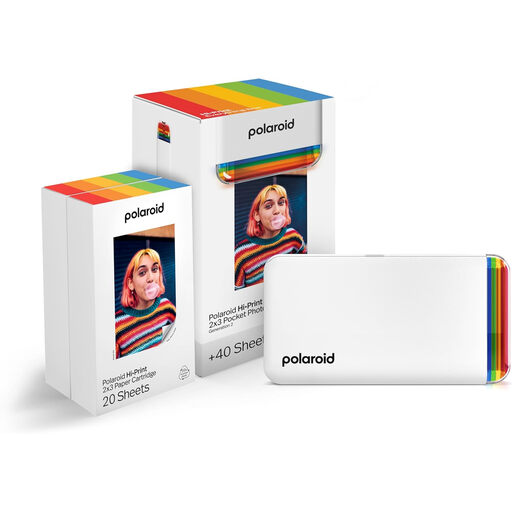 No image available
Consider this bundle for small photos to add to diary pages. Check its working clearance and phone compatibility against your setup.
The bundle includes a 40-sheet paper cartridge.
 No image available
Consider this portable printer for small diary entries. Check that its photo-paper format fits your pages and that the Xiaomi Home App supports your intended phone.
 No image available
Consider the larger print format if your diary pages have room for it. Measure the space needed to load and output photos, and check phone compatibility.
The product name specifies Bluetooth and a 4 × 6-inch print format.
Choose a size that leaves the amount of writing space you need on each page. Canon’s 54 × 85 mm QX20 card media and Fujifilm’s 54 × 85 mm INSTAX mini format suit small entries, while 100 × 148 mm postcard prints need a larger page; measure the usable area before settling on a system.
Not for models designed to print from a compatible smartphone. Canon specifies app-based Wi-Fi phone printing for the SELPHY QX20, while Fujifilm describes Bluetooth phone printing for INSTAX SQUARE Link; check the relevant app against your phone before buying.
Check your local authority’s electrical recycling options or a retailer take-back route rather than putting the printer straight into general household waste. GOV.UK says the UK’s waste electrical and electronic equipment rules aim to reduce electrical waste sent to landfill.