Who each format suits

Postcard-print woodland photographers

If a pinboard, album or small frame is where your woodland photographs will go, postcard output may be enough. Canon’s SELPHY CP1500, for example, supports 100 × 148 mm postcard media without requiring an A4 printer.

Students who print mainly from a phone

If storage space is tight and you want to carry the printer between rooms, a small phone-connected format may suit you. Fujifilm’s instax mini Link 3 has a 62 × 46 mm picture area, so accept a keepsake-sized image rather than a broad landscape print.

Frequent A4 photo-and-study printers

If you regularly want larger woodland prints and also need copying or scanning, an A4 multifunction printer may earn its place on a desk. Epson lists those functions for the EcoTank ET-8500; it is a different commitment from storing a compact photo printer.

What matters when choosing

Compact postcard printer

Choose it when: you want a small photograph to display and postcard size meets your needs.

Accept: postcard output cannot stand in for an A4 landscape print.

Pocket photo printer

Choose it when: carrying the printer and sharing small prints from a phone come first.

Accept: the small picture area leaves less room to appreciate a woodland scene.

A4 photo printer

Choose it when: larger landscape prints and regular desk-based printing both matter.

Accept: you need a suitable permanent place for the printer.

Concern What to check Who this matters to
Print size and detail Decide whether postcard output is large enough for your display plans or whether you need A4; check the supported paper size. If I want branches and the wider woodland composition to hold my attention in a frame, print size comes before portability. Around 40% of consumers put landscape size and detail first.
Storage and phone printing Measure where the printer will be kept and confirm that its connection method and app work with your phone. With little spare desk space, I would rather store a small printer and make quick phone prints, even if the photographs are smaller. Roughly 30% of consumers put space and portability first.
Media and study tasks Check the exact replacement media and its print count; if study tasks matter, check for document, copy and scan functions. When I expect to print regularly, I need to know which supplies I will replace and whether one machine can handle coursework too. About 30% of consumers put supplies and broader use first.

Choices to check carefully

  • Choosing a pocket printer before choosing a print size

    Fujifilm lists a 62 × 46 mm picture area for the instax mini Link 3, while Canon lists 100 × 148 mm postcard media for the SELPHY CP1500. Those formats give a woodland scene very different viewing space.

    Decide where you will display the photograph, then choose a printer that supports the physical size you want.

  • Overlooking model-specific replacement media

    Small photo printers can use different paper, cartridge or film formats. Canon’s XC-20L set, for example, is 54 × 85 mm media specified for the SELPHY QX20, not a general-purpose SELPHY refill.

    Check the complete printer model against the compatible media pack and its stated print count before ordering supplies.

  • Reading manufacturer figures as guarantees

    Canon’s up-to-100-year SELPHY print-life statement depends on its stated test and album-storage conditions. Epson’s up-to-2,300-photo figure for the ET-8500 concerns its included bottles under the manufacturer’s stated conditions.

    Read the conditions attached to a figure, particularly if you plan to display prints outside an album or print on different media.

Relevant brands for reference

Canon

Canon’s SELPHY range includes compact postcard printers and smaller card or sticker formats.

  • Canon lists 100 × 148 mm postcard media, Wi-Fi, USB-C and SD-card printing for the SELPHY CP1500.
  • The CP1500 does not provide A4 output. Canon’s QX20 uses its own smaller, 54 × 85 mm XC-20L media.

Epson

Epson’s EcoTank ET-8500 is an A4 option for someone who also wants study-related printing, copying and scanning.

  • Epson describes the ET-8500 as a six-colour printer with borderless A4 photo output, photo and A4 trays, and Wi-Fi.
  • Its A4 multifunction role is most relevant when you can give the printer a stable place and expect to use its additional functions.

Fujifilm

Fujifilm’s instax mini Link 3 serves phone-connected instant-film printing and small keepsakes.

  • Fujifilm lists wireless smartphone connection and a 62 × 46 mm picture area for the mini Link 3.
  • That picture area is small for a broad woodland composition, and instax mini film is sold separately.

Joybuy products to consider

These choices include compact phone photo printers and an Epson printer to consider if your plans call for a different print format. Check each model’s supported output and media against the size you want for your woodland photographs.

White Polaroid Hi-Print Bluetooth 4x6 photo printer

Polaroid Hi-Print Bluetooth 4x6 Photo Printer, White

Consider this model if a 4x6 print meets your woodland display plans and you want to print from a phone. Check the compatible cartridge and how many prints it supplies.

View on Joybuy

Epson EcoTank ET-18100 printer

Epson EcoTank ET-18100 Printer

If you are considering a printer for larger woodland photographs, check which photo sizes and papers the ET-18100 supports. Measure the space available for it before choosing a place in the flat.

View on Joybuy
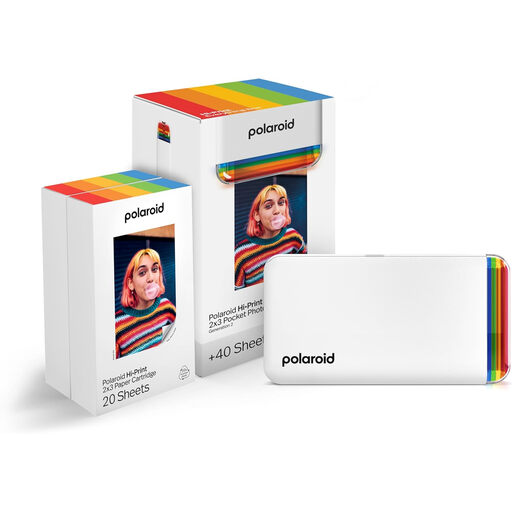
White Polaroid Hi-Print 2x3 Gen 2 printer bundle with 40-sheet paper cartridge

Polaroid Hi-Print 2x3 Gen 2, 40-Sheet Bundle, White

Choose the 2x3 format only if small woodland keepsakes meet your needs rather than a framed landscape print. This bundle includes a 40-sheet paper cartridge; check the compatible replacement cartridge for later use.

View on Joybuy

Xiaomi Portable Photo Printer 1S

Xiaomi Portable Photo Printer 1S, Zero-Ink

Consider this portable model if you want small photos to share rather than a large woodland display print. Confirm its output size, phone-app compatibility and required photo paper before ordering.

View on Joybuy

Frequently asked questions

What print size should I choose for woodland photographs?

Choose postcard size if a pinboard, album or small frame is the destination; Canon lists 100 × 148 mm postcard media for the SELPHY CP1500. If you want a larger landscape display, Epson lists borderless A4 output for the ET-8500. Fujifilm’s 62 × 46 mm instax mini Link 3 picture area is better suited to small keepsakes than to viewing a broad scene.

Can I print woodland photos directly from my phone?

Yes, with a model and app compatible with your phone. Canon specifies phone printing through its SELPHY Photo Layout app over Wi-Fi for the CP1500, while Fujifilm lists a wireless smartphone connection for the instax mini Link 3. Check your phone’s operating system and the relevant app before choosing either model.

Do small photo printers all use the same replacement paper?

No; match replacement media to the complete printer model. Canon’s 54 × 85 mm XC-20L ink and paper set is specified for the SELPHY QX20, so check a pack’s stated compatibility and print count rather than choosing it by size or brand alone.

Can an A4 photo printer handle student documents too?

Some can: Epson lists printing, copying and scanning for the EcoTank ET-8500, alongside A4 and photo-size paper handling. Check the functions of the exact model you intend to buy; an A4 photo format alone does not establish that it can copy or scan.