What matters when choosing?
Decide whether you need to make colour decisions or mainly need to see and sort prints. Then check how the lamp’s position, brightness and mounting method will work at your shared desk.
Specialist print-viewing lamp
Consider it when: You compare prints with proofs, swatches or a calibrated screen and need selectable viewing conditions.
Bear in mind: Calibrite GrafiLite and ILFORD ILFOLUX both state a 5,000 K mode, but a specialist lamp alone does not establish that a home setup meets ISO 3664 viewing conditions.
Compact task lamp
Consider it when: You mainly sort or inspect prints and want to move or clear the lamp after use.
Bear in mind: Daylight Company states that its foldable Twist 2 has a fixed 6,000 K light; its Smart Clip-On Lamp needs a suitable mounting surface and has a stated four-hour battery life.
Monitor-mounted light bar
Consider it when: You review prints immediately in front of a monitor and want to keep the desk surface clear.
Bear in mind: A light bar depends on monitor compatibility and is less flexible when you review photographs away from the screen.
| Concern | What to check | Who this matters to |
|---|
| Print colour |
Check the exact model’s stated colour rendering and available colour temperatures. For proofing, consider whether it has a 5,000 K viewing mode. |
If I compare prints with a reference, I need a viewing condition I can reproduce before deciding whether the colours match. Around 29% of consumers put print colour first. |
| Shared-room light |
Check dimming and whether the head or arm can direct light onto the prints and away from the other occupant. |
When another person is resting nearby, I want enough light to inspect a photograph without shining it towards them. That is the primary concern for around 36% of consumers. |
| Desk space |
Measure the desk and intended mounting point; check the folded size, clip fit or battery runtime as appropriate. |
If I need to clear the desk after sorting prints, storage or secure mounting matters more to me than a permanent lamp position. Around 21% of consumers prioritise that flexibility. |
| Screen-and-print work |
For a monitor bar, check monitor fit and whether its stated coverage reaches the place where you lay the print. |
When I move between an image on screen and a print on the desk, I need the paper lit in its working position. Around 14% of consumers make that combined workflow their first priority. |
Relevant brands to consider
These brands provide different lamp designs relevant to this task; their specifications apply to the named models, not to every product they make.
Calibrite
GrafiLite is positioned by Calibrite for desktop print and colour assessment.
- Calibrite states 95+ CRI, 2,700 K, 4,000 K and 5,000 K settings, three illumination intensities and an A4 neutral-grey viewing mat.
- Those lamp features do not, on their own, establish that a complete home viewing setup conforms to ISO 3664.
ILFORD
ILFOLUX is a print-viewing option for comparing photographs and screen images.
- ILFORD states approximately 95 CRI, dimming, adjustable positioning and 3,000 K, 4,000 K, 5,000 K and 6,500 K modes.
- Before buying, confirm the retailer, warranty and power arrangement for the product offered to you.
Daylight Company
Its named foldable and clip-on lamps offer task-light formats for desks with limited space.
- Daylight Company states 95+ CRI for both Twist 2 and its Smart Clip-On Lamp. Twist 2 folds away; the clip-on model has a flexible arm and three brightness levels.
- Twist 2 has a stated fixed 6,000 K setting. The Smart Clip-On Lamp needs a suitable clamp point and has a stated four-hour battery life.
BenQ
ScreenBar Halo mounts on a monitor for work carried out directly in front of the screen.
- BenQ states Ra≥95 and a 63 cm × 40 cm lighting area at 500 lux for ScreenBar Halo.
- Check monitor thickness and curvature compatibility; the mount does not suit a paper-only desk without a monitor.
Anglepoise
The compact, dimmable 90 Mini Mini may suit a desk where physical fit takes priority over colour-critical assessment.
- Anglepoise states an integrated dimmable LED for this model.
- Its published CRI is 86 and R9 is 38; check whether those stated figures meet your needs before relying on it to judge print colour.
Joybuy options for a shared desk
These foldable, clip-on and compact lamps offer ways to light prints at a shared desk. If accurate colour assessment is your main task, check each exact model’s colour-rendering and colour-temperature specifications before choosing it for that purpose.
 No image available
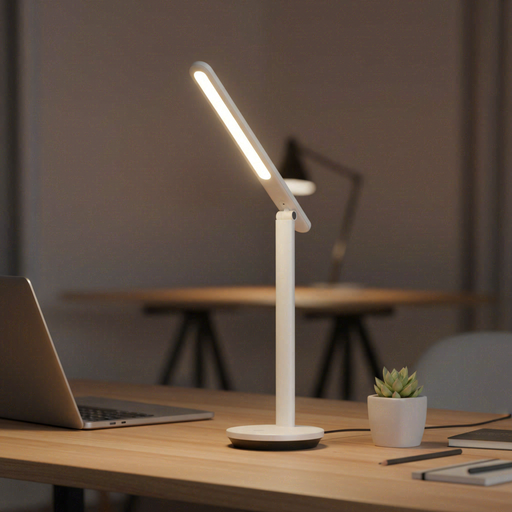
Yeelight LED Folding Desk Lamp Z1 Pro (White)
Consider this foldable lamp if you need to reposition the light over individual prints and clear the desk afterwards.
Its description states an adjustable arm and head, stepless brightness control and rechargeable operation. For colour-critical review, check the model’s CRI and colour temperatures; also confirm that its battery runtime suits your sessions.
View on Joybuy
 No image available
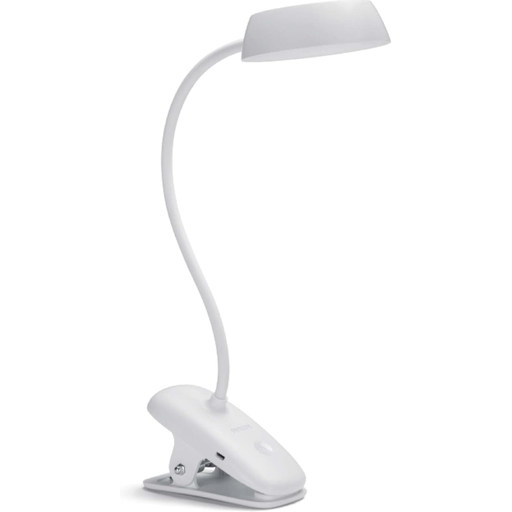
Philips Doughnut Desk Clip USB Rechargeable 3W (White)
Consider the clip-on format if the desk surface is limited and you have a secure place to mount the lamp.
This model states USB-rechargeable operation and stepped dimming. Confirm that the clip fits your intended surface and that the runtime suits your sessions; check model-specific colour-rendering and colour-temperature details before making print-colour decisions. The listing advises use in a dry environment and self-assembly.
View on Joybuy
 No image available
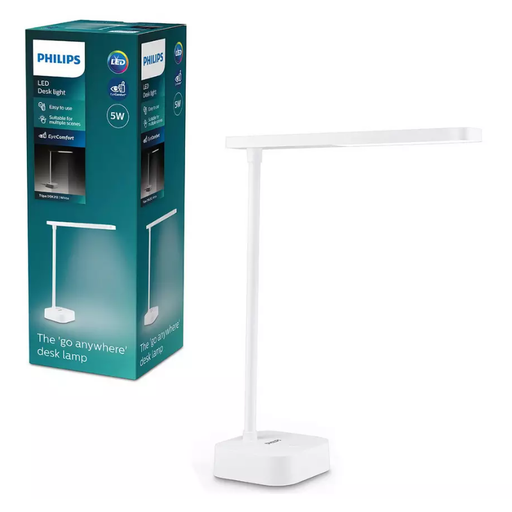
Philips Tilpa LED USB Rechargeable Table Lamp 18W (White)
Consider this compact table lamp if you want adjustable brightness on a small desk or bedside surface.
The listing states three brightness settings and USB-rechargeable operation. Check its colour-rendering and colour-temperature specifications before using it for colour assessment, and confirm the battery runtime. The listing says a USB power adapter is not included.
View on Joybuy
Frequently asked questions
Can an ordinary LED desk lamp be used to judge the colour of prints?
An ordinary desk lamp can serve for casual sorting, but colour-critical decisions call for model-specific colour-rendering and colour-temperature information. The International Organization for Standardization’s ISO 3664:2025 addresses viewing conditions for photographic prints; buying a lamp with a 5,000 K mode does not by itself establish that your bedroom setup meets those conditions.
Why choose more than one colour-temperature setting?
Selectable settings let you compare a print under different lamp conditions instead of only one fixed light. Calibrite states 2,700 K, 4,000 K and 5,000 K modes for GrafiLite, while ILFORD states 3,000 K, 4,000 K, 5,000 K and 6,500 K for ILFOLUX; none of those settings reproduces every real room.
What should I measure for a clip-on or monitor-mounted lamp?
Measure the intended mounting surface and check that it will hold a clip securely. For a monitor bar, check the exact screen’s thickness and curvature against the model’s limits: BenQ lists flat-monitor thicknesses of 0.7–6 cm and curved-monitor thicknesses of 1.6–3.8 cm for ScreenBar Halo.
What does a CE or UKCA mark tell me about a desk lamp?
A product mark does not tell you whether a lamp is suitable for assessing photographic prints. GOV.UK’s March 2026 electrical-equipment marking guidance lists UKCA or CE for Great Britain, and CE or CE with UKNI where applicable for Northern Ireland. Check the marking appropriate to the product and market, then assess its lighting specifications separately.


