What matters when choosing?
Decide whether your main task is inspecting a whole spread with its tools, working within a smaller desk setup, or assessing images for print. The monitor formats below address those priorities differently; none replaces a colour-managed print workflow.
40-inch 5K2K ultrawide
Choose it when: You regularly need a large two-page preview and room for surrounding controls. Dell UK lists the 39.7-inch U4025QW at 5120 × 2160.
Trade-off: Allow room for the larger display and confirm that your computer can drive its native resolution through your intended connection.
34-inch 3440 × 1440 ultrawide
Choose it when: You want a 21:9 spread canvas in a smaller setup. ASUS United Kingdom lists the ProArt PA348CGV as a 34-inch example with documented colour specifications.
Trade-off: Its 3440 × 1440 canvas has fewer pixels than the Dell U4025QW’s 5120 × 2160 canvas, leaving less room for a detailed spread and panels together.
27-inch 4K photo monitor
Choose it when: Maintaining a calibrated, print-oriented display matters more than fitting a whole spread beside your tools. BenQ UK documents hardware calibration for the 16:9 SW272U.
Trade-off: The non-ultrawide format leaves less horizontal room for a double-page layout and its controls.
| Concern |
What to check |
Who this matters to |
| Colour for print |
Check the exact model’s calibration method and stated colour spaces, and obtain the intended printer-and-paper ICC profile for soft-proofing. |
If my album is going to print, I need to assess its colours through a managed preview rather than trust screen appearance alone. Around 33% of consumers would put print-colour confidence first. |
| Spread workspace |
Compare native resolution, screen dimensions and desk space; check the resolution available from your computer. |
I want to see both pages while keeping layout controls accessible, without constantly changing views. For around 45% of consumers, spread workspace would be the primary concern. |
| Laptop connection |
Check the laptop’s video output, the monitor’s input and power delivery, and the cable required for your chosen display mode. |
When I move between laptop and desk, I want the display connection and charging arrangement to work with my equipment. Connection simplicity would come first for around 22% of consumers. |
Joybuy products for spread viewing
These ultrawide options include 49-inch 32:9 screens for broad layouts and a 34-inch 3440 × 1440 screen for a smaller spread-viewing setup. Their format alone does not establish suitability for print-colour decisions; check calibration and computer compatibility for the model you choose.
 No image available
Acer X Predator X49X 49-inch DQHD QD-OLED monitor
Consider its 32:9 format if you want a particularly wide canvas for spreads and adjacent tools. The product name specifies a 49-inch QD-OLED panel, an 1800R curve, DQHD and USB-C; check whether its vertical workspace, calibration options and connection requirements suit your album workflow.
View on Joybuy
 No image available
CRUA 49-inch curved 5120 × 1440 monitor
The 32:9, 5120 × 1440 format is worth considering if horizontal room for a spread matters most. The product name specifies a VA panel, HDMI 2.1 and DisplayPort 1.4; check whether the 1440-pixel vertical resolution, desk fit and calibration options meet your needs.
View on Joybuy
 No image available
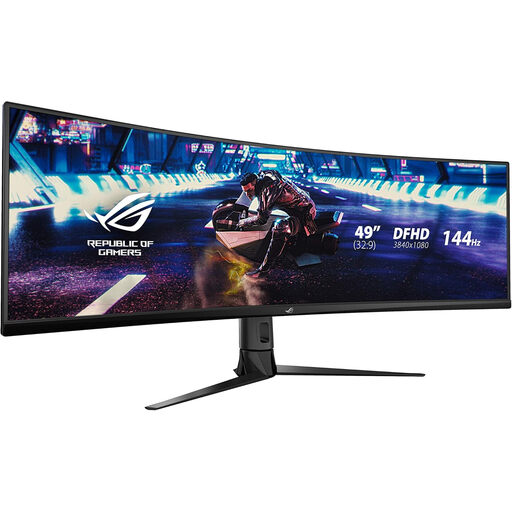
ASUS ROG STRIX XG49VQ DFHD curved monitor
Consider this panoramic format if keeping a broad layout on one screen is your priority. The product name specifies DFHD and 144Hz; check its native vertical resolution against the detail you need for album spreads, and confirm calibration and laptop-connection requirements separately.
View on Joybuy
 No image available
Lepow HC-SJ34MZ5 34-inch curved ultrawide monitor
Its 34-inch, 3440 × 1440 format suits a smaller ultrawide spread-viewing setup. Before using it to judge print colour, check the exact model’s calibration method and colour coverage; also confirm that its connections and stand work with your desk setup.
View on Joybuy
Frequently asked questions
Will an ultrawide screen make album colours match the printed book?
No: screen width helps with layout review, not print matching. Adobe’s Lightroom Classic guidance recommends soft-proofing with the ICC profile for the intended printer and paper so you can assess output-colour limitations before printing.
Is 3440 × 1440 or 5120 × 2160 more useful for double-page spreads?
A 5120 × 2160 ultrawide gives you more pixels for a spread and surrounding tools if your desk and computer support that setup; a 34-inch 3440 × 1440 ultrawide is the smaller-format choice. Dell UK specifies the former resolution for the U4025QW, while ASUS United Kingdom specifies the latter for the PA348CGV.
Can any USB-C laptop run an ultrawide at native resolution and charge through it?
No. Check the laptop’s supported external-display mode, the monitor’s video input and power delivery, and the required cable as a set. A USB-C connector alone does not confirm the video resolution or charging available in your setup.
What if a monitor bought from a UK trader is faulty?
Goods supplied by a trader must meet the satisfactory-quality requirement in the UK Consumer Rights Act 2015. Depending on the fault and circumstances, statutory remedies can include repair or replacement; these rights are distinct from a retailer’s change-of-mind returns policy.
What should I do with an old monitor?
Ask your retailer or local authority about an appropriate electrical-equipment collection or recycling route. GOV.UK describes the UK waste-electrical-equipment framework as supporting recovery, reuse and recycling; confirm which take-back service is available for your monitor before relying on it.


