Buying priorities
Start by deciding what must be recoverable, then check capacity, device compatibility and whether you need shared access rather than a direct-attached drive.
| Priority |
What to check |
Your needs |
| Separate copies |
Choose a destination separate from the computer or phone; decide whether it can be disconnected when not backing up; test restoring a small sample of files. |
I want important photos and records to remain available if I lose access to the main device. The National Cyber Security Centre advises storing a backup in a separate safe location. |
| Capacity and growth |
Measure the folders, videos and device backups you plan to protect; allow room for expected growth; check whether version history will use additional space. |
My backup needs to cover more than today’s visible photo folder, including documents, videos or whole-device backups where needed. |
| Device compatibility |
Check the physical connector, supplied cable, USB version and direct-versus-hub connection; confirm the required Windows and macOS read/write format before use. |
I need to move files between the devices that create and manage them without discovering an incompatible port or read-only format. Western Digital Support notes that formatting erases existing contents. |
| Shared access and upkeep |
For NAS, include compatible internal SATA drives, Ethernet, power and initial software setup; retain another backup destination even if the NAS uses RAID or snapshots. |
Several people or devices may need one central library, but I should choose a NAS only if shared access is worth the setup and ongoing administration. |
Joybuy product options
These Joybuy options cover portable external storage, a NAS for shared household access and USB flash storage for limited supplementary copies of photos and digital records.
 No image available
Samsung T7 Shield Portable SSD 1 TB
A direct-attached option for carrying photo and record copies between compatible personal devices.
Stated 1TB capacity, USB Type-C 3.2 Gen 2, USB-C-to-C and USB-C-to-A cables, and stated sequential speeds of up to 1,050/1,000 MB/s.
Check that 1TB covers the files, growth and any version history you need, and confirm the supplied file system for cross-platform read/write use. Keep another appropriately separate copy for important files.
Joybuy
 No image available
Western Digital My Passport Portable External Hard Drive 2TB Black
Suitable for scheduled local copying from a main computer where a portable direct-attached drive fits the routine.
Stated 2TB capacity, USB 3.2 Gen 1 connectivity, USB bus power and bundled backup software with configurable schedules.
The stated default format is NTFS, with macOS write access requiring additional compatibility software. Confirm the setup for every intended computer and retain a separate backup destination where appropriate.
Joybuy
 No image available
Western Digital Elements Portable 4TB Black USB 3.0
A larger direct-attached destination for a growing home archive of photos, videos and documents.
Stated 4TB capacity, USB 3.2 Gen 1/USB 3.0 connectivity, plug-and-play operation and an included 5Gbps USB-A cable.
The supplied cable uses USB-A and the drive connector is Micro-B, so check ports and adapter needs. Reformatting may be needed for Mac or other operating systems and deletes existing contents.
Joybuy
 No image available
Synology DS225+ 2-Bay Diskless NAS
A network-storage option for households that want central file access and are ready to administer a separate system.
The listing states a two-bay diskless design, shared file access, automated backup functions, RAID, snapshots and remote access.
Internal drives are required and installed capacity depends on the drives chosen. Confirm network installation, device compatibility and account workflow; RAID and snapshots do not replace another backup destination.
Joybuy
 No image available
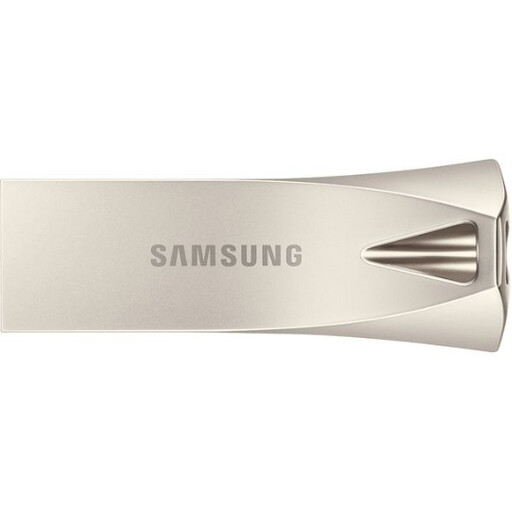
Samsung MUF-512BE3 USB Flash Drive 512 GB
Use this type of removable drive for a selected document set or an additional transport copy rather than a growing main archive.
Stated 512GB capacity, USB Type-A 3.2 Gen 1 interface and up to 400 MB/s read speed.
Check USB-C adapter needs and the supplied file system before relying on it across devices. Its compact format is easy to misplace, so keep it as an additional limited copy.
Joybuy
Frequently asked questions
How much capacity should I buy for photos and digital records?
Measure the folders and device backups you intend to protect, then allow room for foreseeable growth and any backup history you plan to keep. The National Cyber Security Centre notes that a backup can cover selected files or an entire device, so include videos, documents and device backups where relevant.
Can a USB external drive be used by both Windows and macOS?
Yes, if its format and write-access requirements suit both systems. Western Digital Support states that exFAT can be read and written by Windows and macOS, while NTFS mounts read-only on macOS; copy existing data elsewhere before formatting because formatting is destructive.
Does a NAS replace the need for a separate backup?
No. A NAS can centralise files and may provide RAID, snapshots or local versioning, but Synology states that RAID crashes and hard-drive failures can still cause loss. Keep another destination, such as an external drive or appropriately configured cloud backup, and consider an off-site or disconnected copy.
What extra equipment and setup does a NAS require compared with an external drive?
A NAS enclosure generally needs compatible internal SATA drive storage, a network connection, power and operating-system setup. Synology’s DS223j documentation requires at least one SATA drive, warns that installing a drive containing data formats it, and describes LAN connection plus DSM installation.
Can I leave my backup drive connected all the time?
It is convenient for automatic backups, but it can expose the backup to the same incident as the computer. The National Cyber Security Centre reports ransomware incidents affecting connected USB and network storage and advises keeping at least one backup offline or digitally disconnected when not in use.


