What matters when choosing?
Start with the editor you intend to use and the resolution, format and complexity of your footage. Then decide whether editing away from a desk matters more to you than a fixed workspace and room for a growing media library.
| Concern |
What to check |
Who this matters to |
| Editing while travelling |
Compare the laptop and charger you would carry, then check memory, internal SSD space and the connections your media uses. |
If I edit between trips rather than at one desk, I need a computer I can carry without losing space for current projects. Around 29% of consumers would put that portable-editing need first. |
| Footage and export demands |
Identify your footage resolution and codec, typical timeline layers and effects, and export frequency; compare them with your chosen editor's requirements. |
When my projects become more complex, I need the complete configuration to suit the footage I actually edit, not just an appealing processor name. This is the primary concern for roughly 36% of consumers. |
| Photo workflow and display |
Check the selected panel's specifications and your photo app's memory and graphics requirements. Adobe recommends 16GB or more memory for Lightroom Classic. |
If I make colour-sensitive photo edits or use graphics-dependent tools, I need to assess the exact screen and application requirements. About 21% of consumers would prioritise that photo-editing need. |
| Storage and desk setup |
Allow internal space for active projects and check how you will store and back up the media library; account for any monitor and input devices a desktop needs. |
If I mostly edit at home and keep a growing library, I would rather plan my workspace and storage than choose primarily for portability. Around 14% of consumers would make that fixed-desk need their first concern. |
Relevant brands to consider
These product lines illustrate different laptop and desktop routes; compare the particular configuration and software support rather than treating a brand name as a specification.
Apple
MacBook Air and MacBook Pro are portable macOS options. Final Cut Pro is relevant if that is your intended editing application.
- Apple lists display and connection features for MacBook Pro that may matter when choosing a creative-work setup.
- Check the exact Mac and macOS version: Apple states that Final Cut Pro requires macOS 14.6 or later, and some features require newer software and Apple silicon.
ASUS
ProArt is ASUS's creator-oriented Windows laptop line.
- ASUS lists ProArt configurations with OLED displays, higher memory and SSD capacities, and dedicated graphics on selected models.
- Those options and ASUS's display claims vary by model; check the selected panel and configuration.
Dell
XPS offers Windows laptop configurations for consumers comparing portability with creator-oriented hardware.
- Dell's Creator Edition guidance recommends a configuration with an Ultra 7 processor, 16GB memory and a 512GB SSD, with discrete graphics recommended for videography or graphic design.
- That is Dell's guidance, not a requirement for every short edit; XPS screen, graphics and connection options vary by configuration.
Lenovo
Yoga Pro represents a portable creator-laptop route, while Lenovo's creator range also includes desktops.
- The laptop and desktop ranges give consumers working mainly at one desk a reason to compare both form factors.
- Check the individual model's display, graphics, memory and storage rather than assuming every Yoga Pro or creator PC has the same features.
Joybuy product choices
These laptops span portable Windows configurations, larger models with dedicated graphics and a MacBook Pro. Compare each one with your editing application and projects; if you work almost entirely at a desk, assess a desktop setup separately.
 No image available
ASUS ProArt P16 H7606WW-SE006W, 16-inch 4K OLED
Consider this configuration if your editing projects call for more memory and graphics options than a straightforward short-clip workflow.
Its listed configuration includes an AMD Ryzen AI 9 HX 370, NVIDIA GeForce RTX 5080 16GB, 64GB RAM, a 2TB SSD, a touchscreen and Windows 11 Home.
For colour-sensitive photo work, check the exact panel specifications rather than relying on the OLED and 4K descriptions alone.
Joybuy
 No image available
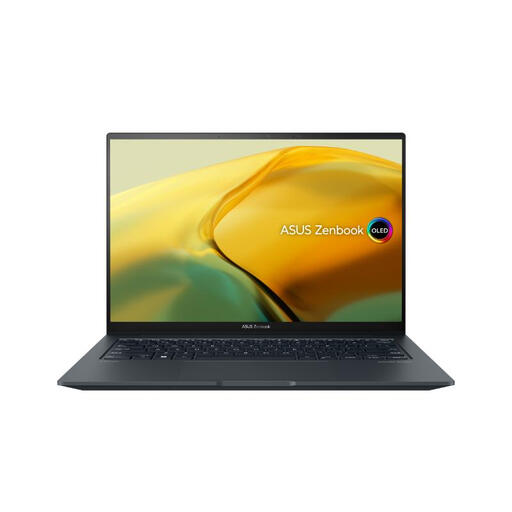
ASUS ZenBook UX3404VC-M3130W, 14.5-inch OLED
This is a smaller-screen Windows option to compare if you edit photos and short videos while travelling.
The title lists an Intel Core i9, 16GB RAM, a 1TB SSD, RTX 3050 graphics, a 2.8K OLED touchscreen and Windows 11 Home.
Check the panel specifications if colour accuracy matters, and assess unplugged use against your travel routine.
Joybuy
 No image available
Lenovo LOQ Essential 15ARP11, 15.6-inch FHD
Compare this Windows laptop if you want dedicated graphics and internal storage for active photo and video projects, while checking that its gaming-oriented configuration suits your editor.
The title lists an AMD Ryzen 7 170, 16GB RAM, a 1TB SSD, GeForce RTX 5050 graphics and a 144Hz FHD display.
Check the complete screen specification for colour-sensitive work and consider the laptop and charger together if you will travel with them.
Joybuy
 No image available
HP OMEN 17-db1000na, 17-inch Full HD
This larger-screen laptop is worth comparing if you usually edit near a workspace but still need a computer you can move.
Its title specifies an AMD Ryzen AI 7 350, 16GB RAM, a 1TB SSD, RTX 5060 graphics and Windows 11 Home.
Consider whether a 17-inch format suits your travel needs, and check the panel specification if your photo work is colour-sensitive.
Joybuy
 No image available
Apple MacBook Pro 14.2-inch M5 Pro, 24GB/2TB, Silver
Consider this Mac route if your chosen editing applications and required features support the device and its installed macOS version.
The title specifies an M5 Pro with a 15-core CPU and 16-core GPU, 24GB unified memory and a 2TB SSD.
If portability is decisive, check the product's weight alongside your other options.
Joybuy
Frequently asked questions
Is 8GB RAM enough for simple photo edits and short videos?
It meets the stated minimum for some applications, but check the recommendation for the software you will use before choosing a computer. Apple lists 8GB as the Final Cut Pro minimum and recommends 16GB; Adobe recommends 16GB or more for Lightroom Classic. Your footage and other open applications also affect the configuration you need.
Do short travel videos require dedicated graphics?
Dedicated graphics are not an automatic requirement for every short edit. Check your editor's requirements and the resolution, effects and complexity of your projects; Dell recommends discrete graphics for videography in its Creator Edition guidance, which is a reason to compare those configurations for more demanding work rather than a universal minimum.
What should I check on a refurbished Windows laptop?
Check its exact processor, memory, SSD, battery and charger, then confirm Windows 11 eligibility and compatibility with your intended editor. Microsoft states that Windows 10 support ended on 14 October 2025 and does not recommend installing Windows 11 on unsupported hardware.
When does a desktop make more sense than a laptop?
Compare a desktop if you normally edit at one desk and have little need to carry the computer. Plan the complete setup, including a monitor, input devices, working storage and backups; a desktop will not replace a laptop for editing while travelling.
Can a refurbished Mac run current Final Cut Pro?
It can only do so if the exact Mac supports a suitable macOS version and meets the application's requirements. Apple specifies macOS 14.6 or later and at least 8GB memory for Final Cut Pro, recommends 16GB, and notes that some features require macOS Sequoia and Apple silicon.


