
24/7 Customer Support

Free returns

Same-day & Next-day Delivery

Quality Guaranteed

Unlock Your Welcome Offers: FREE Delivery | Up to 80% OFF | Free 30-day JoyPlus trial
Download the APP
Whether you create travel videos, livestream from home or capture action footage outdoors, the right camera and smartphone photography accessories can improve stability, sound, lighting and portability. The challenge is separating useful specifications from impressive-sounding features that may not suit your equipment or shooting conditions.
Before buying a smartphone tripod, phone gimbal stabiliser or camera light, check how it fits your existing setup. An affordable accessory that is incompatible, unstable or difficult to carry can quickly become wasted money.
“Universal” often refers only to a broad phone size range or a standard mounting interface. A magnetic phone tripod may require a compatible magnetic case or ring, while a camera accessory may use a 1/4-inch screw, cold shoe or a manufacturer-specific expansion interface.
For DJI Osmo Pocket 3 accessories, confirm that the mount is designed for the correct camera connection. The same applies to GoPro accessories: a standard action-camera mounting interface does not automatically mean every clamp or attachment is suitable for every activity.
A selfie stick that extends close to two metres can be useful for group shots, but the higher it extends, the more sensitive it becomes to wind and movement. Lightweight tripods may also be unsuitable for heavy cameras, larger phones or accessories such as a microphone and LED light.
Check the product’s dimensions, weight and recommended load. When using a smartphone tripod outdoors in the UK, allow for uneven pavements, grass and gusty weather rather than relying solely on the advertised maximum height.
Wireless microphones, remote shutters, phone gimbals and video lights all require charging or battery replacement. A product with a long stated runtime may still need regular charging if used for livestreaming or frequent recording.
Also check whether the accessory is water-resistant, splash-resistant or not waterproof. These descriptions are not interchangeable. Magnetic mounts, lithium-battery devices and small detachable parts should be kept away from children, moisture and excessive heat, following the supplied safety instructions.
Start with the connection between the accessory and your device:
For static filming, a small tabletop tripod may be sufficient. For standing presentations, choose a tripod with stable legs and a suitable working height. The Ulanzi MT-79 extends to 81 inches and uses a 1/4-inch screw, making it more appropriate for setups requiring extra height, such as a camera, phone or light stand.
A Bluetooth selfie stick with a built-in tripod is convenient for travel, but place it on a flat surface and make sure all three legs are stable before recording. Do not extend a telescopic pole beyond its stated limit.
Viewers often notice poor audio and uneven lighting before they notice small image-quality differences. For a wireless microphone, check:
For lighting, look at colour temperature, brightness adjustment, battery capacity and mounting options. A high colour-rendering rating can be useful for more natural-looking subjects, while RGB modes are suited to creative background lighting. Do not point LED panels directly into anyone’s eyes, and allow ventilation while charging or operating.
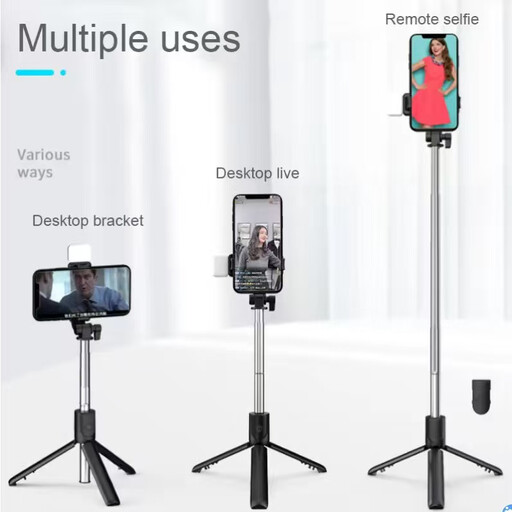
Why This Fits Their Persona: A straightforward option for new vloggers, students and casual travellers who want one compact phone holder for horizontal and vertical shooting.
Its listed 100cm extension is more manageable than an ultra-tall pole, while the instructions emphasise securing the phone and stabilising the tripod legs.
Bluetooth remote control, tripod function, fill light and 200g listed weight.
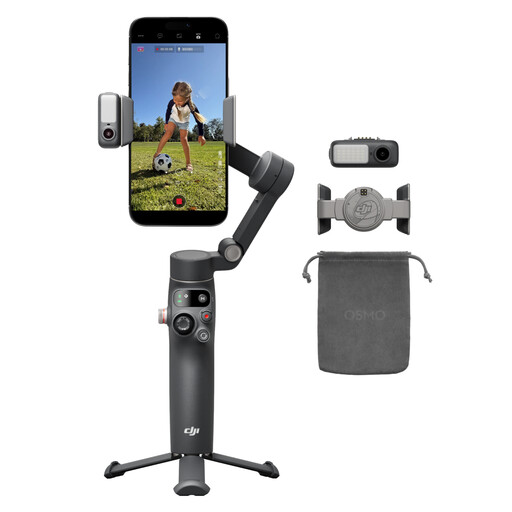
Why This Fits Their Persona: Suited to smartphone filmmakers and creators who want integrated movement control, tracking, lighting and hands-free filming in one device.
It combines a magnetic phone clamp, built-in extension rod and tripod, reducing the need to buy several separate mounting accessories.
3-axis stabilisation, 360° pan rotation, native tracking and a listed 10-hour battery.
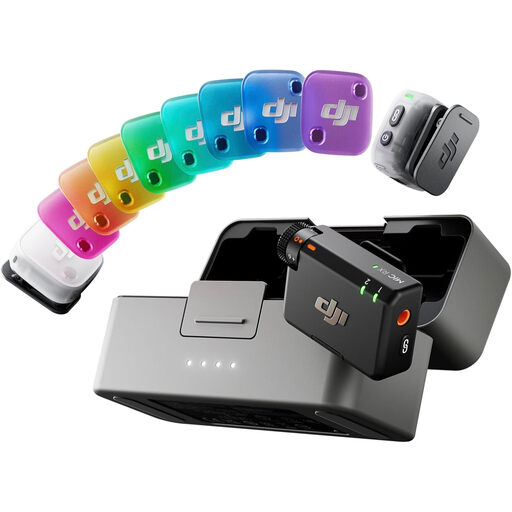
Why This Fits Their Persona: A practical match for interviews, two-person vlogs, livestreams and creators who record in changing indoor and outdoor environments.
The set includes two transmitters and one receiver, so buyers can plan for multiple speakers instead of adding transmitters later.
11g transmitters, two-level noise cancelling, auto limiting and a charging-case runtime listed at up to 48 hours.
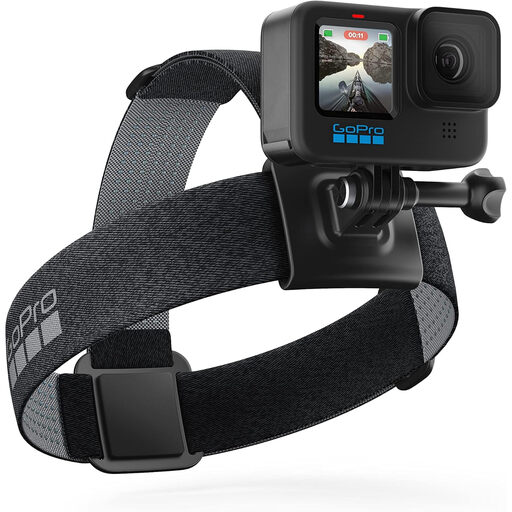
Why This Fits Their Persona: Designed for action-camera users heading skiing, cycling, waterside trips or family adventures who need several mounting methods in one case.
The compact carrying case keeps the mounting components together, while the floating hand grip provides a specific option for water-based filming.
Includes The Handler, Head Strap 2.0 and compact case; listed product weight is 240g.
For DJI Osmo Pocket 3 owners, a mounting expander such as the TILTA Accessory Mounting Expander or Ulanzi PM01 Magnetic Expansion Holder can add mounting flexibility. Always check that the camera is correctly seated and the locking mechanism is engaged.
A protective Ulanzi PK-04 carrying bag helps keep a Pocket 3 and compatible accessories organised during commuting or travel. For lighting, consider the Ulanzi VL120 RGB Video Light or the compact Ulanzi VL81 camera light. Check charging requirements and keep these lights dry and ventilated.
We have compiled a complete, real-time list of products that fully satisfy these strict selection criteria and UK safety regulations.
Start with a stable phone holder or tripod, then add audio and lighting according to your content. A Bluetooth selfie stick tripod can support simple travel videos, while a wireless microphone is more useful if spoken audio is central to your videos.
It depends on the phone, case and movement involved. Magnetic holders can be convenient for static filming, but follow the product guidance and use additional support during vibration, sports or windy conditions. Keep credit cards and other magnet-sensitive data carriers away from the mount.