Choose a compact photo printer if you mainly want individual 6×4 food photographs for albums, frames or small displays. Choose an A4 photo inkjet when photographs need to sit alongside recipes or menu text, or when you need more flexibility over page size and media; pocket printers are for much smaller prints and stickers, not substitutes for either format.
Who is printing food photographs?
The intended use determines whether a food photograph needs room for text, a conventional photo format or a small print to share.
Recipe and menu makers
If photographs must sit beside ingredients, instructions or menu descriptions, start with the required page size and paper type. Epson lists A4 printing and a rear speciality-media feed for its Expression Photo XP-8700; check the intended layout and card against the printer you choose.
Home cooks printing keepsakes
For a single finished-dish photograph to put in an album, frame or recipe binder, a postcard-size printer may be sufficient. Canon specifies 100 × 148 mm prints for the SELPHY CP1500, so it is worth deciding whether that fixed format covers most of your photographs.
Food-content creators on the move
Small phone-led prints can serve as journal inserts, labels or handouts at a tasting or event. Check the actual media dimensions before choosing one: portable sticker formats do not provide an A4 recipe page or a standard 6×4 photograph.
What matters when choosing?
Settle the finished print size first, then check the media system, printing workflow and refills for that format. The concerns below distinguish consumers by the need they would put first when printing food photographs.
| Concern |
What to check |
Who this matters to |
| Print size and layout |
Check the largest supported paper size and whether the feed accepts the paper or card required for your layout. |
If I am putting dish photographs beside ingredients and instructions, I need space to arrange both without squeezing everything into a snapshot format. Around 40% of consumers would put layout flexibility first. |
| 6×4 photo finish |
Confirm the exact print dimensions, compatible media and any conditions attached to finish or longevity claims. |
For an album or a framed photograph of a finished dish, I want a conventional photo size and a finish that suits handling. Around 30% of consumers would make that their primary concern. |
| Portable prints and stickers |
Check media dimensions, whether the paper is adhesive and which phone and app the printer requires. |
At a tasting or while filling a food journal, I would rather make a small print on the spot than carry full-size pages. For around 20% of consumers, portability and small-format printing come first. |
| Compatible refills |
Identify the exact paper, cartridge or ink system for the model and the print size you plan to use. |
If I print food photographs regularly, I want to know which supplies keep my chosen format usable. Refill planning would be the leading concern for around 10% of consumers. |
Mistakes to avoid
-
Choosing a sticker printer for full-page recipes
Pocket printers use much smaller media. Canon specifies 72 × 85 mm and 54 × 85 mm sticker formats for the SELPHY QX20; neither is an A4 page or a standard 6×4 print.
Choose the finished paper size before comparing portable models. Look at A4-capable printers for recipe or menu pages, postcard formats for standalone photographs and pocket formats for small inserts.
-
Overlooking the refill system
A printer and its compatible photo paper, ink or cartridge form a system. For example, Canon specifies that its KP-36IP pack includes colour ink and 36 postcard-size sheets for the SELPHY CP1500; an A4 inkjet uses a different combination of ink and paper.
Check the precise supplies for the model and print size you want, including whether a particular paper cartridge or cassette is required.
-
Confusing photographs of food with edible images
A photograph printed on photo paper is not an image intended to go onto a cake or another food. Ordinary photo paper and printer ink should not be repurposed for that use.
If the image will touch food, assess an edible-printing system and any applicable food-business requirements separately.
-
Treating print-longevity claims as guarantees
Canon's longevity statement for the SELPHY CP1500 depends on specified testing and album-storage conditions. It does not establish the same result for every place a print might be displayed.
Consider where photographs will be stored or handled, and retain digital originals if you may need another copy.
Relevant brands for reference
These examples illustrate different printer formats, not a judgement about every printer made by each brand.
Canon
Canon's SELPHY CP1500 represents postcard-size dye-sublimation printing, while the SELPHY QX20 uses smaller portable sticker media.
- Canon specifies 100 × 148 mm prints and Wi-Fi, USB-C and compatible memory-card printing for the CP1500. The QX20 offers 72 × 85 mm and 54 × 85 mm media.
- Neither model is an A4 recipe-page printer. Treat Canon's durability and longevity statements as claims subject to its stated conditions.
Epson
Epson's Expression Photo XP-8700 is an example of the A4 home photo-inkjet route.
- Epson specifies six-colour Claria Photo HD inks, photo-paper handling and a rear speciality-media feed for thicker card on the XP-8700.
- An A4 setup calls for separate choices about ink and paper; check the intended media and workspace rather than assuming it offers the convenience of a compact snapshot printer.
HP
HP's Sprocket Select illustrates pocket-size, phone-led photo printing.
- HP specifies ZINK media, borderless output, a 10-sheet input tray and Bluetooth printing through its mobile app for the Sprocket Select.
- Its small format does not replace A4 or conventional 6×4 prints. HP also states that the Sprocket Select is not compatible with macOS.
Photo printers on Joybuy
These choices cover a printer to consider for larger food-photo layouts, a 4×6 photo format and smaller portable prints. Match each listing to your intended paper size and check its compatible media before choosing.
 No image available
Epson EcoTank ET-18100 Printer
Consider this model for food photographs in larger layouts only after confirming that its supported paper sizes, photo media and feed options fit the pages you intend to make.
View on Joybuy
 No image available
Polaroid Hi-Print Bluetooth 4×6 Photo Printer, White
The 4×6 photo format suits individual food photographs for albums or frames rather than full-page recipes. If you plan to print from a phone, check the compatible app and the refill cartridge for this model.
View on Joybuy
 No image available
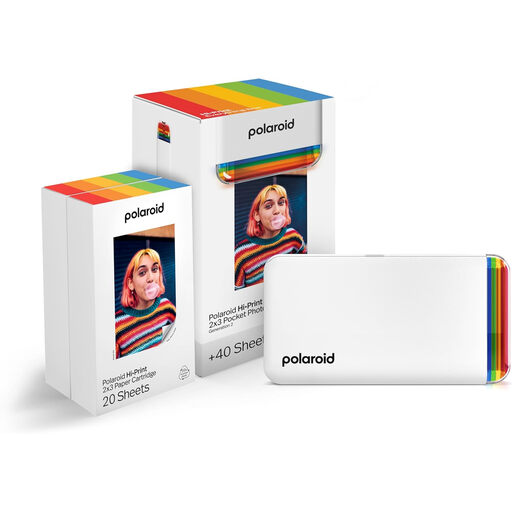
Polaroid Hi Print 2x3 Gen 2 Printer Bundle, White, with 40-sheet paper cartridge
The 2x3 format is for small food-photo inserts or handouts, not A4 layouts or conventional 6×4 photographs. The title specifies a 40-sheet paper-cartridge bundle; check its contents and compatible refills when ordering.
View on Joybuy
 No image available
Xiaomi Portable Photo Printer 1S
For small food-photo keepsakes away from a desk, check this portable model's print dimensions, compatible paper and phone requirements against the way you intend to use it.
View on Joybuy
Frequently asked questions
Do I need an edible printer to print photographs of food?
No, not when the photograph is going onto ordinary photographic paper. If the image is meant to go on a cake or other food, choose a purpose-suitable edible-printing process instead; do not use ordinary photo paper or printer ink on food.
Should I choose a 6×4 printer or an A4 inkjet for recipe cards?
Choose a 6×4 printer when each dish photograph will stand alone; choose an A4 photo inkjet when photographs must share a page with ingredients, instructions or a menu layout. Canon specifies 100 × 148 mm postcard media for the SELPHY CP1500, while Epson specifies A4 output and a rear speciality-media feed for the Expression Photo XP-8700.
Can I print food photographs directly from a phone or camera?
The available connections depend on the printer. Canon specifies phone printing via Wi-Fi and compatible memory-card printing for the SELPHY CP1500; the SELPHY QX20 prints from compatible iOS or Android devices, while HP specifies Bluetooth mobile-app printing for the Sprocket Select. Check the exact camera, phone and app requirements before choosing.
What should I do with an unwanted photo printer?
Look for a suitable local electrical-recycling route rather than putting the printer in ordinary household rubbish. GOV.UK's guidance describes the UK system for waste electrical and electronic equipment; check your local collection arrangements for how to hand over a household printer.


