Choose a microphone headset when the facilitator is the only person speaking locally, or each other participant has a separate microphone. If several people around one table need to be heard by remote attendees, plan shared-room microphone coverage instead; a headset is designed to capture its wearer, not the whole table. For a facilitator's headset, check the exact connection and meeting-platform variant before weighing noise reduction, comfort and talk time.
Who needs which setup?
Planning leaders with several people in one room
If remote attendees must hear contributors around the table, plan microphone coverage for their seating positions rather than relying on the chairperson's headset. Shure's conference-table guidance emphasises microphone placement for multiple talkers.
Facilitators in noisy hybrid workplaces
If you are the only local speaker, a headset with a boom microphone and stated outgoing noise reduction is a personal-audio option. Check microphone features separately from active noise cancellation, which mainly affects what you hear.
Mobile hosts running frequent planning calls
If you move between meeting locations, consider how the headset connects to your devices, packs for travel and feels across repeated calls. Compare talk-time claims under the settings you expect to use.
What matters when choosing?
Personal boom-microphone headset
Choose when: The facilitator is the only local speaker, or everyone else has a separate microphone.
Trade-off: Noise reduction for the wearer's voice does not provide planned pickup for people around a table.
Shared-room conferencing device
Choose when: Several people in a small room need a shared audio endpoint, potentially with video.
Trade-off: A single device still needs coverage that suits the room layout and seating distances.
Table microphones
Choose when: Contributors sit at different positions and microphone placement needs to follow the seating plan.
Trade-off: Setup takes more planning than putting on a headset; Shure advises one microphone for every two participants in its conference-table guidance.
| Concern |
What to check |
Who this matters to |
| Hearing everyone in the room |
Identify all local speakers, then check the shared microphone's intended coverage and placement against their seats. |
If colleagues around my table need to contribute, I need remote attendees to hear them as well as the chair. Around 40% of consumers put shared-room coverage first. |
| Facilitator's voice in noise |
Check for a boom microphone and a specific description of outgoing noise reduction; assess listening ANC separately. |
Leading a call near background chatter makes my own voice the priority. Roughly 30% of consumers chiefly need clearer pickup of the facilitator. |
| Platform and connection fit |
Confirm the exact platform edition, intended Bluetooth or USB connection and connector before ordering. |
I need the headset to connect to my work device and provide any meeting controls my organisation requires. For about 20% of consumers, that fit is the main concern. |
| Comfort and endurance |
Compare fit and stated talk time under the relevant settings, plus charging or corded-use options. |
Moving between locations for repeated calls makes carrying and wearing the headset matter to me. Around 10% of consumers place this need first. |
Mistakes to avoid
-
Buying a personal headset for a whole table
A noise-reducing headset microphone is aimed at its wearer. For several seated speakers, microphone type and placement affect how consistently remote attendees hear them.
List who will speak locally before choosing equipment. If the group shares one audio setup, assess room coverage first and use a headset for the facilitator only where appropriate.
-
Assuming ANC improves pickup across the room
Active noise cancellation primarily changes what the wearer hears; it does not establish how well a microphone captures other participants.
Consider listening noise control and outgoing microphone performance separately. Try the intended arrangement with remote listeners before an important meeting.
-
Ordering the wrong connection or platform variant
Headsets can have different connectors, receivers and platform-specific editions. A compatible audio connection does not by itself establish that the controls your organisation expects will work.
Check the exact variant, included receiver, connector and required meeting-platform workflow against your computer before ordering.
A connector mismatch may mean using an additional adapter or choosing another headset.
Relevant brands to consider
Logitech
Its Zone Wireless 2 personal headset and MeetUp room device illustrate different approaches to a planning call.
- Logitech describes four noise-cancelling microphones on Zone Wireless 2 and a beamforming microphone array on MeetUp.
- Neither a personal headset's microphone features nor a room device's presence removes the need to check who must be heard and where they will sit.
Poly
The Voyager Focus 2 is a personal on-ear Bluetooth headset for a facilitator rather than a shared table microphone.
- HP describes multiple-microphone noise cancellation, three ANC settings and corded-use capability for Voyager Focus 2.
- HP Support states up to 25 hours of talk time with ANC and the online indicator off; settings affect the relevant endurance claim.
Jabra
The Evolve2 65 Flex line is relevant to facilitators moving between meeting locations.
- Jabra describes a fold-flat design and hybrid ANC for Evolve2 65 Flex.
- Check the exact Teams or UC edition, connector or adapter, and included charging accessories; portability does not make it a group microphone.
Joybuy product choices
These choices cover two ways to give several local participants shared room audio, plus a wired headset for meetings where only the facilitator needs a personal microphone. Match the microphone arrangement to the people speaking before comparing the devices.
 No image available
DELL Pro Wired Speakerphone SP325
Consider this shared speakerphone when several people in the room need to speak through one device. It is a wired model; check its intended pickup coverage against the seating plan before relying on it for the meeting.
View on Joybuy
 No image available
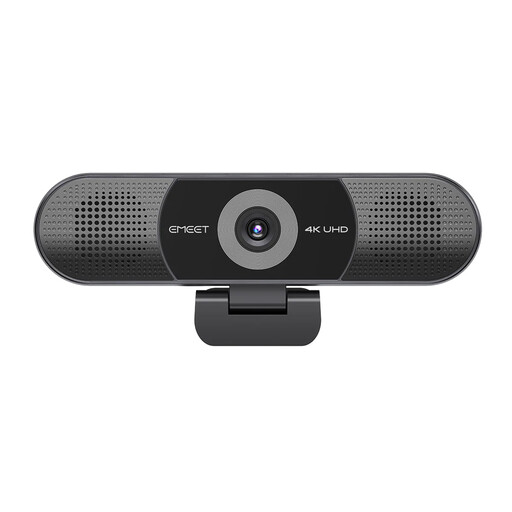
EMEET 4K Webcam with Sony Sensor, 4-Mic Array and Dual Speakers
Consider this shared video-and-audio device when several local contributors need one meeting endpoint. Its title specifies a fixed-focus camera, an adjustable 98° field of view and plug-and-play USB connection; check microphone placement and compatibility with your meeting platform.
View on Joybuy
 No image available
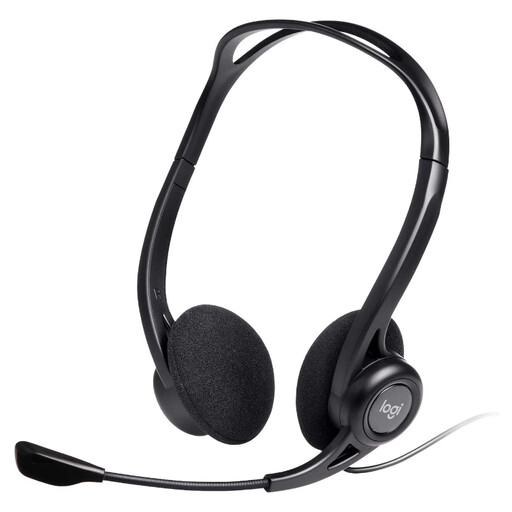
Logitech 960 Wired USB Headset with Noise-Cancelling Mic, Black
Consider this personal headset when only the facilitator speaks locally, or other participants have their own microphones. Its title specifies a wired USB connection, noise-cancelling microphone and inline remote; confirm the connector and any platform certification your organisation requires.
View on Joybuy
Frequently asked questions
Can one headset pick up everyone around a planning table?
A personal headset is not a dependable way to cover everyone around a table; its microphone is intended for the wearer. If several local participants need to contribute, plan a shared device or placed microphones for their seats. Shure's conference-table guidance advises one microphone for every two participants.
Do I need a Microsoft Teams-certified headset?
Check for certification if your organisation requires a certified Teams workflow or headset controls; ordinary audio connection and certification are different considerations. Confirm the exact edition and connection route. Microsoft lists several headset connection styles, while Logitech's Teams certification statement for Zone Wireless 2 concerns native Bluetooth.
How can I plan for a long day of headset meetings?
Compare talk-time claims using the settings you will actually use, and check charging or corded-use options before the day begins. HP Support specifies up to 25 hours for Voyager Focus 2 with ANC and the online indicator off, so that figure should not be assumed for other settings.


