A 27-inch 4K monitor with an adjustable stand is a sensible starting point when one person usually classifies the plant images. If subtle colour differences determine the decision, prioritise a colour-managed workflow; if colleagues need to view images together or repeatedly reset the desk, consider a larger, more adjustable display. Check desk fit and the exact laptop connection rather than assuming screen size or a USB-C port settles the choice.
Who is this for?
Colour-critical plant classifiers
If small colour differences affect identification or documentation, check the colour spaces used by your images and software, as well as the monitor’s calibration information. BenQ UK documents colour-space coverage for its SW272U, but a monitor specification alone does not establish the accuracy of the whole image workflow.
Shared-desk observation teams
When colleagues take turns at a workstation or inspect an image together, screen position and desk fit matter alongside image detail. The Health and Safety Executive advises setting the screen at about an arm’s length, with its top level with the user’s eyes; an adjustable stand makes that setup easier to revisit for each person.
Mostly single-laptop users
If you usually work alone and share the desk only occasionally, a 27-inch 4K work monitor may cover the viewing task without specialist colour-management features you will not use. Check the laptop’s video output and charging requirements before choosing a hub or USB-C model.
What matters when choosing?
For plant-image work at a shared desk, start with the constraint that most affects your day: resetting the screen for different people, making colour-dependent decisions, or connecting a laptop simply.
| Concern | What to check | Who this matters to |
|---|
| Shared positioning |
Check height and tilt adjustment, then measure desk depth and any clamp-compatible edge. Plan where each user will sit. |
When colleagues take turns or inspect one image together, I need to reposition the display without giving up a workable viewing distance; around 42% of consumers put shared positioning first. |
| Colour reliability |
Match the stated colour space to your files and applications; check calibration information for the exact model. |
If a subtle colour difference affects my classification, I need the images and display to form a controlled workflow. For around 33% of consumers, colour reliability is the primary concern. |
| Laptop workflow |
Compare the monitor’s video connection and power delivery with the laptop’s requirements; check the intended cable. |
For routine observations, I want to connect my laptop and get to work without relying on imaging features I will not use; a straightforward laptop setup comes first for around 25% of consumers. |
Mistakes to avoid
-
Choosing a larger screen before checking its position
A larger image area will not help if the display cannot be placed comfortably for each person. The Health and Safety Executive advises positioning the top of the screen at eye level and the display about an arm’s length away.
Measure the available depth and desk edge, then check the stand’s adjustment range or the compatibility of a proposed monitor arm.
A clamp-mounted setup may also require space at the desk edge, a compatible arm or changes to cable routing.
-
Reading gamut coverage as a guarantee of accurate classifications
BenQ UK states colour-space coverage for its SW272U, but gamut figures do not control image-file profiles, application settings, room lighting or the monitor’s calibration state.
If colour affects a decision, compare the monitor’s stated spaces with your files and software, and check what calibration documentation and controls the exact model provides.
-
Assuming every USB-C connection does the same job
A USB-C port alone does not establish that a particular laptop will send the intended video signal, use the monitor’s hub or receive enough power.
Compare the exact monitor and laptop specifications for video and power delivery, and confirm that the cable supports the functions you intend to use.
Depending on that setup, you may still need a suitable cable, a separate charger or a dock.
-
Leaving desk-fit checks until after the cancellation window
For an eligible online monitor purchase from a UK trader, GOV.UK says you must tell the trader within 14 days of receiving the item if you wish to cancel. A change-of-mind cancellation is separate from remedies for faulty or misdescribed goods.
Check the seller’s return instructions and inspect the model, connections and desk fit promptly, while distinguishing a fit decision from a fault.
Relevant brands to consider
BenQ
BenQ’s PhotoVue and Creative Pro lines are relevant when the plant-image workflow has defined colour requirements. BenQ UK states that the SW272U covers 99% Adobe RGB and P3 and 100% sRGB and Rec.709.
- The SW272U is a specialist example to examine for stated gamut and calibration features.
- Those monitor features do not, by themselves, establish that source images, software and lighting are colour-managed.
Dell
Dell’s UltraSharp hub line is relevant when a 27-inch 4K display and laptop-oriented desk connection are the main priorities. Dell UK identifies the U2725QE as a 27-inch 4K Thunderbolt hub monitor.
- The U2725QE is a model to examine for stand adjustment and hub connections at a regularly shared desk.
- Confirm video and charging compatibility with the exact laptop; a hub-oriented setup is not a substitute for a colour-managed workflow.
LG
LG’s UltraFine Ergo line is relevant when repositioning a larger display is central to the shared-desk setup. LG UK lists the 32UN880K-B with a C-clamp stand that extends, retracts, swivels, pivots, raises and tilts.
- The stand offers several ways to reset this model’s position between users.
- Check desk-edge suitability and depth; its stated colour-space coverage should not be treated as the same claim as another model’s calibration features.
Joybuy monitors for these setups
These monitors offer different starting points for plant-image viewing: larger displays for shared viewing, and 27-inch models for a desk usually used by one person at a time. Check each model’s stand, surface and connection requirements against the actual workspace; a stated colour gamut alone does not establish a colour-managed setup.
 No image available
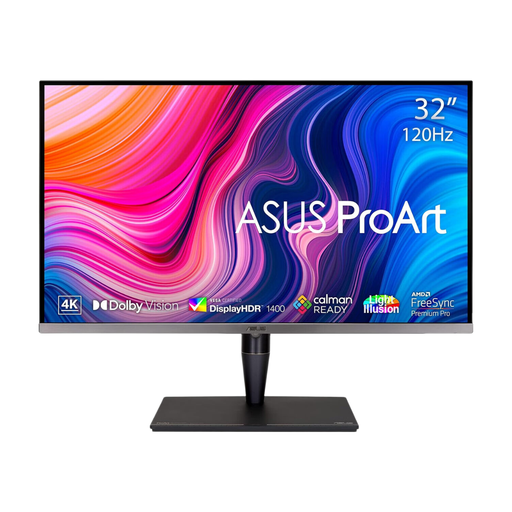
ASUS ProArt Display PA32UCG-K 32-inch 4K monitor
Consider this larger display when colleagues need room to view the same plant image, while checking that its size suits the desk.
The product title identifies an IPS Mini LED panel, Thunderbolt 3 and hardware calibration. Check how the intended computer, files and software would use those features; the title’s brightness figure should be confirmed against the exact model specification.
Joybuy
 No image available
Dahua 32-inch 4K 165Hz curved OLED monitor
Consider the larger screen for shared image viewing, but check whether its curved shape works from the positions people will actually use.
The product title states Type-C 65W power delivery and 99% DCI-P3 coverage. Confirm the exact laptop’s video and charging compatibility; the gamut figure alone does not establish calibrated colour.
Joybuy
 No image available
BenQ MA270UP 27-inch 4K Mac monitor
This 27-inch option is worth examining for a desk usually used by one laptop user and occasionally reset for someone else.
The product title identifies a Nano Glossy IPS screen, USB-C and a height-adjustable stand. Check reflections under the desk’s lighting and confirm which Mac-oriented features work with the computer you will connect.
Joybuy
 No image available
LG UHD Monitor 27UP650K 27-inch 4K IPS
This model is a 27-inch starting point for viewing observation images when HDMI or DisplayPort suits the computer setup.
The product title states 95% DCI-P3 coverage and a white finish. Check the required connection and calibration arrangements separately if laptop charging or repeatable colour decisions matter.
Joybuy
 No image available
iiyama ProLite XUB2792UHSU-B6 27-inch 4K monitor
Consider this 27-inch model for a desk where plant images are usually inspected by one person at a time.
The product title identifies a 4K UHD LED monitor in matte black. Check its stand and the exact computer connection before choosing it for frequent desk hand-offs; do not assume laptop charging or calibration from the title.
Joybuy
Common questions
Does sharing a workplace desk affect display-screen guidance?
Yes, a shared desk still needs a suitable setup for each user. The Health and Safety Executive says the UK display screen equipment rules apply to workers who use a screen daily for continuous periods of an hour or more; check the work pattern and reset the workstation when users change.
Where should the monitor sit for plant-image work?
Position it so the user can view the image without adopting an awkward posture. The Health and Safety Executive advises putting the top of the screen level with the eyes and placing the display about an arm’s length away; reassess those positions when someone else uses the desk.
Will any USB-C laptop work with a USB-C monitor?
No: the connector shape does not establish video output, hub operation or suitable charging. Compare the exact laptop’s capabilities with the monitor’s documented connection and power-delivery specification, and check the cable intended for the setup.
How quickly should I check a monitor bought online in the UK?
Check desk fit and connections promptly if you might cancel an eligible online purchase from a trader. GOV.UK says to tell the trader within 14 days of receiving the item if you wish to cancel; change-of-mind cancellation and remedies for faulty or misdescribed goods are separate matters.


