Platform-first players
If you play mainly on one console, PC or mobile device, start with a controller that supports that device and the connection you intend to use. Layout and extra features matter only after that check.


Choose a controller that supports your main gaming platform and preferred connection before comparing its controls: Xbox, PS5 and Nintendo Switch setups call for different compatibility checks. For platform games, consider how the D-pad and buttons feel to you; in a bright room, check screen glare separately from the visibility of the controller’s button markings.
If you play mainly on one console, PC or mobile device, start with a controller that supports that device and the connection you intend to use. Layout and extra features matter only after that check.
If platform games have you changing direction and reaching for buttons frequently, compare the D-pad, face buttons and bumpers in person where possible. A documented control feature cannot tell you how the layout will feel in your hands.
If bright light makes play difficult, identify whether you struggle to see the display, recognise the controller’s button symbols, or both. Those problems call for different checks before you buy.
Settle the platform and connection first. Then assess directional controls and the particular visibility problem you encounter in your room.
| Concern | What to check | Who this matters to |
|---|---|---|
| Platform and connection | Match the exact controller variant to your main device and intended wired or wireless connection. For Nintendo hardware, check the console generation too. | If my controller cannot connect to the device I use for platform games, its other features will not help me play. Around 50% of consumers put platform and connection compatibility first. |
| Directional controls | Try the D-pad, face buttons and bumpers if possible; check whether button mapping works on your intended platform. | When I change direction and press buttons in quick succession, I want a layout I can use comfortably. Directional control is the main concern for around 30% of consumers. |
| Bright-room visibility | Separate display glare from difficulty recognising physical buttons. Inspect the exact controller colour and button markings under similar lighting where possible. | I need to know whether bright light affects what I see on screen or which control I can find without looking down. Roughly 20% of consumers prioritise that bright-room distinction. |
Similar layouts do not mean identical platform support. Microsoft lists Xbox consoles, Windows PC, Android and iOS for its Xbox Wireless Controller, while 8BitDo sells separate Ultimate 2C Wireless and Bluetooth models with different stated platforms.
Note your main device and connection method, then check both against the exact model you plan to order.
If a controller does not work with your setup, arranging a return or replacement takes additional time.
Haptic feedback, adaptive triggers and polling-rate figures describe controller features, not how clearly you can see a display or read button symbols in bright light.
Identify which surface is hard to see. If it is the controller, inspect the exact colour variant and its markings; if it is the screen, assess the display setup separately.
8BitDo states a 1,000Hz polling-rate figure for the Ultimate 2C Wireless Controller over 2.4G and wired connections. That claim should not be carried over to its Bluetooth Android use or to the different Ultimate 2C Bluetooth model.
If that specification affects your choice, check that the exact model, device and connection match its stated conditions.
These brands offer different controller routes; the relevant choice depends on your device, the exact model and the features your games use.
A first-party route for Xbox players and people considering the Xbox Wireless Controller for a supported Windows PC or mobile device.
A first-party route for players choosing a controller for a Nintendo Switch or Switch 2 setup.
A first-party PS5 route for players considering DualSense controls.
A third-party route that requires particular care with platform-specific model names.
These controllers cover Nintendo Switch, Xbox, phone and PS5 uses. Choose by your main device first, then check the exact connection, game support and controls that matter to you; none should be selected solely because the room is bright.
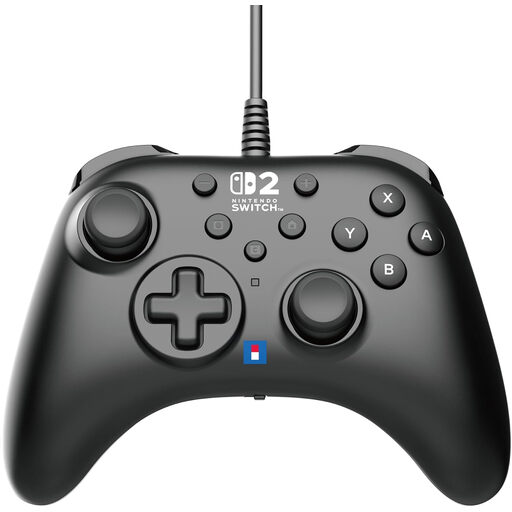 No image available
Consider this for Nintendo Switch platform games if a wired controller suits where you sit. Check the cable connection against your setup and whether your games need motion controls or HD Rumble.
 No image available
Consider this for Xbox or a supported Windows PC or mobile device. Microsoft lists a hybrid D-pad and button mapping for the Xbox Wireless Controller; check pairing for your device and inspect this colour variant’s button markings in your lighting.
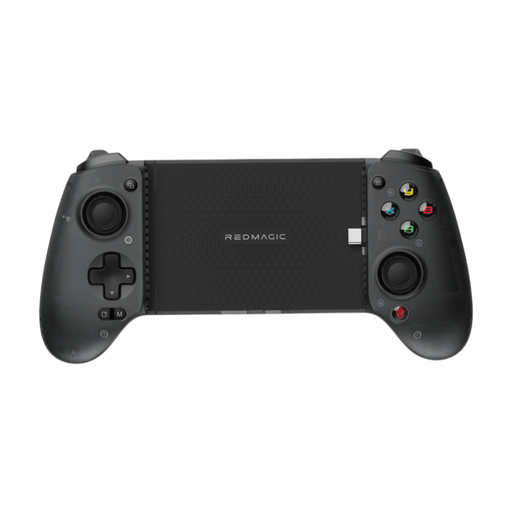 No image available
Consider this for phone-based platform games if you use a compatible USB-C iPhone or Android device. Confirm that your exact phone fits and that the game accepts controller input before choosing it instead of a console controller.
 No image available
Consider this for PS5 platform games. PlayStation describes haptic feedback and adaptive triggers in compatible games; confirm feature support on your device and game, and inspect this colour variant’s button markings if visibility is a concern.
Not necessarily: first check whether the difficulty is screen glare or recognising the controller’s physical buttons. For the latter, inspect the exact colour variant and its button markings under similar lighting; extra controller features alone do not address screen glare.
Do not assume universal compatibility. Microsoft lists Xbox consoles, Windows PC, Android and iOS for the Xbox Wireless Controller, while Nintendo’s Pro Controllers and the differently named 8BitDo Ultimate 2C variants have their own platform requirements. Match the exact model and connection method to your main device.
For online sales, GOV.UK says customers can cancel up to 14 days after delivery without giving a reason. Check how to notify the seller if you change your mind; remedies for faulty or misdescribed goods are separate from a change-of-mind cancellation.