Choose for the console or computer running the game, not for the TV: an Xbox Wireless Controller suits supported Xbox and Windows setups, DualSense suits PS5 and supported computers, and a Nintendo Switch Pro Controller suits Switch play. For platform games, consider the directional controls you prefer, then check the exact controller’s connection method and any game-dependent features.
Who needs which setup?
Players using more than one device
If you play on Xbox, a Windows PC connected to a TV, or another supported device, check each controller’s stated host compatibility and connection method. Microsoft Xbox, PlayStation and 8BitDo list different supported devices for their controllers.
Players using a docked Nintendo Switch
If you mainly play Switch platform games on a TV, Nintendo’s Pro Controller offers a single + Control Pad instead of the separate directional buttons on the left Joy-Con.
Players focused on repeated directional input
If movement relies heavily on the D-pad, compare layouts and hand feel before prioritising extra controls. If you sit away from the screen, check whether your preferred wired connection can reach your seat.
What matters when choosing?
Start with the device running the game, then consider directional-control comfort and how the controller will connect from your usual seat.
| Concern | What to check | Who this matters to |
|---|
| Host compatibility |
Match the exact controller variant and connection method to the console or computer running the game. |
I need the pad to work with my console or TV-connected computer before any other feature matters. Around 36% of consumers would put host compatibility first. |
| Directional controls |
Compare the D-pad layout and position, especially if you use it more than the analogue stick. |
Repeated movements make a comfortable directional layout my main concern. Around 29% of consumers would prioritise directional-control feel. |
| Connection setup |
Check the supported wireless or USB method and whether a wired cable will reach your seat. |
I want to play from my usual seat without awkward pairing, charging or cable placement. Connection convenience would come first for around 21% of consumers. |
| Upkeep and features |
Check the power arrangement and whether additional controls or accessories suit how you play. |
I would rather understand the charging routine and which controls I will use before choosing. Around 14% of consumers would make upkeep and features their primary concern. |
Mistakes to avoid
-
Assuming the TV determines controller compatibility
The controller connects to the device running the game; Bluetooth alone does not establish support for every console.
Identify that device first, then check the exact controller variant and its supported connection methods.
-
Assuming every DualSense feature works on PC
PlayStation says PC haptic feedback requires USB and a supporting game; adaptive triggers also depend on game support.
Check the platform game’s controller support and decide whether its standard controls meet your needs.
PlayStation states that a USB cable is not included with DualSense, so check whether you already have a suitable one.
-
Overlooking directional-control comfort
Microsoft Xbox’s hybrid D-pad and Nintendo’s single + Control Pad have different layouts; a list of extra buttons cannot tell you which feels comfortable.
If possible, try the directional controls you expect to use for repeated movement before choosing on other features.
-
Putting an old controller in general waste without checking
GOV.UK explains that UK electrical-waste regulations are intended to encourage recovery, reuse and recycling of electrical equipment.
Check your local authority’s electrical-waste instructions or whether a retailer offers take-back.
Brands to consider for these setups
Xbox
Microsoft’s Xbox Wireless Controller is a first-party option for Xbox consoles and Windows PCs.
- Microsoft Xbox lists Xbox Wireless, Bluetooth, a hybrid D-pad and button mapping for this controller.
- Its stated device list does not establish Nintendo Switch or PlayStation console compatibility.
PlayStation
DualSense is the first-party PS5 controller and can connect to supported computers and mobile devices.
- PlayStation lists USB-C and Bluetooth connection options for supported devices.
- On PC, haptic feedback needs USB and a supporting game; adaptive triggers depend on game support. PlayStation says a USB cable is not included.
Nintendo
The Nintendo Switch Pro Controller is a full-size option for Switch games played through a dock and TV.
- Nintendo identifies a single + Control Pad and says the controller can pair wirelessly or connect through the dock while the console is docked.
- Choose it for its stated Switch use rather than assuming support for other consoles or computers.
8BitDo
The Ultimate 2C range includes separately specified Windows/Android and Nintendo variants.
- 8BitDo lists 2.4G or wired Windows connection for the Ultimate 2C Wireless, and Bluetooth or wired connection for the Ultimate 2C Bluetooth on supported Switch systems.
- The similarly named variants have different stated platform support; check the full model name before choosing.
Controllers on Joybuy
These controllers cover stated Xbox and Windows PC setups, a PC/Switch option, and a DualSense option for PS5 and supported computers. Match each one to the device running your platform game before considering its controls or connection.
 No image available
Microsoft Xbox One S Elite Wireless Controller Series 2
Consider this wireless Series 2 variant for the Xbox or PC setup identified in its title. Check the supplied controls and accessories if a particular D-pad arrangement matters to you.
View on Joybuy
 No image available
Xbox Wireless Controller — Robot White
For a supported Xbox or Windows setup, this model offers the hybrid D-pad, Xbox Wireless and Bluetooth methods listed by Microsoft Xbox. Choose the connection method supported by your host device.
View on Joybuy
 No image available
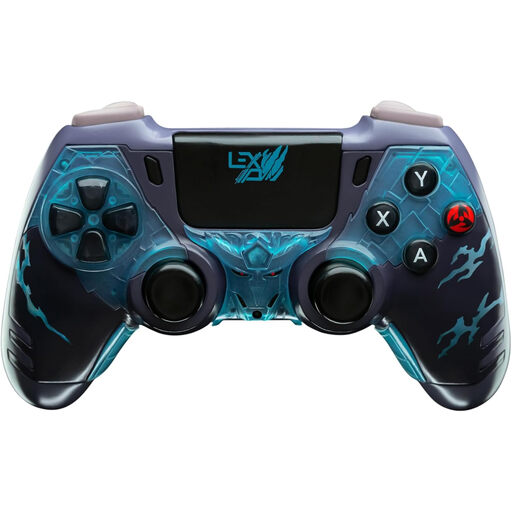
LEXIP Kakashi Kamui Controller (PC, Switch)
Consider this PC/Switch-labelled option if either is your game host. Confirm the exact connection arrangement and, for wired play, that the cable will reach your seat.
View on Joybuy
 No image available
Turtle Beach Afterglow Ignite Time Machine Wired RGB Controller (Xbox, PC)
This wired Xbox/PC option suits a setup where a cable can reach the play position. The Joybuy product description specifies a 10 ft USB-C cable; check its reach against your room layout.
View on Joybuy
 No image available
Sony DualSense Wireless Controller — HYPERPOP Techno Red
Consider this DualSense variant for PS5 or a supported computer. PlayStation lists USB-C and Bluetooth connections; on PC, haptic feedback requires USB and a supporting game, while adaptive triggers depend on game support.
View on Joybuy
Common questions
Will any Bluetooth controller work with games shown on my TV?
No: compatibility depends on the console or computer running the game, not the display. Check that device against the exact controller’s supported platforms and connection methods.
Can DualSense work on a PC connected to a TV?
Yes, DualSense can connect to supported Windows PCs by USB-C or Bluetooth. PlayStation says PC haptic feedback needs USB and a supporting game, while adaptive triggers depend on game support.
How does a Nintendo Switch Pro Controller connect for TV play?
Nintendo says it can pair wirelessly with a Switch or connect through the dock while the console is docked. Check that the controller and game suit the Switch setup you intend to use.
Do platform games on a large screen require a wired controller?
No: supported wireless controllers can suit a TV setup. A wired model is worth considering if its cable reaches your seat and you prefer a direct connection; otherwise, check the wireless method your game host supports.
Where can I take an old controller for disposal in the UK?
Check your local authority’s electrical-waste instructions or a retailer’s take-back arrangements. GOV.UK explains that UK electrical-waste regulations aim to encourage recovery, reuse and recycling of electrical equipment.


