
24/7 Customer Support

Free returns

Same-day & Next-day Delivery

Quality Guaranteed

Unlock Your Welcome Offers: FREE Delivery | Up to 80% OFF | Free 30-day JoyPlus trial
Download the APP
As a Joybuy Product Recommendation Officer, I often see how a single accessory can completely transform a desk from a simple workspace into a personalised gaming command centre. A Playstation desk mat is more than just a surface; it's a statement piece that combines functionality with nostalgia. However, not all desk mats are created equal. Many fall short, leaving you with a faded design or a surface that hinders your mouse's performance.
This guide will help you navigate the common pitfalls and identify the key features that define a quality mat, ensuring your investment enhances your setup for years to come.
Before you add that eye-catching mat to your basket, be aware of these frequent issues that can lead to buyer's remorse:
To ensure you get a product that performs as well as it looks, focus on these non-negotiable specifications.
The top layer is where the action happens. Most high-quality gaming mats use a polyester fabric surface. This material offers a superb balance between speed (for quick, sweeping motions) and control (for pixel-perfect precision). Look for a tightly woven fabric, as this ensures your mouse sensor reads the surface accurately without any tracking skips. It also provides a comfortable resting place for your wrists during long sessions.
The foundation of any good non-slip mouse mat is its base. The standard for quality is a natural rubber base. This material provides substantial weight and a high-friction texture that grips firmly to your desk surface, whether it's wood, glass or laminate. It ensures that no matter how frantic the action gets, your keyboard and mouse remain on a stable, unmoving platform.
A large desk pad for gaming, often labelled as an XL gaming mouse mat or extended gaming mat, is designed to accommodate both your keyboard and mouse. Typical dimensions are around 80 cm x 30 cm. This generous size creates a single, unified surface, eliminating the awkward edge of a smaller mouse pad and providing unrestricted movement. Before buying, measure your desk to ensure a good fit, leaving enough room for your monitor and other accessories.
Instead of a one-size-fits-all approach, we match products to specific user needs. Here are our recommendations based on different profiles.
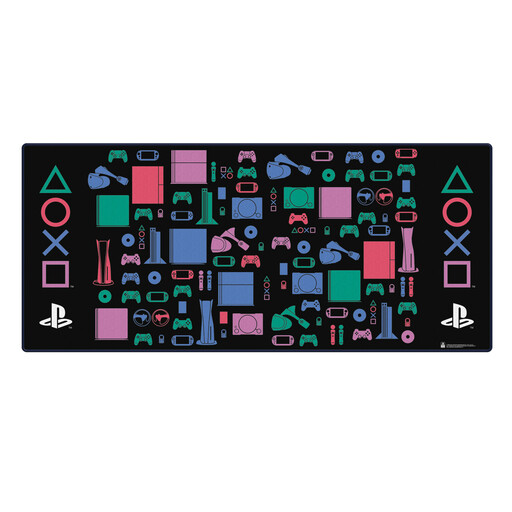
Why This Fits Their Persona: This is for the enthusiast who grew up with the iconic console and wants to build a retro gaming setup. It's a functional piece of classic PlayStation merchandise that celebrates gaming history while serving a practical purpose.
As official PlayStation accessories, the branding is authentic and the print quality is designed to last, avoiding the fading seen on unofficial products. The rubber non-slip base ensures it stays put.
The generous 81cm x 36cm size provides ample room for a full-sized keyboard and mouse. The polyester surface offers a smooth glide for precise mouse control.
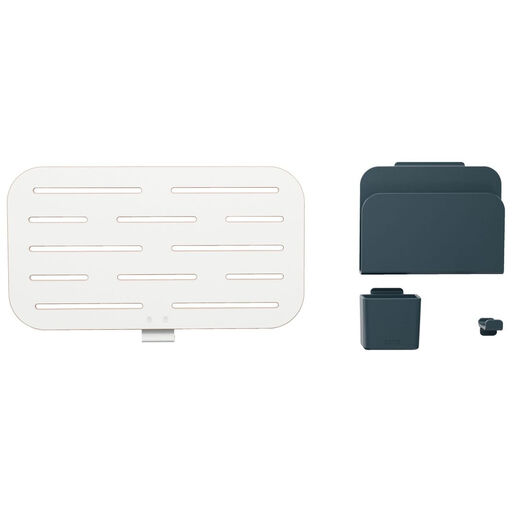
Why This Fits Their Persona: For the user who believes a clean desk leads to a clear mind. After laying down a large desk mat, their next priority is ensuring every pen, cable and controller has a dedicated home, eliminating all clutter.
This avoids the trap of a "tidy but impractical" setup. Instead of just hiding mess, its customisable pegboard system creates an efficient, accessible layout for essential tools, complementing the clean surface of a desk mat.
Its modular design allows for complete customisation to fit your specific accessories. The durable construction is practical for everyday use and keeps your workspace tidy.
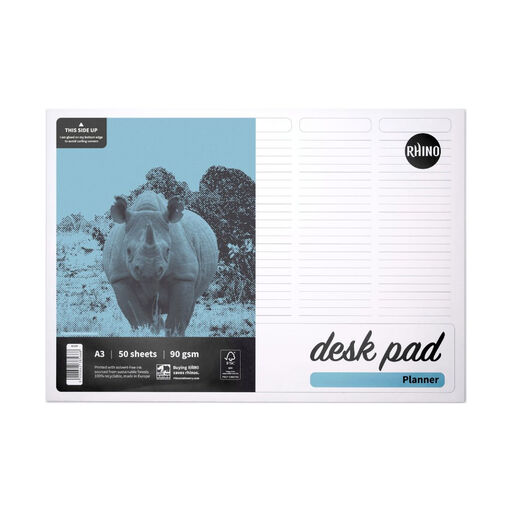
Why This Fits Their Persona: This user's desk is a multi-purpose space for gaming, work and study. They value physical, analogue tools to organise their thoughts and schedules, keeping their digital screen free for the task at hand.
It avoids the trap of flimsy, curling desk pads. The sturdy backing board and glued bottom edge keep the sheets flat and neat on your desk mat. The premium 90gsm paper prevents ink bleed-through.
The fully customisable 5-column layout can be adapted for weekly, daily or project planning. It provides a versatile planning space that sits neatly alongside a keyboard on a large desk mat.
We have compiled a complete, real-time list of products that fully satisfy these strict selection criteria and UK safety regulations.
For most fabric desk mats, regular maintenance is simple. For minor spills or dust, a wipe with a damp cloth is usually sufficient. For a deeper clean, you can hand wash it in a sink or bath with cool water and a small amount of mild soap. Gently scrub the surface, rinse thoroughly and let it air dry flat. Avoid using harsh chemicals, bleach or a tumble dryer, as heat can damage the rubber base and the printed design.
Absolutely. The benefits of an extended desk mat are not exclusive to gaming. The large, consistent surface is excellent for graphic designers, video editors or anyone who uses a mouse extensively. It also protects your desk from scratches and spills, provides a comfortable surface for writing and helps to organise your workspace into a more cohesive and aesthetically pleasing area.
The primary difference is size. A traditional mouse pad is a small square designed only for your mouse. A desk mat, or extended mouse pad, is much larger, intended to sit under both your keyboard and mouse. This creates a single, level surface, preventing your keyboard from wobbling and giving your mouse a much larger area for movement, which is beneficial for both gaming and general productivity.