For a compatible appliance and readings at the socket, choose a display meter that shows accumulated kWh and accepts your tariff; Energenie says its ENER007 provides these functions. Choose an energy-monitoring smart plug if you need app history or timed switching, but check that the exact model measures energy and confirm its UK plug, load limit, appliance exclusions, network and app requirements. Neither option measures hard-wired loads or guarantees a lower bill.
Who these monitors suit
One-appliance investigators
If you want to check a plugged-in appliance without setting up a connected home, look for a readable display, an appropriate load rating and accumulated kWh readings. Energenie documentation describes accumulated energy and cost readings for its ENER007.
Usage-history trackers
If you need records or cost estimates over time rather than a reading at the socket, check the history and reporting features of the exact model, app and firmware. TP-Link describes app-based history and tariff estimates for supported monitoring plugs.
Schedule-and-monitor households
If you want both consumption records and timed switching, confirm that the same model supports energy monitoring and schedules, and that the appliance is suitable for scheduled power control. TP-Link and Energenie describe models that combine these functions.
What to check before buying
Standalone display meter
Choose it when: You want to read a compatible appliance’s usage at the socket without relying on an app.
Trade-off: It does not provide the app history or scheduling functions of a connected plug.
Energy-monitoring smart plug
Choose it when: You want supported app-based readings over time, with scheduling available on some models.
Trade-off: App, network or hub requirements vary; TP-Link says P110M energy monitoring is available in the Tapo app, not through Matter.
Whole-home monitoring
Consider it when: You need an overview that goes beyond the appliance plugged into one socket.
Trade-off: Smart Energy GB explains that an in-home display shows overall use but does not automatically identify each appliance.
| Concern |
What to check when buying |
Who this matters to |
| Appliance and socket fit |
Check the UK plug, appliance load, exact model rating and manufacturer exclusions. TP-Link specifies indoor use and a 13 A maximum for its UK P110 and P110M; Electrical Safety First advises avoiding overloaded sockets. |
If I’m checking a particular appliance, I need a plug that fits and a rating that covers its load, with the maker’s exclusions respected. Consumers who put socket and appliance fit first make up around 36%. |
| Useful readings and records |
Look for accumulated kWh, a suitable measurement range, tariff settings and the exact model’s history or export options. Energenie and TP-Link describe tariff-based cost readings for supported products; these are estimates, not a supplier bill. |
When an appliance’s use varies, I want accumulated kWh and a relevant tariff setting, not just an instant watt reading. Around 29% of consumers prioritise interpretable readings and records. |
| Scheduling with measurement |
Confirm that the exact model supports both functions and that the appliance can be power-cycled safely and resumes as intended. Check which app or hub provides the controls and readings. |
If I want timed switching as well as measurement, I need to know the appliance can handle power being switched off and restored. Consumers who prioritise scheduling alongside measurement make up around 21%. |
| Connectivity and simplicity |
For a smart plug, check Wi-Fi or hub needs, software support and what works during an internet outage. Energenie specifies 0.5 W consumption for the ENER007; do not treat that as a like-for-like comparison with models lacking a comparable figure. |
When I want a direct reading without another app or account, a display at the socket may suit my needs better. Around 14% of consumers put app-free use and fewer connected-device dependencies first. |
Buying pitfalls to avoid
-
Assuming every scheduling plug measures energy
A plug can switch an appliance on a schedule without providing kWh readings. TP-Link distinguishes monitoring models such as P110 and P115 from P100 and P105.
Check the exact model’s documentation for energy monitoring and where its readings appear.
-
Relying on a familiar model name to confirm socket compatibility
Regional versions can differ. TP-Link specifies a 13 A maximum for its UK P110, while a separately described four-pack lists an EU socket and 16 A / 3680 W.
Before buying, check the actual plug, regional variant and rating against the manufacturer’s information for your appliance and socket.
-
Assuming every app or smart-home system shows the same readings
Cost displays depend on the tariff entered, and energy monitoring may not be available through every compatible ecosystem. TP-Link says P110M energy monitoring is available in the Tapo app, not through Matter.
Check which app or hub provides the readings and how it handles the tariff and history you need.
-
Confusing a measuring device with an electricity-saving box
A device that claims to lower bills simply by being plugged in is not the same as a meter that reports watts or accumulated kWh. Which? reported finding no evidence that the separately marketed bill-saving devices it tested worked.
Look for explicit energy-measurement features rather than a promise that the device will reduce bills.
Relevant brands to consider
Energenie
Relevant to both routes: the ENER007 is a display-led meter, while Mi|Home Smart Plug+ MIHO005 adds app monitoring and timers.
- Energenie specifies accumulated readings, tariff settings and 0.5 W consumption for the ENER007.
- Its stated accuracy figures are manufacturer specifications, not independent test results. MIHO005 has its own 3000 W maximum; do not transfer ENER007 specifications to it.
TP-Link Tapo
The UK P110 and P110M are monitoring smart plugs with schedules; P110M adds Matter integration for compatible ecosystems.
- TP-Link documents consumption history and tariff-based estimates for supported models, subject to its app and firmware requirements.
- TP-Link says P110M energy monitoring is not supported through Matter and directs users to the Tapo app. Check each model’s load rating and appliance exclusions.
Meross
The specifically identified MSS315 UK combines a smart plug with real-time and historical reporting in the Meross app.
- Meross specifies app-based real-time and historical energy reporting for this model.
- Meross specifies a 2.4 GHz Wi-Fi network and a 13 A maximum for the UK variant; these details do not establish measurement accuracy or apply to other regional versions.
Eve
Eve Energy is a Thread- and Matter-oriented smart plug and power meter for households considering a compatible home hub and ecosystem.
- Eve describes energy tracking and schedules.
- Eve specifies a Thread border router requirement for the relevant functionality. Check the particular UK plug and version before buying.
Joybuy product choices
These Joybuy listings include a smart plug identified as a power meter and a smart plug described with scheduling features. If kWh measurement is essential, check that the exact model explicitly supports energy monitoring.
 No image available
Eve Energy Matter Smart Plug with Power Meter, UK Type G Plug
For a compatible UK Type G socket, this listing describes energy tracking alongside timed switching.
Real-time and historical energy tracking; schedules; Matter over Thread; UK Type G plug; 13 A / 2900 W maximum load.
A Matter controller and Thread border router are required for the stated Matter integration and full Thread network functionality. Indoor use only; do not exceed the stated maximum load.
View on Joybuy
 No image available
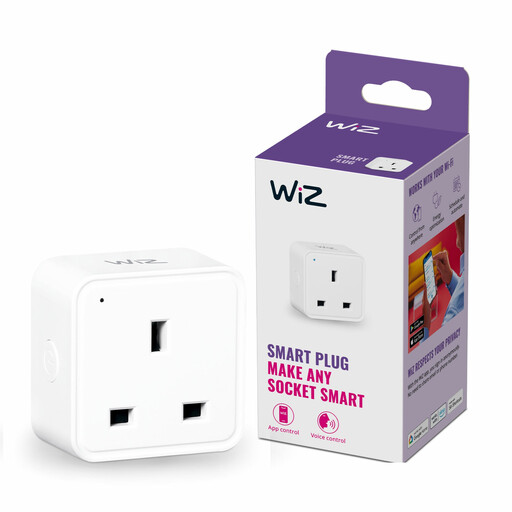
WIZ Smart Plug White
For app-based remote switching and timed control, the listing describes Wi-Fi setup without an additional hub or gateway.
The listed features include schedules, timers and Away mode. If you need kWh readings, check that this exact model supports energy monitoring.
View on Joybuy
Frequently asked questions
Will a plug-in monitor measure my whole electricity bill?
No. It measures the electricity passing through a compatible socket, not the whole household. Smart Energy GB notes that an in-home display shows overall use but does not automatically identify each appliance; use accumulated kWh for the appliance and test period you want to understand.
How should I interpret an appliance cost reading?
Enter the relevant electricity rate supported by the device and compare consumption over a representative operating period. Energenie describes single- and dual-tariff settings for ENER007, while TP-Link describes fixed- and variable-rate estimates for supported Tapo plugs. The displayed cost is an estimate based on the tariff entered, not your supplier’s bill.
Will a monitoring smart plug work if my internet goes down?
It depends on the model and feature. TP-Link says relevant Tapo plugs can be controlled locally through its app without internet and that schedules continue; this does not establish that remote access or every reporting function remains available. Check the exact model’s documentation for the functions you need.
What should I check after setting up a monitor or smart plug?
Follow the manufacturer’s setup instructions, use the device only within its stated rating and check the plug, socket and appliance for damage or overheating. For a connected device, check its software support and keep it updated; the National Cyber Security Centre advises against buying devices whose manufacturer support has ended or is due to end soon.


