
24/7 Customer Support

Free returns

Same-day & Next-day Delivery

Quality Guaranteed

Unlock Your Welcome Offers: FREE Delivery | Up to 80% OFF | Free 30-day JoyPlus trial
Download the APP
Starting a podcast, streaming channel, or home recording setup is an exciting venture. But choosing the right gear can be a minefield. The market is flooded with options, and it's easy to fall into common traps that leave you with a setup that doesn't meet your needs or, worse, needs replacing within months. As a Joybuy Product Recommendation Officer, my role is to help you see past the marketing jargon and make an informed choice.
Before you add anything to your basket, let's look at the three most common pitfalls when buying a podcast microphone kit:
To avoid these issues, focus on a few key technical specifications. Getting these right will ensure your investment serves you well, both now and in the future.
Your microphone needs to connect to your recording device, which is usually a computer. The two main connection types are USB and XLR.
A USB/XLR microphone offers both connection types. You can start with the simplicity of USB and have a clear upgrade path to an XLR setup later without needing to buy a new mic. This future-proofs your purchase.
This is arguably the most critical choice for home creators.
For most aspiring podcasters and streamers in the UK, a dynamic microphone is the more practical starting point.
How you position your microphone is crucial for sound quality. A basic desk stand is often included in cheaper kits, but it places the mic far from your mouth and picks up vibrations from your desk.
A streaming mic with boom arm is a far superior solution. It clamps securely to the edge of your desk and allows you to position the microphone perfectly in front of your mouth. This ensures a consistent, strong signal and isolates the mic from knocks and bumps. Look for a kit with a sturdy, all-metal boom arm and a C-clamp that can accommodate the thickness of your desk.
Based on these practical considerations, here are some recommendations matched to different types of creators.
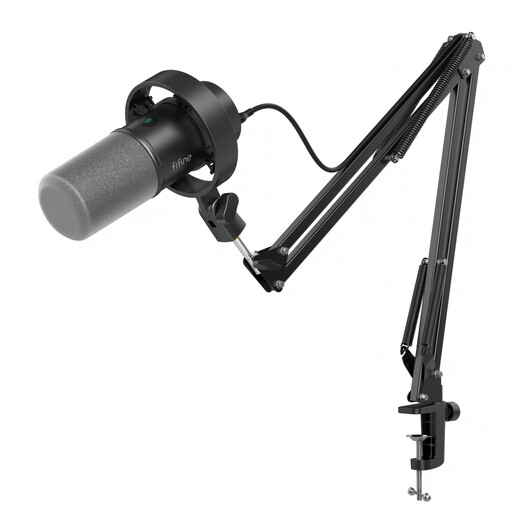
Why This Fits Their Persona: This is an ideal all-in-one package for someone starting their content creation journey. It provides a high-quality microphone and all the essential, sturdy hardware, removing the guesswork and ensuring you have a reliable setup from day one that can grow with you.
It sidesteps all three pitfalls. It's a dynamic mic suited for home use, features dual USB/XLR connectivity for future upgrades and includes a robust metal streaming mic with boom arm, not a flimsy desk stand.
Includes on-mic controls like a gain knob, tap-to-mute and a microphone with headphone jack for real-time audio monitoring when using USB. This is a complete, high-value package.

Why This Fits Their Persona: This gaming microphone for PC is designed for streamers who value aesthetics and quick control. The controllable RGB lighting syncs with other gaming gear, while the handy tap-to-mute function is essential for live broadcasts.
The dual USB/XLR connection prevents the upgrade dead end. As a dynamic mic, it excels at isolating the user's voice from keyboard clatter and fan noise, a common issue in gaming setups.
Features user-friendly controls for gain and headphone volume directly on the mic (in USB mode). It includes a desktop stand but also has standard 3/8'' and 5/8'' threads to mount on a boom arm.
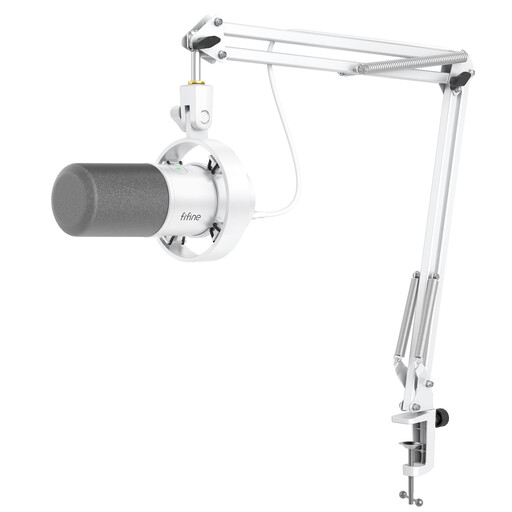
Why This Fits Their Persona: For creators who need professional performance for a voice-over recording mic and want a clean, minimalist aesthetic for their on-camera setup. The white finish and complete kit provide a polished look straight out of the box.
This kit delivers on the "all-in-one" promise with quality components. The dynamic capsule is ideal for voice work in home environments, and the dual connectivity offers maximum versatility for recording on a laptop or with a professional audio interface.
The combination of a broadcast-quality dynamic mic, a sturdy matching white boom arm and a shock mount provides excellent vocal clarity and isolation from vibrations, ensuring clean audio for professional work.
We have compiled a complete, real-time list of products that fully satisfy these strict selection criteria and UK safety regulations.
It depends on the microphone's connection. If you are using the USB connection, you do not need an audio interface; you can plug it directly into your computer. If you want to use the XLR connection, you will need an audio interface or a mixer to connect the microphone to your computer. A microphone with both options gives you the choice to start simply with USB and add an interface later.
For most home studios in the UK, which are typically untreated rooms like bedrooms or offices, a dynamic microphone is often the more practical choice. It is better at rejecting background noise and room echo, resulting in a cleaner, more focused recording of your voice. Condenser mics are more sensitive and may pick up too much ambient sound unless your room is acoustically treated.
A boom arm requires very little desk surface. Most use a C-clamp that attaches to the edge of your desk, typically needing only a few inches of clearance. Before buying, it's wise to check the maximum desk thickness the clamp can accommodate to ensure it fits your workspace. This is a far more space-efficient and acoustically sound solution than a large desk stand.