Podcasters recording near rehearsal activity
If other sounds, vibration or room reflections may enter your introduction, assess a close-positioned cardioid dynamic microphone and make a test recording in the room.


For spoken podcast introductions in a rehearsal room, start by assessing a close-positioned cardioid dynamic microphone, then test it where you will record; its pickup pattern alone will not eliminate room sound. A USB/XLR model suits direct computer recording with the option of an interface later, while an XLR-only model suits an existing interface setup. Consider an XLR condenser for both introductions and music recording only if you can provide its required power and a room test gives you an acceptable result.
If other sounds, vibration or room reflections may enter your introduction, assess a close-positioned cardioid dynamic microphone and make a test recording in the room.
If you want to record directly to a computer without starting with an audio interface, a USB/XLR microphone also leaves open the option of using an XLR setup later.
If the same microphone must also record singing or instruments, consider how those recordings sound in your rehearsal room. An XLR condenser such as the Audio-Technica AT2020 requires equipment that supplies 48V phantom power.
Choose the connection that fits your recording equipment, but judge room sound through a close-positioned test rather than the microphone type alone.
Choose when: You need direct computer recording now but may use an interface or mixer later; the Shure MV7+ and RØDE PodMic USB offer both connections.
Bear in mind: Dual connections do not replace close placement, and any software features you intend to use need a compatibility check.
Choose when: You already have, or intend to use, a compatible audio interface or mixer for spoken-word recording; the Shure MV7X and RØDE PodMic are XLR options.
Bear in mind: These microphones do not provide a direct USB recording connection; RØDE says the PodMic needs an XLR cable and interface for computer recording.
Choose when: Recording vocals or instruments as well as introductions is a priority, and a test in your rehearsal room produces a result you want to use.
Bear in mind: The Audio-Technica AT2020 needs a compatible XLR connection with 48V phantom power; its suitability in your room cannot be decided from its intended uses alone.
| Concern | What to check | Who this matters to |
|---|---|---|
| Room sound | Check the pickup pattern and whether you can position the microphone close to your mouth on a stable mount. Test it during typical rehearsal-room activity. | If rehearsal sounds compete with my introduction, I need my voice to remain the focus of the recording; roughly 50% of consumers put room control first. |
| Direct recording | Check for USB output to your recording device and XLR output if you may later use an interface or mixer. | I want to record an introduction on my computer without setting up an interface first; for around 25% of consumers, that straightforward connection is the primary need. |
| Multiple recording uses | Check whether the microphone suits the sources you intend to record and whether your equipment supplies 48V phantom power if you choose an AT2020. | My microphone also needs to cover singing or instruments, so an introduction alone cannot decide the choice; this is the main concern for roughly 25% of consumers. |
RØDE says its XLR PodMic needs an XLR cable and audio interface for computer recording. The Audio-Technica AT2020 also uses XLR and requires 48V phantom power.
Before choosing either route, check the complete connection from microphone to recording device, including compatible inputs and power where required.
RØDE advises speaking around 5–10 cm from the end of the PodMic USB. A cardioid pickup pattern does not make microphone position irrelevant.
Use a stable stand or arm and record a short introduction in the actual rehearsal room, then adjust position and orientation while listening back.
Audio-Technica lists the AT2020 for podcasting, vocals and instruments, but those uses do not establish how your rehearsal-room introduction will sound.
If you want one microphone for speech and music, test those sources in the room and confirm that your XLR equipment provides the AT2020’s required 48V phantom power.
Its spoken-word dynamic models here range from the dual-connection MV7+ to the XLR-only MV7X and SM7B.
Its speech-focused dynamic options here include the XLR PodMic and dual-connection PodMic USB.
The AT2020 is a cardioid condenser that Audio-Technica lists for podcasting, voiceovers, singing and live instruments.
These two USB/XLR dynamic microphones are options for recording introductions directly to a computer while retaining an XLR connection for another setup. Test close placement in your rehearsal room whichever you choose.
 No image available
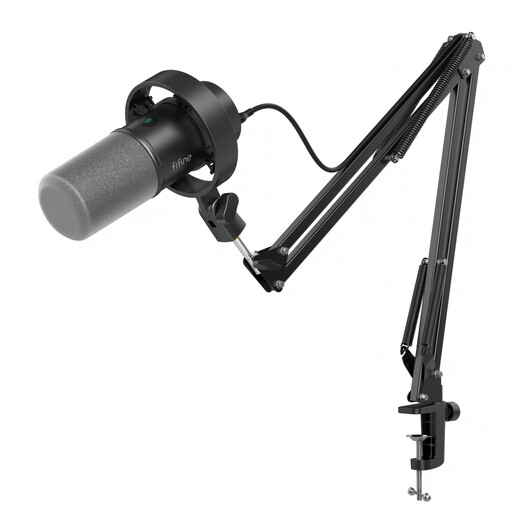
Consider this kit if a boom arm would help you position a microphone for spoken introductions while keeping both USB and XLR connection options.
Its named features include a boom arm, mute button, headphone jack and gain knob. Before relying on an XLR setup or the included mount, check the cable requirements, control functions and desk-clamp fit.
 No image available
Consider this tabletop option if you want to record introductions over USB now and retain an XLR connection for an interface-based setup.
Its named features include a mute button, headphone jack and RGB lighting. If you plan to move it onto an arm or record over XLR, check the accessories needed and which controls remain available.
Choose USB when you need to record directly to a computer without an interface; choose XLR when you already use a compatible interface or mixer. The Shure MV7+ and RØDE PodMic USB provide both connections, while RØDE says its XLR PodMic needs a cable and interface for computer recording. In either setup, test microphone placement in the room.
For the RØDE PodMic USB, RØDE advises placing your mouth around 5–10 cm from the end grille. Use that model-specific guidance as a starting point and listen to a rehearsal-room test recording before settling on a position.
It depends on the model: RØDE lists no power requirement for its dynamic PodMic, while the Audio-Technica AT2020 condenser requires 48V DC phantom power. If you choose the AT2020, confirm that your XLR interface, mixer or power supply provides it.
Check an appropriate electrical-equipment collection or recycling route when the microphone reaches the end of its useful life. GOV.UK’s guidance on waste electrical and electronic equipment covers recovery, reuse and recycling; check your local collection service for its accepted items.