What to check before buying
Set the desk to a workable typing height before choosing a keyboard shape. Then decide whether your main purchase reason is comfort, faster access to editing commands or a familiar layout that fits your workspace.
| Concern |
What to check |
Who this matters to |
| Standing posture |
At your usual standing height, check that the keyboard sits just below elbow level and can stay centred with the screen. |
I want to edit while standing without reaching up to the keys or twisting towards the screen. Around 42% of consumers might put workstation comfort first. |
| Timeline shortcuts |
List your repeated commands and check whether the editor and keyboard software can assign them without system-shortcut conflicts. |
When I move through a timeline, I want quick access to the commands I use repeatedly, rather than extra keys with no useful assignment. Shortcut workflow could be the primary need for around 33% of consumers. |
| Layout and workspace fit |
Confirm the selected UK or US layout, board size, connection method and whether its sound suits the room where you edit or record. |
I need key placement I can type on accurately and a keyboard that fits beside the rest of my equipment. Around 25% of consumers might prioritise layout, sound or connection fit. |
Joybuy keyboard choices
These keyboards offer different starting points for a standing podcast-editing desk: a split layout, compact mechanical formats and full-size typing layouts. Compare the selected key layout and any editing controls with your own software and workspace.
 No image available
HP 960 split-layout wireless keyboard with padded wrist rest
Consider the split layout if you want to try a different hand position at your standing desk; adjust keyboard height separately. Check the exact regional key layout and whether the software for any shortcuts you intend to assign works with your editor and operating system.
View on Joybuy
 No image available
Ticktype EVO75, US layout, Creamy Rye switches, Anodized Basalt Grey
This VIA-compatible wireless mechanical keyboard is worth considering if you want to investigate custom key assignments for editing. Its US layout needs checking against your typing habits, and the assignments you want must work with your editor and operating system.
View on Joybuy
 No image available
Targus EcoSmart full-size wireless keyboard (UK)
Its UK full-size layout suits an editor who wants familiar key placement rather than a compact arrangement. Check whether you need keyboard-level remapping for your workflow, and make sure the full-size board fits at your standing typing position.
View on Joybuy
 No image available
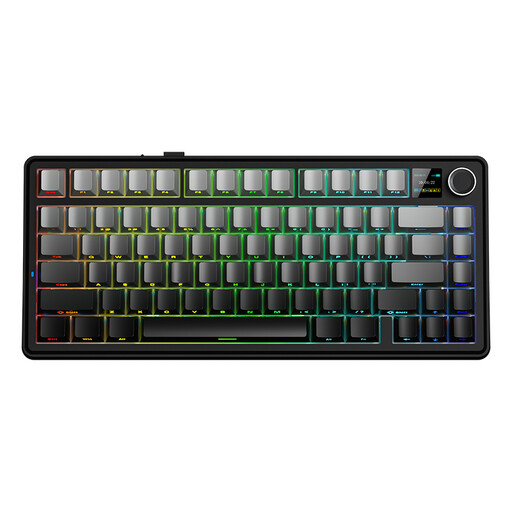
AULA F75 MAX 75%, US layout, Gradient Grey, Reaper switches
The 75% layout may appeal if you want a smaller keyboard beside your editing equipment. The listed connection modes are wired, Bluetooth and 2.4G; the knob is described as a volume control, so do not assume it can control the timeline. Check whether the US key placement and any intended macro assignments suit your setup.
View on Joybuy
 No image available
Ticktype DP104, 108-key US layout, Gecha Gray, Silent Tactile switches
This full-size mechanical option is for an editor who wants dedicated keys and is comfortable with US key placement. The variant has Silent Tactile switches, but check whether its sound suits your recording space; also confirm any keyboard-level shortcut controls you need.
View on Joybuy
Frequently asked questions
Will an ergonomic keyboard fix an uncomfortable standing setup?
No: keyboard shape cannot replace workstation adjustment. The Health and Safety Executive advises positioning the keyboard just below elbow height and assessing the whole workstation, so set the desk and equipment position before deciding whether a different keyboard shape helps you.
Do I need macro keys to edit a podcast timeline?
Only if you have repeated commands that you can usefully assign to them. Adobe documents custom shortcuts in Audition, while Apple documents key-command assignment in Logic Pro for Mac; check your editor's available commands and operating-system conflicts before paying attention to extra controls.
Should I choose UK-ISO instead of a US keyboard layout?
Choose UK-ISO if familiar UK key placement matters to your typing and shortcuts; a US layout remains an option if you deliberately prefer it. Confirm the exact selected variant rather than assuming the listing image shows the keys you will receive.
Do breaks still matter if I alternate between sitting and standing?
Yes. The Health and Safety Executive advises breaks or changes of activity for employees who are display-screen equipment users and favours short, frequent breaks over longer, less frequent ones. Alternating desk positions does not by itself replace changes of activity.
Must a keyboard sold in Great Britain show a UKCA mark?
Do not assume UKCA is the only acceptable marking. GOV.UK guidance dated August 2026 says Great Britain continues to recognise CE marking alongside or instead of UKCA where the relevant product-regulation requirements are met. That guidance covers England, Scotland and Wales; check market-specific information for Northern Ireland.


