
24/7 Customer Support

Free returns

Same-day & Next-day Delivery

Quality Guaranteed

Unlock Your Welcome Offers: FREE Delivery | Up to 80% OFF | Free 30-day JoyPlus trial
Download the APP
In the world of remote and hybrid work, a reliable headset is no longer a luxury; it's an essential tool. Yet, finding the right one can feel like navigating a minefield of technical jargon and exaggerated marketing claims. Many professionals invest in a new remote work headset only to find it falls short, leading to frustration and wasted money. As a Joybuy Product Recommendation Officer, my role is to help you sidestep these issues by focusing on what truly matters for clear, comfortable and productive communication.
This guide focuses on the Poly Blackwire 3220 USB-C headset, a popular choice for UK professionals. We will break down the common purchasing pitfalls and highlight the key features that make a genuine difference to your workday.
Before you buy, be aware of these common traps that catch out many UK shoppers:
To avoid these problems, focus on three non-negotiable specifications. These are the details that separate a dependable work tool from a disappointing gadget.
The single most important feature of a headset with mic for PC is its ability to isolate your voice. Look for a headset with a dedicated noise-cancelling microphone. Unlike microphones that simply capture all sound, these are engineered to focus on the user's voice while actively filtering out low-level, consistent background distractions. This is a critical feature for anyone working in a shared office, a busy home, or a call centre headset UK environment. It ensures your colleagues and clients hear you, not your surroundings.
The transition to USB-C is well underway, but many UK offices and homes still rely on devices with older USB-A ports. A headset that only offers a USB-C plug can limit its usefulness. A truly versatile stereo USB headset for calls should provide a solution for both. The ideal setup is a native USB-C connector for modern devices, bundled with a certified USB-C to USB-A adapter. This plug-and-play flexibility ensures you can connect to virtually any computer without hassle.
For long work sessions, comfort and audio clarity are paramount. A stereo headset (with two earcups) provides immersive sound, which is better for focusing during calls and also suitable for listening to media between meetings. A lightweight frame, adjustable headband and soft, breathable ear cushions are essential for all-day wear. These design elements prevent the pressure and fatigue associated with poorly constructed headsets.
Based on the criteria above, here are some recommendations matched to different professional needs.

Why This Fits Their Persona: This is for the professional who splits their time between a home office and a corporate environment. They need a single, reliable solution that works seamlessly with both their modern USB-C laptop and the older USB-A desktops at the office.
It directly solves the connectivity pitfall by including a USB-C to USB-A adapter in the box. Its noise-cancelling mic and lightweight design also address the common issues of poor audio and discomfort.
Universal plug-and-play compatibility with both USB-C and USB-A ports. Professional-grade noise-cancelling microphone for clear calls.
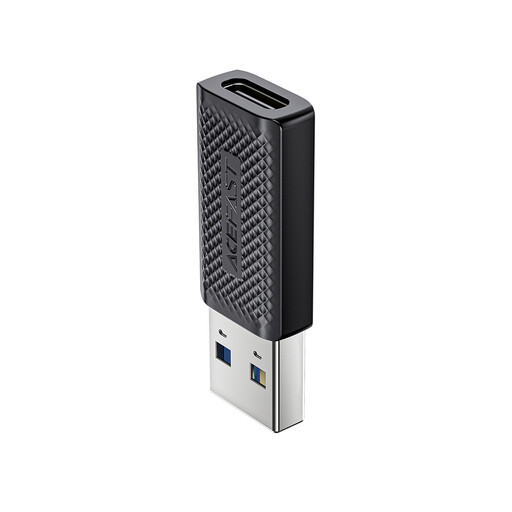
Why This Fits Their Persona: This is for someone who has already purchased a USB-C peripheral, like a headset or external drive, but is working with a computer that only has older USB-A ports. They need a simple, reliable way to bridge that technology gap without buying all new hardware.
This adapter is the direct solution to the connectivity mismatch pitfall. It prevents a modern USB-C device from becoming unusable with older, but still perfectly functional, computer hardware.
Provides a cost-effective way to ensure compatibility between new USB-C accessories and older USB-A ports. Supports high-speed data transfer up to 5 Gb/s.
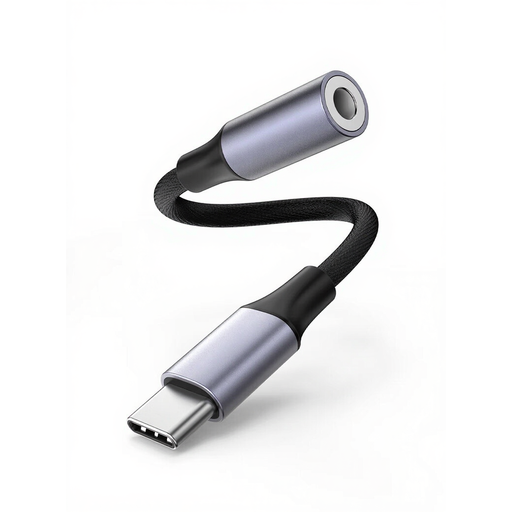
Why This Fits Their Persona: This is for the user who already owns a high-quality pair of headphones with a traditional 3.5mm jack but needs to connect them to a modern laptop or smartphone (like an iPhone 15/16 or Galaxy S24) that lacks a headphone port.
It prevents you from having to discard a perfectly good pair of 3.5mm headphones. The integrated DAC (Digital-to-Analogue Converter) chip also avoids the poor audio quality common with basic, non-powered adapters.
Allows use of traditional 3.5mm headphones with modern USB-C devices. The built-in DAC chip helps maintain clear, high-fidelity stereo audio quality.
We have compiled a complete, real-time list of products that fully satisfy these strict selection criteria and UK safety regulations.
No, it is designed to be a plug-and-play device. Simply connect the USB-C plug (or the USB-A adapter) to your computer. Your operating system, whether Windows, macOS or ChromeOS, should automatically recognise it as an audio device. You may need to select "Poly Blackwire 3220" as your default input and output device in your sound settings or within applications like Teams or Zoom.
The microphone is engineered to significantly reduce consistent, low-frequency background noises such as office chatter, air conditioning and keyboard clicks. This ensures your voice remains the primary focus during a call. However, it may not completely eliminate loud, sudden or high-frequency sounds like a dog barking or a siren.
Yes, if your mobile phone has a USB-C port that supports audio output, you can plug the headset directly into it. It is a practical solution for taking professional calls on the go without relying on your phone's built-in microphone and speaker.