
24/7 Customer Support

Free returns

Same-day & Next-day Delivery

Quality Guaranteed

Unlock Your Welcome Offers: FREE Delivery | Up to 80% OFF | Free 30-day JoyPlus trial
Download the APP
Driving an older car you love shouldn't mean you're stuck with outdated technology. If your vehicle predates the era of integrated smart displays, you've likely felt the inconvenience of juggling your phone for navigation while trying to keep your eyes on the road. The good news is that a portable CarPlay screen offers a simple, effective upgrade without the cost and complexity of replacing your entire head unit.
However, the market is flooded with options, and not all are created equal. Many drivers are drawn in by flashy features, only to be let down by poor performance. Before you buy, it's crucial to understand the common pitfalls that can turn a promising upgrade into a frustrating waste of money.
As the Joybuy Product Recommendation Officer, my role is to help you navigate these issues. This guide will break down the essential features to look for and highlight some practical options to modernise your driving experience.
To avoid disappointment, focus on these three non-negotiable specifications. They are the foundation of a reliable and user-friendly universal CarPlay display.
The screen is your primary interface, so its quality is paramount. Don't be swayed by screen size alone; clarity is what matters.
The main appeal of these devices is bringing modern smartphone integration to your dashboard. How they connect is a critical factor.
A dashboard mounted car screen can do more than just run apps. The most practical models combine several functions into one device, reducing clutter and simplifying installation.
Based on these practical criteria, here are a few options tailored to different driver needs and priorities.
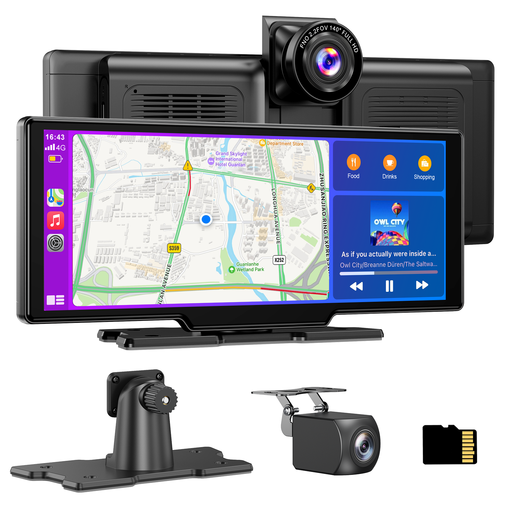
Why This Fits Their Persona: This is for the driver of a pre-2018 vehicle who wants a complete technological overhaul in one go. It provides navigation, media and front/rear cameras without needing to modify the car's original stereo.
It sidesteps the hidden cost trap by including a 64GB TF card. The 10.26-inch screen with 1600x600 resolution is sharp and clear and dual-band Wi-Fi helps ensure a stable wireless connection.
A true all-in-one system combining a 4K front dash cam, 1080P rear camera and wireless CarPlay/Android Auto in a single, easy-to-mount unit.
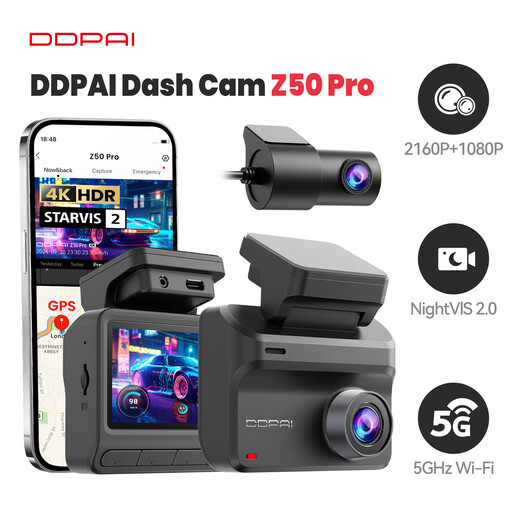
Why This Fits Their Persona: For the driver who prioritises road safety and evidence-grade footage above all. They may already have a navigation solution and want a dedicated, high-performance dash cam system.
This device avoids the "jack-of-all-trades" trap by focusing solely on being an exceptional dash cam. It uses advanced image processing and a quality sensor, delivering on its promise of clear 4K video rather than compromising for other features.
Features true 4K front recording and AI-enhanced night vision for superior clarity in all lighting conditions. The 5GHz Wi-Fi allows for fast video transfers to your phone.
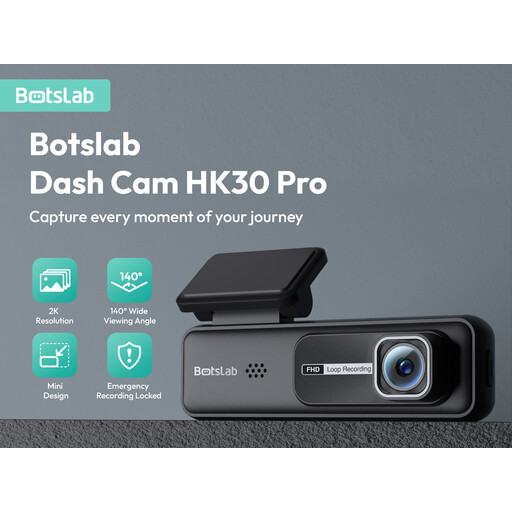
Why This Fits Their Persona: Ideal for new drivers or those on a tight budget who want the essential safety net of a dash cam without the expense of a full infotainment system. It's a simple, effective first step into in-car tech.
This device avoids the trap of over-promising. It is a straightforward dash cam that delivers on its core promise: reliable, high-quality video recording. Its simplicity is its strength, ensuring it's easy to set up and use.
Offers excellent value with 2K Quad HD resolution, which is a significant step up from standard 1080p. The compact, mini design is unobtrusive on the windscreen.
We have compiled a complete, real-time list of products that fully satisfy these strict selection criteria and UK safety regulations.
Most dashboard mounted car screen units plug into the 12V cigarette lighter socket, which is typically only powered when the car's ignition is on. This means it will not drain your battery when the car is parked. For models offering a 24/7 parking monitor mode, a separate hardwire kit is required. These kits connect to your car's fuse box and include a voltage-cutoff feature to prevent the battery from being fully drained.
The small, built-in speakers are generally only suitable for navigation voice prompts. For listening to music or podcasts, you will want to connect the unit to your car's stereo. The most common methods are via an AUX cable, Bluetooth or an FM transmitter. An AUX cable usually provides the most stable and highest-quality audio connection.
While the main screen unit is typically a simple plug and play setup, installing the rear camera is more involved. It requires running a wire from the front of the car to the rear, usually hidden under interior trim panels. The camera itself is mounted near the number plate and must be wired into the reversing light's power supply so it activates automatically when you select reverse gear. This is a manageable DIY task for many, but it does require some time and patience.