
24/7 全天候客户支持

免费退货

当日/次日达

品质保障

开启新人专享福利: 全场免邮 | 低至 2 折 | 免费试用 30 天 JoyPlus 会员
下载 Joybuy
By Joybuy Product Recommendation Officer
A portable handheld fan can make a crowded train, warm office or outdoor event considerably more comfortable. However, product listings often focus on impressive RPM figures, “all-day” battery claims and compact styling while leaving out the details that affect everyday use.
Before buying, watch for three common traps:
The right choice depends on where and how you intend to use it. A commuter may prioritise quiet operation and USB charging, while a festival-goer may need a larger battery and a visible charge indicator.
A rechargeable handheld fan is generally more convenient than a battery-operated fan for regular use, particularly if you already carry a power bank or USB charger. Battery capacity is shown in mAh, but a larger number does not automatically guarantee longer use: motor power, airflow setting and display functions also affect consumption.
Look for:
For example, the JISULIFE Turbo Handheld Fan Pro1S lists a 5,000mAh battery, USB-C charging and an operating range of approximately 3–15 hours, depending on settings and usage. Its “up to 40 hours” cooling description refers to a different low-demand usage condition, so shoppers should read the full specification rather than rely on one headline number.
A USB rechargeable fan is particularly useful for commuting, hotel rooms, camping and long journeys, provided you charge it before leaving.
A high RPM number can indicate a fast motor, but it does not tell you how comfortable the airflow will feel. Check whether the fan offers several speed levels, the stated maximum air speed and whether the airflow is concentrated or broad.
A mini portable fan with three speeds may be sufficient for an office desk or short journeys. A model with five or more settings gives finer control, which can be useful when moving between a quiet workplace and a hot outdoor environment.
Also consider noise. A quiet portable fan is more suitable for video calls, libraries, bedrooms and shared offices. Brushless motors are often described as quieter, but actual sound can still vary by speed and construction. If a listing does not provide a decibel rating, treat “quiet” as a descriptive claim rather than a precise measurement.
A handheld fan with stand can serve as a desk fan when you need both hands free. A lanyard or wrist strap helps prevent drops on public transport, at concerts or while walking. Some models fold or include a neck-wearing option, making them more adaptable than a basic personal cooling fan.
For households with children, check the blade and grille design, supervise use and keep fingers, hair and objects away from the air intake and outlet. Fans containing lithium-ion batteries should not be punctured, dismantled, exposed to fire or charged with incompatible accessories. Keep any fan away from water and heavy rain unless the product specifically states otherwise.
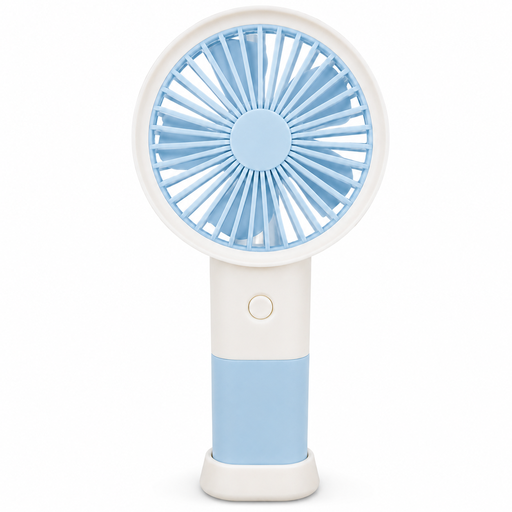
Why This Fits Their Persona: It offers straightforward controls and everyday versatility for commuters, office workers and shoppers wanting a practical entry-level fan.
The three speed settings are clearly specified, while the table stand avoids relying on handheld use all day. Type-C charging also works with many laptops, power banks and adapters.
Three adjustable speeds; integrated table stand; Type-C charging; compact format for bags and backpacks.
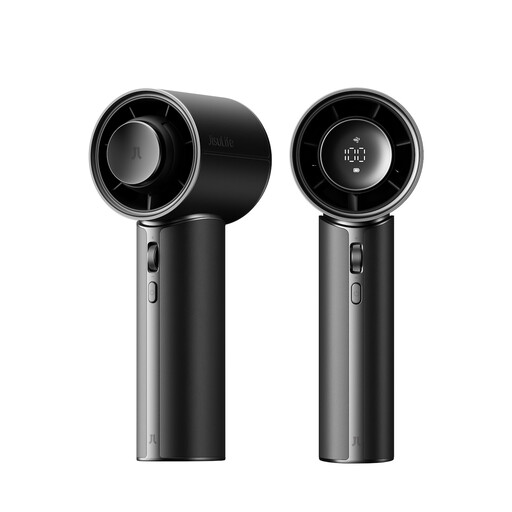
Why This Fits Their Persona: A suitable option for shoppers who value a refined finish, detailed controls and carrying flexibility for travel, events or daily commuting.
The listing provides a runtime range of 3–30 hours rather than presenting one figure without context. A display shows wind speed and battery information, helping avoid unexpected shutdowns.
100 wind-speed levels; 4,250mAh battery; LED display; retractable lanyard and storage pouch.
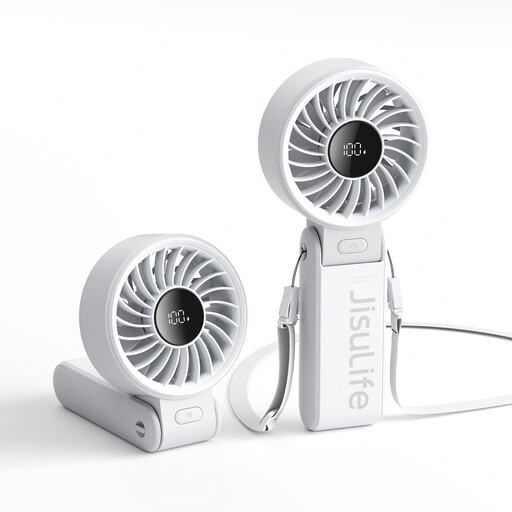
Why This Fits Their Persona: Its foldable, multi-use design suits festival visitors, travellers, outdoor enthusiasts and anyone moving between handheld, desk and hands-free cooling.
The five speeds and battery display provide more control than a single-speed mini fan. Its stated 3.5–19-hour operating range makes the speed-dependent runtime clear.
5,000mAh battery; five speed settings; foldable 3-in-1 design; handheld, desk and neck-worn use.
We have compiled a complete, real-time list of products that fully satisfy these strict selection criteria and UK safety regulations.
Before placing an order, confirm:
A small personal fan is generally convenient for travel, but airline rules can vary for devices containing lithium-ion batteries. Keep rechargeable fans in accessible hand luggage where required, and check the current policy of your airline before flying. At concerts and sporting venues, bag-size and item restrictions may also apply.
The electricity cost is usually modest because these fans use relatively low power and have small batteries. The exact cost depends on battery capacity, charging frequency and your electricity tariff. Charging from a laptop or power bank may shift where the energy comes from but does not eliminate energy use.
Use the lowest comfortable speed, avoid blocking the air intake, keep the vents free from dust and use a suitable charger. Do not expose the fan or battery to excessive heat, water or impact. If the fan becomes unusually hot while charging, disconnect it and follow the manufacturer’s safety instructions.