
24/7 Customer Support

Free returns

Same-day & Next-day Delivery

Quality Guaranteed

Unlock Your Welcome Offers: FREE Delivery | Up to 80% OFF | Free 30-day JoyPlus trial
Download the APP
Whether you're a student juggling assignments, a gamer battling for storage space or a creative professional safeguarding a portfolio, the "Storage Full" notification is a familiar frustration. A reliable portable hard drive is no longer a luxury; it's an essential tool for backing up precious memories, expanding your digital library and working on the go.
But navigating the market can be confusing. With a sea of acronyms, capacities and connection types, choosing the right device can feel overwhelming. As the Joybuy Product Recommendation Officer, my role is to help you cut through the clutter. This guide will walk you through the key considerations and highlight some excellent options to help you find the perfect portable storage solution for your needs in the UK.
Before diving into specific products, let's cover a few key factors that will help you narrow down your search.
The most significant choice you'll make is between a traditional Hard Disk Drive (HDD) and a Solid State Drive (SSD).
Capacity is measured in gigabytes (GB) and terabytes (TB), where 1TB equals 1,000GB.
Your data is valuable, so protecting it is crucial. Many modern drives offer built-in security features. A secure encrypted hard drive with 256-bit AES hardware encryption provides a powerful layer of protection, making your data unreadable to anyone without the password.
Also, consider compatibility. Most drives are formatted for Windows straight out of the box. If you're looking for the best external hard drive for Mac, you may need to reformat the drive or install a specific driver to enable full read/write access.
Here are our recommendations, selected to meet a range of different needs and budgets.
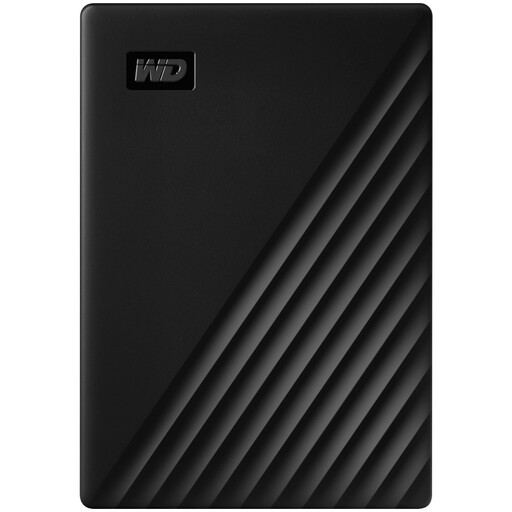
Why It Stands Out: The My Passport is a trusted all-rounder that balances portability, security and value. It's a dependable workhorse for everyday data storage and backup, featuring robust software tools and a design that considers environmental impact.
Pros:
Who is it for?: Students, home users and office professionals who need a reliable and secure drive for backing up documents, photos and important files. It's an excellent choice for a first 1tb portable hard drive.
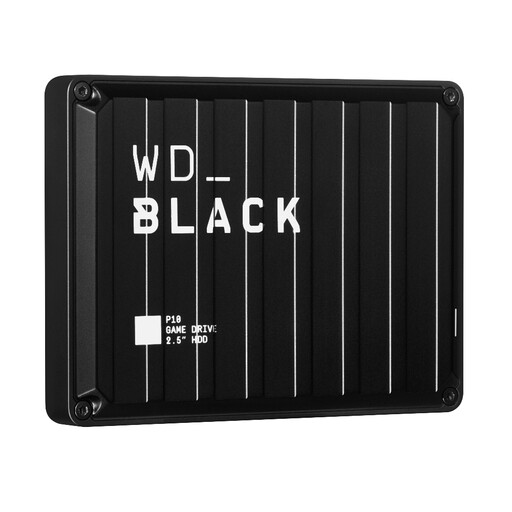
Why It Stands Out: This drive is purpose-built for gamers. With a massive 5TB capacity and a design optimised for console and PC use, the WD BLACK P10 allows you to carry an enormous game library with you wherever you go.
Pros:
Who is it for?: Dedicated console and PC gamers who are tired of deleting games to make room for new ones. This WD external hard drive is the perfect solution for expanding your digital collection.

Why It Stands Out: The Samsung T9 is all about speed and toughness. As a high-performance portable SSD, it's engineered for professionals who can't afford to wait. It combines blistering transfer rates with a rugged design, making it a top-tier choice for demanding workflows.
Pros:
Who is it for?: Creative professionals—videographers, photographers and graphic designers—who need maximum performance and durability for transferring and working with large files on location. This is a leading Samsung portable SSD for power users.
If these specific models don't quite fit your requirements, or if you're simply looking for a different style or capacity, there are many other choices available.
Explore our full collection of black USB drive options to find the perfect match for your setup and budget.
A portable hard drive (HDD) uses mechanical spinning platters to store data. It offers higher capacities for a lower price but is slower and more susceptible to damage from drops. A portable solid-state drive (SSD) uses flash memory, making it much faster, more durable and quieter, though it typically costs more per gigabyte.
You can use most USB external HDDs and SSDs to store and play previous-generation games (PS4 on PS5, Xbox One on Series X/S). However, to play current-generation games, they must be on the console's internal drive or a compatible expansion card. An external drive is an excellent and cost-effective way to archive current-gen games, allowing you to move them back to the internal drive quickly without re-downloading.
Most external drives come pre-formatted with the NTFS file system for Windows. While a Mac can read files from an NTFS drive, it cannot write to it without extra software. For full compatibility, you can reformat the drive to a Mac-native format like APFS. Alternatively, some drives, like the WD My Passport, provide a downloadable driver that enables full read/write access on macOS without reformatting.