Choose portable work accessories around your laptop’s actual video, charging and connection capabilities, rather than the shape of its USB-C port. A compatible portable monitor can help when you need a second screen at changing desks; a hub suits a smaller set of recurring connections, while a fuller dock makes more sense where you regularly reconnect many peripherals. Add compact input devices, carrying protection or portable power only where they solve a specific problem in your routine.
Who is this kit for?
Frequent desk switchers
Workers moving between home, office and shared desks need equipment they can carry and connect without rebuilding a fixed workstation. The Health and Safety Executive includes mobile work and hot-desking in its display screen equipment guidance for Great Britain.
Single-cable laptop users
Consumers hoping to connect a display and peripherals while charging through one USB-C connection need to check each function against their laptop. Lenovo’s portable-monitor requirements and Anker’s hub guidance both make host-port capabilities important to that choice.
Workers reconnecting several peripherals
People who repeatedly attach storage, cards, wired networking or displays may benefit from a broader port selection at a regular work location. Anker’s hub and CalDigit’s dock illustrate different connection needs, but the host computer still determines which functions can be used.
What matters when choosing?
Check the laptop’s video output and charging requirements before choosing a monitor or hub. Then consider which items you will actually carry and reconnect at each work location.
| Concern | What to check | Who this matters to |
|---|
| A dependable second screen |
Match the monitor’s video and power requirements to the laptop port. Check the screen’s carrying weight and how its stand fits the desks you use. |
When I change desks, extra screen space helps only if my laptop can drive the display. Around 34% of consumers put a dependable second screen first. |
| Connections and charging |
Check the host’s video capability, the hub’s actual output ports and how much charging power reaches the laptop after the hub’s own use. |
If I reconnect a display and peripherals each day, I need those connections to work without compromising laptop charging. Roughly 33% of consumers prioritise connections and charging. |
| Input and carrying |
Check keyboard layout, mouse suitability, packed size and whether a sleeve fits the equipment you intend to carry. |
A kit I carry between desks needs to be manageable to unpack and comfortable to use. About 20% of consumers place compact input and protection first. |
| Portable power |
Match the power bank’s output to the device’s charging requirements. If flying, check its watt-hour marking and the airline’s current rules. |
When I cannot rely on a socket, charging my work device matters more than adding another peripheral. Around 13% of consumers put travel-ready portable power first. |
Buying pitfalls
-
Assuming every USB-C port carries video and power
A plug may fit while the laptop, cable or accessory lacks a function needed for the intended display or charging setup. Lenovo specifies DisplayPort Alt Mode requirements for its ThinkVision M14 monitors.
Compare the exact laptop-port specification with the monitor or hub’s video mode, charging requirements and display limits before ordering.
-
Counting the charger’s full output as laptop power
A hub can use some incoming power itself. Anker states that its 555 hub accepts up to 100W for pass-through charging but reserves 15W for operation.
Check the laptop’s charging requirement alongside the hub, charger and cable ratings.
For the Anker 555, the wall charger is not included, so a suitable charger is a separate item to account for.
-
Treating portable accessories as a substitute for workstation assessment
A light kit does not address every issue with a regularly used home, office or shared-desk setup. The Health and Safety Executive includes mobile workers and hot-desking in its Great Britain display screen equipment guidance.
Discuss recurring setup or discomfort issues through your employer’s assessment arrangements and adjust the workstation at each regular location.
-
Packing a power bank without checking flight rules
The UK Civil Aviation Authority says power banks must travel in the cabin, not checked baggage. A power bank that suits a device’s charging needs still needs to meet the rules for the journey.
Read its watt-hour marking, keep it in cabin baggage and check the airline’s current instructions before flying. Do not travel with a damaged or swollen unit.
Relevant brands for reference
Lenovo ThinkVision
The M14 and M14d are portable USB-C monitor examples for adding a screen to a laptop setup.
- Lenovo specifies DisplayPort 1.2 Alt Mode compatibility for both models; the M14d lists up to 65W power pass-through.
- The laptop must provide the video and power functions required by the particular monitor. Do not assume that any USB-C port will work.
Anker
Its 555 USB-C hub is an example for connecting an HDMI display and other peripherals through a portable hub.
- Anker lists up to 100W power input for the 555, with 15W reserved for hub operation.
- The hub’s USB-C data ports do not provide display output. Check the host laptop’s video capability and use the specified display connection.
CalDigit
The TS4 is a fuller dock to consider where a regular desk needs numerous recurring connections.
- CalDigit lists 18 ports, 2.5GbE and up to 98W host charging for the TS4.
- Display support depends on the host and operating system; CalDigit notes a single-external-display limit for original Apple M1 computers through the Thunderbolt port. At a stated 0.64kg, it also adds more to a daily bag than a small hub.
Portable-work products on Joybuy
These products address second-screen, compact-input and laptop-connection needs at changing desks. Choose among them by the laptop functions and carrying requirements that matter to your setup.
 No image available
ASUS ZENSCREEN MB166CR FHD
A portable-monitor option if you need a second screen at changing desks and your laptop supports the display connection it requires.
Check the laptop’s USB-C video capability before choosing this model; the FHD designation alone does not establish host compatibility.
View on Joybuy
 No image available
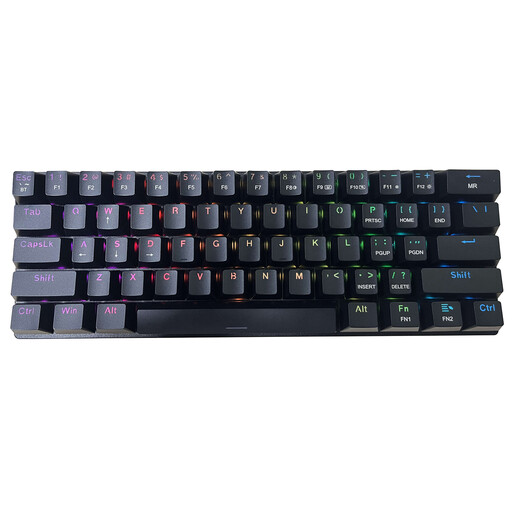
Free Gift Mouse ET 60% Tri-Mode Mechanical Keyboard, QWERTY US
The 60% layout offers a smaller keyboard to carry between desks.
This variant has 61 keys and clicky blue switches. Check whether its QWERTY US layout and switch sound suit your work areas, particularly if you need a UK layout or work in shared spaces.
View on Joybuy
 No image available
USB-C Adapter, 2 HDMI + DP + 2 USB 3.0 + 2 USB 2.0 + RJ45 + PD + SD/TF + Audio
This port selection is relevant if you repeatedly reconnect displays and peripherals at a work location.
The name lists two HDMI ports, DisplayPort, four USB ports, RJ45, PD, SD/TF and audio. Check your laptop’s video support, the adapter’s charging rating and its display limits before relying on a particular setup.
View on Joybuy
 No image available
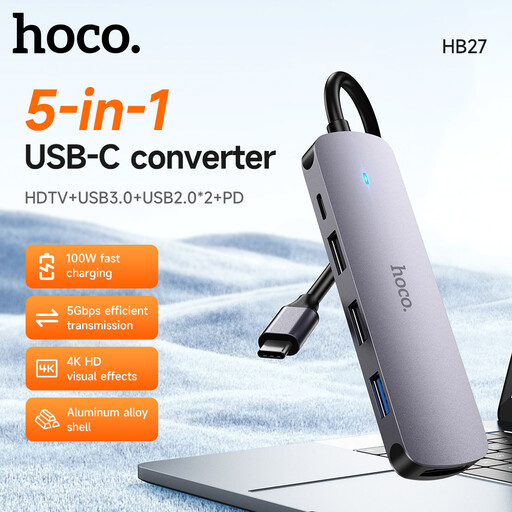
HOCO HB27 USB-C Hub – Metal Gray
Consider this hub when you need a compact way to connect a display and common peripherals at changing desks.
Check your laptop’s USB-C video support and the hub’s charging capability against your devices before depending on HDMI output or power pass-through.
View on Joybuy
Frequently asked questions
Will any USB-C laptop port run a portable monitor?
No: the laptop port must support the video connection required by the particular monitor. Lenovo specifies DisplayPort 1.2 Alt Mode for its ThinkVision M14 and M14d, so check your laptop documentation as well as the display’s requirements.
Does a USB-C hub pass all of a charger’s power to the laptop?
Not necessarily. Anker states that its 555 hub reserves 15W for operation from up to 100W of power input, and its wall charger is separate. Compare the power available through your chosen hub with what your laptop accepts.
Does portable equipment remove the need to assess a regular workstation?
No. The Health and Safety Executive’s Great Britain display screen equipment guidance includes mobile workers and hot-desking; a portable monitor or hub does not replace assessment of the work arrangements that apply to you. Northern Ireland has separate guidance from the Health and Safety Executive for Northern Ireland.
Can I put a work power bank in checked baggage?
No. The UK Civil Aviation Authority says power banks must be kept in the cabin rather than checked baggage. Check the battery’s watt-hour marking and your airline’s current instructions before travelling.
What safety checks help when buying electrical work accessories for Great Britain?
Identify the exact model and its applicable safety information, particularly if a listing raises a concern. The UK Government provides a product-safety alerts and recalls service that you can check for that model; requirements for Northern Ireland should be considered separately.


