Second-screen commuters
If you need documents, spreadsheets or meetings visible alongside your main task, a portable monitor is worth considering once you have checked your laptop's video connection. It also adds something substantial to carry.


Start with the connections and charging requirements of your work laptop, plus your employer's accessory rules. Carry a portable monitor if a second screen solves your main problem and the laptop supports it; otherwise, a compact hub, charging kit or input devices may address the task with less to carry.
If you need documents, spreadsheets or meetings visible alongside your main task, a portable monitor is worth considering once you have checked your laptop's video connection. It also adds something substantial to carry.
If you move between desks with different displays, network connections or USB peripherals, focus on the ports you actually use and the power your laptop can receive through a charger or hub.
If carrying and setting up extra equipment is the main obstacle, a compact keyboard-and-mouse set or a suitable case may be more useful to you than another screen. Check how each item connects to your work device.
Decide what slows you down away from your usual desk, then check that the proposed kit works with your laptop and is permitted at work. A connector that fits does not, by itself, establish video or charging support.
Choose it when: charging, carrying or laptop input matters more than extra screen space.
Trade-off: it keeps the kit smaller but does not give you a second display.
Choose it when: working across documents or presenting makes a second screen the priority, and your laptop supports the monitor's required video connection.
Trade-off: the display needs bag space, a suitable work surface and a workable power arrangement.
Choose it when: you regularly connect to an office screen or wired equipment but do not need to carry a monitor.
Trade-off: a hub adds ports, not video functions your laptop lacks; pass-through charging also needs checking as a complete setup.
| Concern | What to check | Who this matters to |
|---|---|---|
| More screen space | Match the monitor's required video mode to the exact laptop port; consider its weight and how it will be powered. | If I need to keep a spreadsheet and meeting notes visible together, a second screen may justify the extra item in my bag. Around 29% of consumers put portable screen space first. |
| Power and connections | Check the required display and network ports, laptop charging input, and the charger, cable and hub combination. | When I change desks, I need my laptop to charge and connect to the equipment I use there. For around 29% of consumers, reliable power and connections are the primary concern. |
| Carrying and input | Compare the packed size of the case and peripherals; check laptop fit and whether wireless pairing or a receiver is permitted. | I carry my kit regularly, so I want input devices and protection that fit my bag without making each move cumbersome. Carrying and input come first for around 21% of consumers. |
| Workplace approval | Ask IT which personal accessories and connection methods are allowed; raise workstation-assessment needs with your employer. | Before I connect anything to a managed laptop, I need to know that I can use it for my work. Around 21% of consumers make workplace approval their first concern. |
A matching connector does not establish that the laptop provides the video or power function an accessory needs. Lenovo, for example, specifies DP1.2 Alt Mode and PD2.0 for the ThinkVision M14.
Check the exact laptop model against the accessory's video and power requirements, and confirm that IT permits its use.
Power available to a laptop can differ from a hub's headline pass-through rating. Belkin states that its AVC004 adapter uses 8 W of its stated 100 W input for the hub itself.
Start with the laptop's charging requirement, then check the charger, cable, hub and laptop together under the connections you intend to use.
Technical compatibility does not settle whether an accessory may be connected to a managed work device. The Information Commissioner's Office highlights security risks associated with personal-device use, including weak access controls and insecure storage.
Ask IT about the specific hub, wireless connection, receiver, headset or other accessory before using it for work.
Lithium-battery precautions affect how you pack a charging kit for a flight.
The UK Civil Aviation Authority says to keep power banks with you in the cabin, not in checked luggage. Check your airline's rules for your battery before travelling.
ThinkVision mobile monitors are relevant if you want a second screen with stated connection requirements.
Its portable-monitor range is relevant to workers considering a screen they can move between locations.
USB-C hubs and adapters are relevant when office displays or wired peripherals are already available.
Compact keyboard-and-mouse sets suit workers prioritising portable input rather than another display.
USB-C chargers and power banks are relevant when access to mains power is the main constraint between locations.
These choices cover portable second screens, adapters for existing displays and wired equipment, and a laptop case for moving between workplaces. Choose the part of the kit that addresses your main task, then check its fit and connection requirements.
 No image available
Consider this when a second screen is more useful than a smaller carry kit, and check that your laptop provides the required video connection.
The product name specifies a 14-inch touchscreen, 60 Hz refresh rate, 100% sRGB, VESA compatibility and a 180° adjustable stand. Check the monitor's weight if you expect to carry it regularly.
 No image available
Consider this for desks where you need to connect an existing display or wired network, provided your laptop supports the required outputs.
The product name lists 4K HDMI, VGA, Gigabit Ethernet, dual USB 3.0 ports and 100 W Power Delivery. Check the power reaching your laptop with your charger and cable; the stated rating alone does not establish it.
 No image available
This is another second-screen option for moving between desks; check whether the work laptop can provide the display connection it needs.
The product name specifies a 15.6-inch Full HD IPS display, USB Type-C connection and anti-glare surface. Allow for the screen in your bag and check its carrying weight against the rest of your kit.
 No image available
Consider this if an existing workspace has a display and several wired peripherals to connect, rather than carrying your own monitor.
The product name lists two USB-A 3.0 ports, one USB-C 3.0 port, SD/TF connections and HDMI 4K at 60 Hz. Check host compatibility and the adapter's dimensions and charging arrangement for your intended kit.
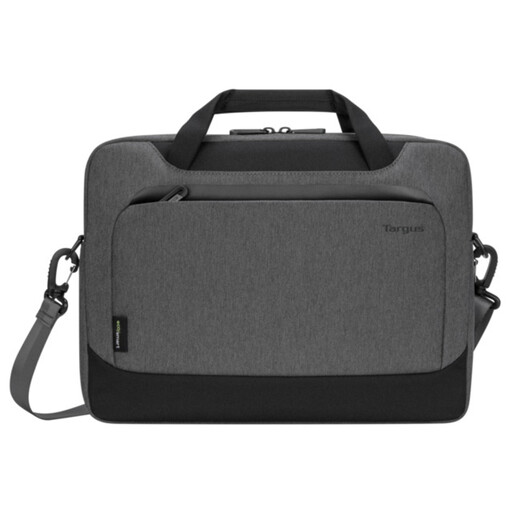 No image available
A carrying option for someone moving a laptop between work locations without adding another screen or adapter.
The product name identifies a 14-inch slipcase. Check your laptop's actual dimensions against the internal fit, and confirm there is room for any charger or accessories you intend to carry.
A portable monitor is not an automatic requirement under the Health and Safety Executive guidance cited here. The HSE says employers must assess the workstation of a worker who uses display screen equipment daily as part of normal work for continuous periods of an hour or more, then address identified risks; the appropriate measure depends on the whole workstation and the work involved.
No: USB-C connector shape alone does not establish video or charging compatibility. Check your laptop's exact capabilities against the accessory requirements; Lenovo, for instance, specifies DP1.2 Alt Mode and PD2.0 for the ThinkVision M14.
Check your employer's policy before connecting it. The Information Commissioner's Office highlights security risks associated with personal devices used for work, while the rules for a particular accessory and managed laptop depend on your organisation.
Keep the power bank with you in the cabin, not in checked luggage, as the UK Civil Aviation Authority advises. Check the airline's current battery requirements for your particular power bank before travelling.