Who needs which setup?
The useful starting point is whether you need internet on one device or a connection that several devices can share.
Hybrid workers needing a backup connection
If a laptop needs access during occasional work away from home or the office, compare phone tethering with a separate mobile hotspot. Check the chosen network at each regular work location before relying on either.
Students using a tablet as their main device
A cellular tablet can access mobile data directly for documents, learning platforms and messages while travelling. If a laptop also needs internet, check the tablet’s sharing capability rather than assuming it can serve both devices.
Travellers carrying several devices
A SIM-based hotspot can share mobile data; a travel router instead needs a suitable upstream connection, such as hotel Wi-Fi, Ethernet or tethering. For trips abroad, check the destination’s roaming terms as well as the available connection.
What should you check before choosing?
Choose the source of your internet connection first, then check where it must work and which devices will use it.
Phone tethering
Consider it: For occasional laptop or tablet access when your phone, coverage and tariff suit the task.
Trade-off: The connection uses the phone’s battery and data allowance.
Dedicated mobile hotspot
Consider it: When several devices need a shared mobile-data connection or you want connectivity separate from your phone.
Trade-off: It adds a device to charge and needs a compatible SIM and service arrangement.
Cellular tablet
Consider it: When the tablet itself is your main work or study device.
Trade-off: Direct data access on the tablet does not establish that it can connect your laptop too.
Travel router
Consider it: When you already have hotel Wi-Fi, Ethernet or a tethered connection to distribute to your devices.
Trade-off: A travel router does not necessarily contain its own mobile-data modem.
| Priority | What to check | Your needs |
|---|
| Local coverage |
Compare candidate networks at each destination using Ofcom’s Map Your Mobile checker, including its indoor and outdoor predictions. Treat predicted coverage as a starting point, not a guarantee inside a particular building. |
I need the connection to work where I actually sit, not just somewhere in the surrounding area. |
| Tariff and roaming |
Check the data allowance, whether the tariff permits your intended device and tethering use, and any roaming limits for destinations abroad. Ofcom advises checking your package before overseas travel because roaming can bring extra charges. |
Video calls, uploads and cloud files need to fit the plan I intend to use. If I travel abroad, I need to know which terms change. |
| Devices and ports |
Count the devices that must connect together. For a hotspot, check its stated device capacity and whether the exact model has a suitable Ethernet port; for a tablet, check sharing support separately. |
Will my laptop and phone need to be online at the same time, or do I only need data on one tablet? |
| Connection source |
For a travel router, identify whether you will supply hotel Wi-Fi, Ethernet or a tethered connection. Confirm that the exact model supports that method; cellular capability should not be assumed from the term ‘travel router’. |
I want my devices on one local network, but I also need to know where that network gets its internet connection. |
| Compatibility and security |
Check the exact device’s SIM format, network support and lock status. For a router, review its administration-password setup and published update information. |
I need hardware that works with my intended service and that I can manage when using it away from home. |
| Power |
Compare the manufacturer’s stated battery runtime with your expected time away from charging, and plan how you will recharge. Treat claimed runtime as conditional rather than a promise for a full workday. |
If I am away from a socket for hours, I need a workable charging plan for the device providing the connection. |
Relevant brand references
These product lines illustrate different connection types; a brand reference does not mean that every model has the same features.
TP-Link
The M8550 is an example of a SIM-based mobile router intended to share a connection across devices.
- TP-Link lists 5G/4G/3G support, a Gigabit WAN/LAN port and support for up to 32 connected devices on the M8550.
- Those model specifications do not establish signal quality or service suitability at your destination.
NETGEAR
The Nighthawk M3 is a dedicated 5G hotspot for people considering a separate connection for multiple devices.
- NETGEAR says the M3 allows SIM and data-plan swapping, supports up to 32 devices and offers up to 13 hours of battery life.
- Its stated capacity and battery life do not establish coverage, roaming entitlement or runtime for your particular use.
Apple
A Wi-Fi + Cellular iPad illustrates the route where the tablet itself needs mobile data.
- Apple says eligible Wi-Fi + Cellular iPad models can use mobile-data plans, including short-term plans.
- Choose the cellular variant if direct mobile data matters; a connection on the tablet does not automatically meet a laptop’s connectivity needs.
GL.iNet
The Beryl AX GL-MT3000 illustrates a travel router used with an existing internet connection.
- GL.iNet documents Ethernet, repeater, tethering and cellular connection methods for this model.
- Check what equipment each method requires; the list of connection methods does not mean every setup has a built-in cellular modem.
Joybuy mobile hotspots and cellular tablets
These options cover a separate mobile hotspot and tablets with stated cellular connectivity. Choose between them according to whether you need to share data with other devices or primarily connect the tablet itself.
 No image available
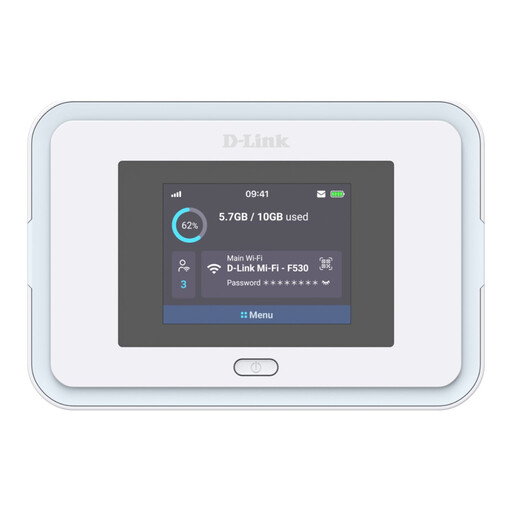
D-Link F530 5G NR AX3000 Wi-Fi 6 Mobile Hotspot
A separate hotspot for sharing mobile data while working away. The product information specifies a Nano SIM, AX3000 Wi-Fi 6 and a display for monitoring data use; it claims up to 7 hours of use. Check local coverage, SIM and network compatibility, tariff terms and a charging plan for your working hours.
View on Joybuy
 No image available
TECLAST ArtPad Pro 12.7-inch 2K Dual SIM 4G LTE Tablet with Stylus
Consider this when the tablet itself is your mobile work or study device. Its listing states dual-SIM 4G LTE and an included stylus with 4096 pressure levels. Check coverage, SIM and network compatibility and the data plan; if a laptop also needs access, confirm the tablet’s hotspot capability.
View on Joybuy
 No image available
TABWEE W90 11-inch Dual 4G SIM Tablet, 256GB
This is a cellular-tablet option for using data directly on your main device. The listing specifies dual 4G SIM connectivity, Nano-SIM slots and 256GB storage; SIM cards are not included. Check UK network compatibility and any hotspot needs, and confirm the exact battery and Android specifications before choosing this variant.
View on Joybuy
 No image available
TECLAST T65 Plus 13.4-inch Dual SIM 4G LTE Tablet, 256GB
Its stated dual-SIM 4G LTE connection suits direct mobile data use on the tablet. The listing also specifies a 13.4-inch, 120Hz display and 256GB storage. Consider whether that screen size suits your travel setup, and check coverage, SIM and network compatibility, tariff terms and any need to share data with other devices.
View on Joybuy
 No image available
TECLAST T70 14-inch 1920×1200 Dual SIM 4G LTE Tablet
This larger-screen tablet has stated dual-SIM 4G LTE for data on the tablet itself. Check whether a 14-inch device suits how you travel, along with local coverage, SIM compatibility and tariff terms. Confirm the exact battery and operating-system specifications before planning runtime or choosing a variant, and check hotspot support if other devices need access.
View on Joybuy
Frequently asked questions
How can I check whether a mobile router will work at my destination?
Compare the intended networks at each regular destination using Ofcom’s Map Your Mobile checker, including its indoor and outdoor coverage predictions. Buildings and other local conditions can affect the result, so test the chosen connection where you will work if reliable access is essential.
Can I use my phone plan for a laptop or separate router?
Check the terms of the specific plan rather than assuming the same allowance covers every setup. Phone tethering uses your phone’s connection; a separate router needs a compatible SIM and service arrangement. Confirm permitted use, data limits and device compatibility before relying on either for work.
Does a travel router provide mobile internet by itself?
Not necessarily: it needs a supported upstream connection. GL.iNet documents Ethernet, repeater, tethering and cellular connection methods for the Beryl AX GL-MT3000, but you must check the equipment required for the method you intend to use. For independent SIM-based access, check that the exact router has a cellular modem.
What should I check before using the connection abroad?
Check your destination’s roaming terms before travelling. Ofcom warns that roaming can bring extra charges, so confirm the applicable data allowance, usage limits and charges with your provider rather than relying on your UK allowance.
Will a mobile router or tablet work with any SIM?
Do not assume it will. Check the exact device’s SIM format, supported network bands and lock status against the service you intend to use. Ofcom’s rule against selling locked mobile phones concerns phones; it should not be taken as confirmation that a particular router or tablet is unlocked.


