What to check before buying
Identify the approved device and how much editing you will do before deciding how small the keyboard needs to be.
| Concern |
What to check |
Who this matters to |
| Easy carrying |
Compare listed dimensions and weight with your bag space; check whether the keys have a cover for travel. |
When I move between locations, I want the keyboard to fit beside my review device without adding much bulk. Around 29% of consumers put easy carrying first. |
| Device and editing workflow |
Confirm the exact host device, connection method, operating system and keyboard layout; decide whether document navigation calls for a trackpad. |
If I change between approved devices or annotate on an iPad, I need a keyboard and navigation method that work with the device in front of me. For around 36% of consumers, compatibility and navigation are the primary concern. |
| Confidential handling |
Follow your organisation’s device and connection rules, and use its approved arrangements for viewing and sharing the contract. |
I need to review sensitive clauses without exposing the screen or moving the file through an unapproved channel. Keeping that workflow controlled comes first for around 21% of consumers. |
| Extended typing |
Check the keyboard’s size, layout and connection requirements against the table space and host device you will have. |
When I expect to draft substantial notes rather than make a few comments, I can carry a larger keyboard if it suits my typing setup. Around 14% of consumers prioritise extended typing. |
Joybuy keyboard options
These options span an iPad keyboard case, smaller separate keyboards and full-size layouts for field-trip contract review. Check the exact work device and layout before choosing between them.
 Image unavailable
Rexsun P11-2 Keyboard Case for iPad Pro 11 / Air 10.9 and 11, White
Consider this case if you review documents on an iPad named in the listing and want a keyboard with a trackpad. The title specifies a magnetic floating design, detachable protective cover and precision trackpad; confirm your exact iPad model before buying.
View on Joybuy
 Image unavailable
VoxorAI BOX1 Black Bluetooth Keyboard
A separate keyboard to consider if your approved review device may be a computer, iPad or smartphone. The product title specifies Bluetooth connectivity; check the exact key layout and compatibility with your device.
View on Joybuy
 Image unavailable
Hyper® HyperSpace Next Bluetooth Keyboard (UK), White
Consider this separate Bluetooth keyboard if you prefer a UK-labelled option for field review. Confirm the exact key mapping, host compatibility and packed size against your working setup.
View on Joybuy
 Image unavailable
Targus EcoSmart Full-Size Wireless Keyboard (UK)
A full-size option to consider when field visits involve more typing and you have room to work at a table. Check its dimensions, exact key mapping and connection requirements against your bag and approved device.
View on Joybuy
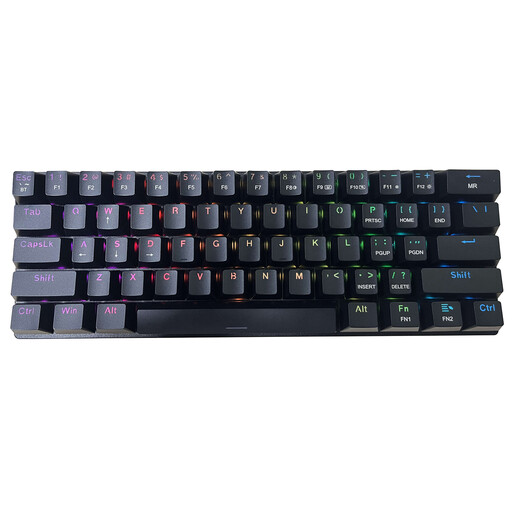 Image unavailable
ET 60% Tri-Mode Mechanical Keyboard, US QWERTY, 61 Keys
Consider this smaller-format keyboard if a US layout works for your contract edits. Its title specifies rechargeable operation, RGB backlighting and clicky Blue switches; consider the switch sound in shared spaces and confirm compatibility with your approved device.
View on Joybuy
Questions about field use
Will one wireless keyboard work with every work device?
No: check the exact device, operating system, connection method and keyboard layout. Logitech lists several supported operating systems for Keys-To-Go 2, whereas Apple limits its cited Magic Keyboard to named iPad Air models running iPadOS 18.3 or later.
Can a keyboard keep field-based contract review confidential?
No: a keyboard is an input accessory, not a substitute for approved devices and secure working practices. The Information Commissioner’s Office advises using approved technology for personal data; also follow your organisation’s rules for screen visibility and document sharing.
How should I care for a keyboard carried between sites?
Follow the cleaning and storage instructions for the exact model, and do not assume a portable keyboard is waterproof. Lenovo describes a liquid-resistant coating on the palm rest of its Go Wireless Split Keyboard, not waterproofing for the whole keyboard.
What product-marking information matters for a wireless keyboard?
Check the intended market and the product information for the applicable rules. For Great Britain, Department for Business and Trade guidance recognises CE marking alongside or in place of UKCA marking under the applicable product regulations; Northern Ireland has a different market process.
What should I do with an old wireless keyboard?
Use an appropriate electrical-waste collection or take-back route when replacing it. GOV.UK guidance on waste electrical and electronic equipment describes measures intended to encourage recovery, reuse and recycling; check the arrangements available where you dispose of the keyboard.


