Choose a separate, slim keyboard if you may edit on a phone, tablet and laptop during the same trip. A compact illuminated keyboard is worth considering for longer sessions in dim light, while an iPad keyboard case makes sense only if your exact iPad is compatible and you want its integrated position and pointer controls. Check the layout, connection method and how your screen will stand before choosing.
Who each setup suits
Multi-device hotel traveller
If your reading list moves between a phone, tablet and laptop, a separate keyboard with device switching may be more useful than a case fitted to one tablet. Logitech says Keys-To-Go 2 connects to up to three devices; Keychron lists three Bluetooth connections plus a 2.4 GHz dongle for the B1 Pro.
iPad reader wanting an integrated setup
If you have a compatible iPad Air, a keyboard case can combine screen positioning and pointer control. Apple lists an adjustable viewing angle, trackpad, charging pass-through and front-and-back protection for its Magic Keyboard for iPad Air 11-inch (M4); compatibility must be checked against the exact iPad.
Comfort-first evening editor
If list clean-up becomes a longer typing session, key visibility in a dim room may matter more to you than the smallest packed size. Logitech says the MX Keys Mini illuminates its keys when hands approach and adjusts the lighting to its surroundings.
What matters when choosing
Start with the device you will actually edit on, then weigh the space your keyboard takes against typing comfort and any stand or trackpad you need.
| Concern |
What to check |
Who this matters to |
| Packing and setup |
Compare folded or packed size, and check how your phone or tablet will stand on the hotel desk. |
I want to unpack quickly for a short edit without carrying a larger desk setup. Around 33% of consumers put compact packing and setup first. |
| Device switching |
Check compatible operating systems, saved-device capacity and how you switch connections. |
My edits move between a phone, tablet and laptop, so changing devices matters more than an integrated case. For around 25% of consumers, switching is the primary need. |
| Typing and visibility |
Check the key layout and whether the exact model has illumination for dim-room use. |
I expect to spend longer correcting and organising entries, sometimes with the room lights low. Typing comfort or key visibility comes first for around 25% of consumers. |
| Integrated iPad use |
Match the case to your exact iPad generation and software version; decide whether you need a trackpad. |
I want my compatible iPad to stand at a useful angle while I edit, with pointer control in the same setup. Around 17% of consumers prioritise that integrated arrangement. |
Buying pitfalls
-
Assuming the same screen size means the same keyboard-case fit
Apple specifies compatible iPad Air generations and an iPadOS 18.3-or-later requirement for its Magic Keyboard for iPad Air 11-inch (M4). Screen size alone is not a sufficient match.
Check your iPad’s exact model and generation against the case listing before ordering.
-
Forgetting where the screen will stand
A separate travel keyboard does not itself give a phone or tablet the adjustable position and trackpad offered by an integrated case.
Check whether your existing stand or case will hold the screen securely at the hotel desk.
-
Assuming layout and switching work the same on every model
Connection modes, saved-device arrangements and keyboard layouts differ between the Logitech, Keychron and Microsoft models considered here.
If familiar UK key placement matters, confirm the exact layout variant as well as compatibility with every device you intend to use.
-
Overlooking battery upkeep and disposal
Power arrangements vary: Microsoft says its Designer Compact Keyboard uses four CR2032 batteries. GOV.UK advises against putting unwanted electrical products and batteries in household rubbish.
Check the power arrangement before travel, and use an appropriate collection route when the keyboard or batteries are no longer usable.
Brands to consider
Logitech
Its Keys-To-Go 2 and MX Keys Mini illustrate two different choices: a slim keyboard for travel and a compact keyboard with illuminated keys.
- Logitech says Keys-To-Go 2 has a built-in cover and connects to up to three devices.
- The comfort-oriented MX Keys Mini is a different route from the more minimal Keys-To-Go 2. Confirm the exact layout and device compatibility for either model.
Keychron
The B1 Pro UK-ISO is a separate compact-keyboard option for readers considering several connection methods.
- Keychron lists Bluetooth, 2.4 GHz and wired modes for the B1 Pro.
- It is not a protective tablet case; check the exact layout variant and availability before choosing it.
Apple
Its Magic Keyboard for iPad Air 11-inch (M4) is relevant to readers who want a case fitted to a compatible iPad Air rather than a separate keyboard.
- Apple lists a trackpad, adjustable viewing angles, USB-C pass-through charging and front-and-back protection.
- Compatibility is limited to Apple’s listed iPad Air models and requires iPadOS 18.3 or later.
Microsoft
The Designer Compact Keyboard is a compact Bluetooth option chiefly relevant to Windows users.
- Microsoft says it can pair with up to three devices.
- Microsoft specifies a Windows 10 or Windows 11 PC with Bluetooth 4.0 or later for setup. The keyboard uses four replaceable CR2032 batteries.
Joybuy product choices
These choices cover separate keyboards for travel or desk-based editing and a keyboard case for a compatible iPad. Compare their layouts, screen support and device fit against the way you edit your reading list.
 No image available
Hyper® HyperSpace Next Bluetooth Keyboard (UK, White)
Consider this separate keyboard if you want to edit on more than one device or use a keyboard away from a tablet case.
The product name identifies a Bluetooth wireless model and a UK variant. If editing on a phone or tablet, check that you have a stable way to stand up the screen.
View on Joybuy
 No image available
VoxorAI B033 Bluetooth Keyboard (Black)
Consider the B033 if a separate keyboard for phone, tablet or computer editing appeals to you.
Its name identifies Bluetooth connectivity. Confirm the key layout if familiar UK punctuation placement matters to your reading-list edits.
View on Joybuy
 No image available
Targus EcoSmart™ Full-Size Wireless Keyboard (UK)
Consider this option if you prefer a full-size keyboard for editing at a hotel desk and have room to carry it.
The product name identifies a UK wireless variant. Compare its packed size with compact models, and check its battery arrangement before travel.
View on Joybuy
 No image available
Rexsun P11-2 Keyboard Case for iPad Pro 11-inch and Air 10.9/11-inch (White)
Consider a keyboard case if you edit on an iPad and want the screen and keyboard in one arrangement rather than carrying a separate keyboard.
The P11-2 product name specifies a magnetic design, detachable protective cover and trackpad. Match your exact iPad generation to the case listing; screen size alone does not establish compatibility. Check the keyboard layout and power arrangement for your trip.
View on Joybuy
 No image available
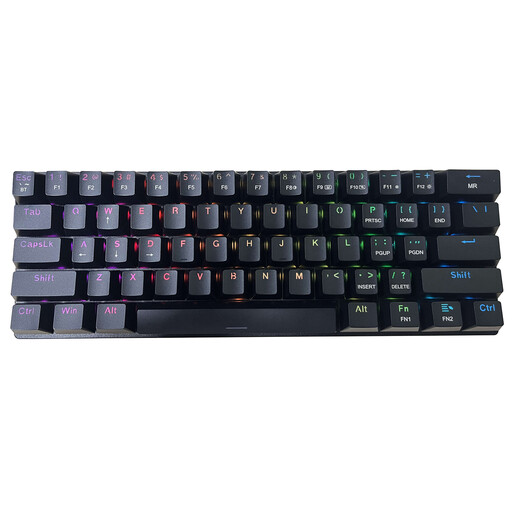
Free Gift Mouse ET 60% Tri-Mode Mechanical Keyboard (US, 61 Keys)
Consider this compact-format keyboard if you have limited space for your hotel-room setup and its US layout suits your typing.
The product name specifies RGB backlighting, clicky blue switches and a rechargeable design. Check whether the switch sound suits a shared room, and confirm how many devices you can pair and switch between.
View on Joybuy
Frequently asked questions
Will an iPad keyboard case fit any iPad of the same size?
No: keyboard-case compatibility depends on the exact model, not just screen size. Apple lists specific iPad Air generations for its Magic Keyboard for iPad Air 11-inch (M4) and requires iPadOS 18.3 or later; check your own case listing against your iPad model and software version.
Do I need a trackpad to edit a reading list?
Not necessarily: a separate keyboard may be enough if you mainly make text changes and are comfortable controlling the screen directly. If your editing involves frequent pointer actions, compare that setup with a compatible keyboard case that includes a trackpad.
Are compact wireless keyboards always rechargeable?
No; the power arrangement depends on the model. Apple describes its Magic Keyboard (USB-C) as rechargeable, while Microsoft says its Designer Compact Keyboard uses four CR2032 batteries. Check what your chosen keyboard needs before packing for a trip.
Can an old wireless keyboard go in household rubbish?
No. GOV.UK advises against putting unwanted electrical products and batteries in household rubbish. Use an appropriate electrical-waste or battery collection route for the items you need to dispose of.


