What to check before buying
For consumers writing a project proposal away from a socket, establish how long the keyboard needs to run before balancing bag space against the layout and connections needed for sustained editing.
| Concern |
What to check |
Who this matters to |
| Power away from mains |
Check whether the selected version is rechargeable or uses replaceable batteries, and read the conditions behind any stated runtime. |
If I need to finish a substantial draft without a socket, I want enough power for the whole session. Around 40% of consumers put uninterrupted writing first. |
| Carry size and typing space |
Compare the keyboard’s dimensions, key spacing and cover, where applicable, with the space available in your bag. |
When I draft mainly on a tablet, I want the keyboard to travel with it without making a long passage awkward to type; around 30% of consumers prioritise that balance. |
| Layout and device fit |
Confirm the physical UK layout, supported operating system and whether connection requires Bluetooth or a compatible receiver port. |
If I revise between a laptop and tablet, I need familiar keys and a connection that works with both. For around 30% of consumers, device and layout fit comes first. |
Portable keyboard choices on Joybuy
These wireless keyboards offer different layouts for writing away from a socket. Consider how much keyboard you want to carry, then check the selected version’s power and connection details against your planned session and device.
 Image unavailable
ASUS ROG Strix Scope II 96 Wireless Keyboard, White, UK Layout
Consider this version if you want a wireless keyboard labelled with a UK layout and prefer a 96% format to a smaller keyboard. Check its expected runtime under the settings you intend to use, and whether its carry weight suits your trip.
View on Joybuy
 Image unavailable
HyperX Alloy Rise 75 Wireless Keyboard UK
The 75% wireless format is worth considering if you want a smaller keyboard for proposal drafting. Confirm the physical UK key arrangement and the runtime for your intended lighting settings before relying on it away from mains power.
View on Joybuy
 Image unavailable
Hyper® HyperSpace Next Bluetooth Wireless Keyboard (UK), White
This Bluetooth model may suit drafting on a device that supports wireless pairing. Confirm its physical layout, charging arrangement and expected runtime for the selected version before taking it on an extended writing session.
View on Joybuy
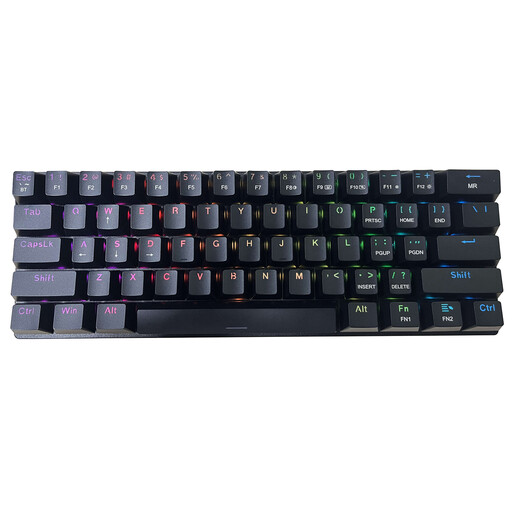 Image unavailable
Free Gift Mouse ET 60% Tri-Mode Mechanical Keyboard, US Layout
The 61-key, 60% format may appeal if a small keyboard matters most. Its stated US QWERTY layout and clicky blue switches may not suit familiar UK punctuation or every writing environment; check how the reduced key arrangement works for your editing tasks. The title also specifies RGB backlighting and a rechargeable design, so check runtime with your intended settings.
View on Joybuy
 Image unavailable
Targus EcoSmart™ Full Size Wireless Keyboard (UK)
A full-size format may suit writers who prefer more typing space and can accommodate a larger keyboard in their bag. Check the exact UK key arrangement and battery replacement plan before using it away from a socket.
View on Joybuy
Common questions
How much battery life do I need for a proposal-writing session?
Choose a power arrangement that covers your planned session with room for interruption or delay, then charge the keyboard or prepare batteries before leaving. Apple says its Magic Keyboard (USB-C) lasts about a month or more between charges; Keychron claims up to 1,200 hours for B1 Pro under an assumption of approximately five hours of use per day. Those claims are not directly comparable session tests.
Do I need a 2.4 GHz receiver as well as Bluetooth?
Bluetooth can be enough if your writing device supports it and you want to pair without a receiver. A 2.4 GHz mode offers another connection method for a compatible host, but check its USB port or adapter requirements; Keychron lists Bluetooth, 2.4 GHz and wired modes for B1 Pro.
Should I choose a UK-ISO or British English keyboard?
If you rely on familiar UK punctuation and key positions, confirm the physical layout of the exact version you order. Keychron lists a UK-ISO B1 Pro variant, and Apple identifies its cited Magic Keyboard (USB-C) version as British English; a general UK label is still worth checking against product images or layout details.
What should I do if a rechargeable keyboard battery looks damaged?
Stop using or charging the keyboard if its battery is visibly damaged or swollen, and follow the manufacturer’s instructions for help or replacement. London Fire Brigade warns that damaged batteries can present a fire risk.


