For editing revision notes away from mains power, choose a keyboard that works with your existing device before weighing how it fits in your bag and how you will keep it powered. A separate Bluetooth keyboard can suit compatible devices you move between, while a fitted iPad keyboard case offers an integrated setup but must match the exact iPad; rechargeable and replaceable-cell keyboards each require preparation before a long session.
Who needs a portable keyboard?
Tablet-first revision editors
If you edit and reorganise notes mainly on a tablet or phone, look for a keyboard you can pack easily and use with that device’s operating system. A separate keyboard may also leave you needing a way to position the screen.
Multi-device study switchers
If your notes move between a laptop, tablet and phone, check compatibility with each device and whether the keyboard lets you switch between them. Logitech lists three-device switching for the Pebble Keys 2 K380s; Microsoft lists it for the Designer Compact Keyboard within its documented setup requirements.
Charge-planning minimalists
If a session may outlast your access to a socket, decide whether you would rather charge a keyboard beforehand or carry suitable replacement cells. Your note-editing device needs enough power for the session too.
What matters when choosing?
Start with the device you use for revision, then consider how you will carry and power the keyboard. If you use an iPad, decide separately whether a fitted case would make editing easier than carrying a standalone keyboard.
| Concern | What to check | Who this matters to |
|---|
| Device compatibility |
Check your device and operating-system version against the keyboard’s compatibility list. For a fitted case, match the exact iPad model. |
If my keyboard cannot connect to the device holding my notes, I cannot use it for editing; around 36% of consumers put device compatibility first. |
| Carrying and typing |
Consider the packed size, key layout and whether you need a separate stand. Check switch noise if you work in a quiet shared space. |
Moving between study locations makes bag space and a workable typing position important to me; roughly 29% of consumers prioritise carrying and typing fit. |
| Power continuity |
Identify the charging connection or replacement-cell type, then plan for your session length. Check what cable or cells come with the keyboard. |
When I cannot recharge during revision, I need a power routine I can maintain; about 21% of consumers make uninterrupted keyboard use their primary concern. |
| Integrated iPad setup |
Match the case to the exact iPad and check which features that particular case includes, such as a stand, trackpad or pass-through charging. |
I want to carry my iPad and keyboard as one editing setup rather than position separate pieces; around 14% of consumers put that fitted workflow first. |
Buying mistakes to avoid
-
Assuming every wireless keyboard works with every device
Compatibility differs by model. Logitech lists several operating systems for its Keys-To-Go 2, while Microsoft documents Windows 10 or 11 and Bluetooth 4.0 or later for setting up the Designer Compact Keyboard.
Check your revision device, operating-system version and the keyboard’s connection requirements before ordering.
-
Choosing an iPad case by screen size alone
Apple lists different compatible iPad families and generations for its fitted keyboard accessories. A similar-looking case is not necessarily a match for your iPad.
Find your exact iPad model and generation, then compare it with the case manufacturer’s compatibility list.
-
Treating either battery method as maintenance-free
A rechargeable keyboard needs power before the session; a replaceable-cell keyboard needs the correct spare cells if its batteries run down. Apple’s USB-C Magic Keyboard and Microsoft’s coin-cell-powered Designer Compact Keyboard illustrate the two arrangements.
Check battery status before leaving and take the appropriate charging cable or replacement cells when needed.
That preparation can mean carrying a cable and finding a charging opportunity, or keeping suitable spare cells to hand.
-
Buying specialist equipment before a DSA assessment
For students seeking Disabled Students’ Allowance in England, GOV.UK advises against buying equipment before the needs assessment. The equipment supported depends on the individual assessment.
If you plan to seek this support, complete the eligibility and assessment steps before choosing a specialist keyboard.
Brands to consider for these keyboard routes
Logitech
Logitech’s Keys-To-Go 2 represents a covered, portable Bluetooth keyboard; its Pebble Keys 2 K380s represents a compact keyboard for switching between devices.
- Logitech lists support for multiple operating systems on these models and three-device switching on the Pebble Keys 2 K380s.
- A separate keyboard does not by itself provide the screen position or trackpad you may want for editing notes.
Apple
Apple offers a rechargeable Bluetooth Magic Keyboard as well as fitted keyboard accessories for particular iPads.
- Apple lists USB-C charging for the cited Bluetooth Magic Keyboard; selected compatible iPad keyboards include a trackpad and pass-through charging.
- Check the listed Apple-device compatibility, particularly the exact iPad model for a fitted keyboard.
Microsoft
Microsoft’s Designer Compact Keyboard represents a compact, coin-cell-powered option for a compatible Windows setup.
- Microsoft lists pairing with up to three devices for this model.
- Its documented setup calls for Windows 10 or 11 and Bluetooth 4.0 or later; that guidance does not establish suitability for other operating systems.
Joybuy keyboard options
These keyboards offer different ways to edit notes away from a socket, from compact Bluetooth layouts to full-size wireless designs. Compare each one with your device, preferred layout and carrying routine; the options are not interchangeable with fitted iPad cases.
 No image available
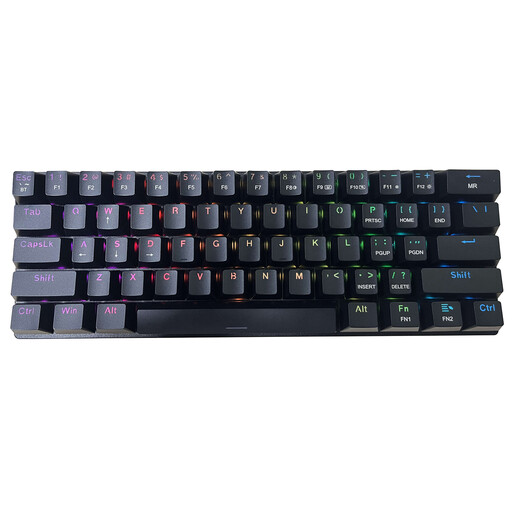
ET 60% Tri-Mode Mechanical Keyboard, US QWERTY
Consider this compact keyboard if you want a separate typing setup to carry between revision locations. Its name specifies 61 keys, a rechargeable design and clicky Blue switches; check device compatibility and whether the US layout and audible switches suit your study space.
View on Joybuy
 No image available
VoxorAI BOX1 Black Bluetooth Keyboard
This separate Bluetooth keyboard is an option to assess if you edit notes on a computer, iPad or smartphone. Check its compatibility with your exact device, its key layout and how long it will run between charges before relying on it away from mains power.
View on Joybuy
 No image available
Hyper HyperSpace Next Bluetooth Keyboard (UK), White
Consider this UK-layout Bluetooth model if you prefer that layout for editing notes. Check the space it takes in your bag, compatibility with your device and the charging routine you would need for a session away from a socket.
View on Joybuy
No image available
Lofree OE907 65% Mechanical Keyboard, US QWERTY
The 68-key layout may appeal if you want a smaller separate keyboard for revising on the move. Its name specifies Bluetooth 5.1 and wired modes; confirm compatibility, expected battery use and whether the US layout suits your typing.
View on Joybuy
 No image available
Targus EcoSmart Full Size Wireless Keyboard (UK)
This UK-layout option is worth considering if you prefer a full-size keyboard and can accommodate it in your bag. Before taking it away from a socket, check its battery requirements, expected running time and whether your device can use its intended wireless connection.
View on Joybuy
Common questions
Can I edit revision notes with a portable keyboard when there is no mains socket?
Yes, if both your editing device and a compatible keyboard have enough power for the session. Apple’s cited Magic Keyboard recharges via USB-C, while Microsoft’s Designer Compact Keyboard uses replaceable coin cells; check the power method of the exact model you choose.
Do I need a keyboard made specifically for my iPad?
You need a model-specific accessory if you want a fitted iPad keyboard case, but a compatible separate Bluetooth keyboard is another option. Match any fitted case to your exact iPad model, and check the features of that particular case rather than assuming every version includes the same trackpad or charging arrangement.
What should I do with an old keyboard or used batteries?
Take unwanted electrical equipment and batteries to an appropriate collection or recycling point rather than putting them in household rubbish. GOV.UK advises using electrical-waste recycling facilities and battery collection points; check the collection arrangements available where you live.


