Mobile lesson planners
If you move between classrooms, home and other locations, packing space and protection in transit matter. Logitech describes Keys-To-Go 2 as a slim keyboard with a built-in cover for use with tablets, phones and laptops.


Choose a slim keyboard with a cover if you regularly pack it alongside a tablet or phone; choose a compact desktop-style keyboard if longer lesson-planning sessions make familiar keys and controls more important. Check the exact desk footprint, keyboard layout and compatibility with every device you intend to use before deciding how much portability to trade for typing space.
If you move between classrooms, home and other locations, packing space and protection in transit matter. Logitech describes Keys-To-Go 2 as a slim keyboard with a built-in cover for use with tablets, phones and laptops.
If you draft substantial plans at a cramped desk, familiar key size may matter more than minimising what you carry. HP describes its portable 350 Compact as having standard-size keycaps.
If you plan on more than one computer, tablet or phone, check how each keyboard moves between compatible devices. Logitech and HP describe multi-device switching on the models discussed here; CHERRY lists several connection channels for the KW 9200 MINI.
Start with the space available beside your lesson materials, then decide which keys and device connections you cannot do without.
| Concern | What to check | Who this matters to |
|---|---|---|
| Desk space and portability | Compare the keyboard’s exact width and depth with your clear desk space; check for a cover if you pack it regularly. | When a notebook or worksheets must share my small desk, I need a keyboard that leaves room to work and is easy to carry. Around 42% of consumers would put space and portability first. |
| Long-session typing | Check the selected layout, key size and arrangement of punctuation, arrow keys and any number pad you use. | If I spend a long session drafting plans, familiar keys and controls matter more than saving every centimetre. Roughly 33% of consumers would prioritise typing comfort. |
| Device switching | Confirm operating-system support and the connection method required by each device. | Moving between a work computer and personal devices is easier when I can use the same keyboard with each one. About 25% of consumers would make connection flexibility their main concern. |
A small travel board and a compact keyboard with standard-size keycaps can make different compromises during a long writing session.
Compare dimensions and images of the exact layout and key arrangement before choosing; check the applicable return terms if key feel is important to you.
Bluetooth, a wireless receiver and a wired connection are different options. Support for several devices does not establish that a keyboard offers each method.
List your devices and operating systems, then check the selected model’s stated compatibility and connection methods.
Variants in a product family can place the Enter key and commonly used symbols differently, affecting punctuation-heavy lesson plans.
Confirm the exact listed UK layout or ISO variant when that layout matters to you.
GOV.UK guidance includes battery-powered products within the types of electrical and electronic equipment that can be covered by WEEE rules.
Use an appropriate electricals-recycling route and follow local collection instructions for any removable batteries.
Its Keys-To-Go 2 and Pebble Keys 2 K380s illustrate different portable formats: a covered, tablet-oriented keyboard and a compact Bluetooth keyboard.
The KW 9200 MINI is a compact desktop-style option for people assessing several connection methods.
The 350 Compact is a portable Bluetooth option for buyers who value standard-size keycaps.
The B1 Pro is relevant if you are considering a 75% keyboard and looking for a UK ISO variant.
These compact and folding keyboards are relevant to lesson planning where desk space is limited. Compare each model’s layout and connection options with your own writing and device needs.
 No image available
Consider this 78-key board if you want a compact layout and use several devices. Its listed options include 2.4 GHz wireless and Bluetooth 5.0/4.0, with support for up to four devices. The specified QWERTY US layout may change where familiar UK symbols appear; compare its dimensions with your desk space.
 No image available
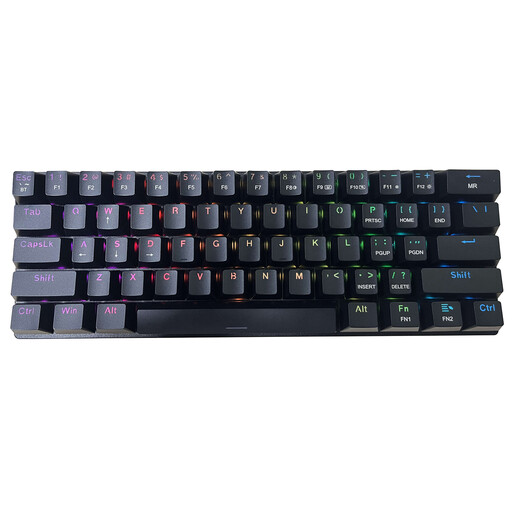
Consider the 61-key format if keeping more desk surface clear matters more than retaining a larger keyboard layout. The title specifies tri-mode operation and clicky blue switches; check the exact connection methods, dimensions and typing sound against your needs. It is listed with a QWERTY US layout.
 No image available
Consider this 75% wireless model if you want a compact format for lesson planning. Check the selected variant’s exact key layout and dimensions before deciding whether it fits your desk and punctuation habits.
 No image available
Consider its 68-key format if a compact board suits your desk. The title lists Bluetooth 5.1 and wired operation, plus a QWERTY US layout. Check its dimensions and, if you move between paired devices, whether the selected keyboard offers the switching you need.
 No image available
Consider this folding keyboard if packing it between planning sessions is a priority. Its title lists Bluetooth connectivity for computers, laptops, iPads and smartphones. Check the unfolded desk footprint, exact key layout and device-switching behaviour before purchase.
Choose a covered travel keyboard when you frequently pack it with a tablet or phone; lean towards a compact desktop-style board when familiar keys matter more during longer lesson-planning sessions. In either case, compare its exact footprint with the space you have.
Prioritise it if you regularly type on more than one compatible device. Logitech states that Keys-To-Go 2 and Pebble Keys 2 K380s switch between up to three devices, while HP lists up to three Bluetooth devices for the 350 Compact; check that the model also supports each device and connection method you need.
Check the layout designation for the exact variant before checkout, particularly if you often type UK punctuation or currency symbols. Keychron’s UK ISO listings show why a product family name alone is not enough to identify the selected layout.
Use an appropriate electricals-recycling route and follow local instructions for any removable batteries. GOV.UK guidance explains that battery-powered products can still fall within the electrical and electronic equipment covered by WEEE rules.