Travellers short on bag space
If your tablet or laptop already shares a bag with training materials, you need a keyboard that is easy to stow and protect between stretches of writing.


Choose a slim, protected keyboard if fitting it into your train bag is the main concern; consider a compact model with an explicit quiet-key claim if you expect to draft longer plans beside other passengers. Before buying, check the exact layout and connection requirements against every device you intend to use. A fuller keyboard may suit your typing preferences, but you will need to make room for it in your bag and on your work surface.
If your tablet or laptop already shares a bag with training materials, you need a keyboard that is easy to stow and protect between stretches of writing.
If you will be writing agendas, exercises or trainer notes in a shared carriage, key noise matters as well as portability.
If you draft on a laptop and review slides or messages on a tablet or phone, check whether one keyboard can connect to each device and switch between them.
Start with the space available in your bag and on the train, then decide how much quiet typing, device switching and familiar key spacing matter to your planning work.
| Concern | What to check | Who this matters to |
|---|---|---|
| Bag space and protection | Check the exact variant’s dimensions and weight, and whether it has a cover or needs a sleeve. | If my keyboard shares a bag with a device, cables and training papers, I need it to stow without making the bag awkward to carry. Around 36% of consumers put space and protection first. |
| Quiet typing | Look for an explicit quiet-key claim for the model; consider how you can assess its feel before travelling. | When I am drafting beside other passengers, I want to limit the sound of repeated typing. Quiet key action is the main concern for around 29% of consumers. |
| Device compatibility | Check each device’s operating system and connection method, plus how many devices the keyboard can remember. | I may move between a laptop outline and notes or messages on another device, so switching without repeatedly pairing matters most to around 21% of consumers. |
| Longer writing sessions | Check key size and arrangement alongside the space the keyboard will occupy when in use. | If I will write detailed objectives, timings and activities during the journey, familiar keys matter more to me than the smallest packed size. Around 14% of consumers prioritise longer-session typing comfort. |
A different key arrangement can interrupt writing when you reach for familiar symbols or punctuation.
Check the layout stated for the exact variant, rather than relying on an image. Keychron, for example, lists a UK-ISO option for its B1 Pro.
Bluetooth, a 2.4 GHz receiver and a wired connection need different capabilities from your laptop, tablet or phone. Multi-device support also varies by model.
Check the operating systems and ports of the devices you will carry, then confirm the keyboard’s supported connection methods and device-switching limit.
A receiver or wired connection may also mean carrying a compatible adapter.
A compact layout alone tells you neither how the keys sound nor whether their spacing suits a longer session plan.
Look for a model-specific quiet-key claim if noise matters, and assess the key arrangement before depending on it for sustained writing.
The keyboard still has to fit alongside your device, charger and papers. National Rail advises that luggage be securely packed and light enough to carry easily.
Check how you will pack the complete kit; use a covered keyboard or suitable protection where keys could rub against other items.
Logitech offers different approaches within this decision: a covered travel keyboard, a compact model described as quiet, and a more feature-led compact model.
HP’s 350 Compact Multi-Device Bluetooth Keyboard is a reference point for travellers who want a compact keyboard with standard-size keycaps.
Keychron’s B1 Pro is relevant if a UK-ISO option and alternatives to Bluetooth matter to your work setup.
These keyboards offer different ways to plan while travelling, from compact layouts to full-size keys. Match the exact variant to the space in your bag, the devices you carry and the amount you expect to type.
 Image unavailable
Consider its compact layout if bag space matters, but check that its US key arrangement suits your writing.
The title specifies 78 keys, 2.4 GHz and Bluetooth 5.0/4.0 connections, and support for up to four devices. It names Windows, Mac, Linux and Chrome; confirm compatibility with any other device you intend to use.
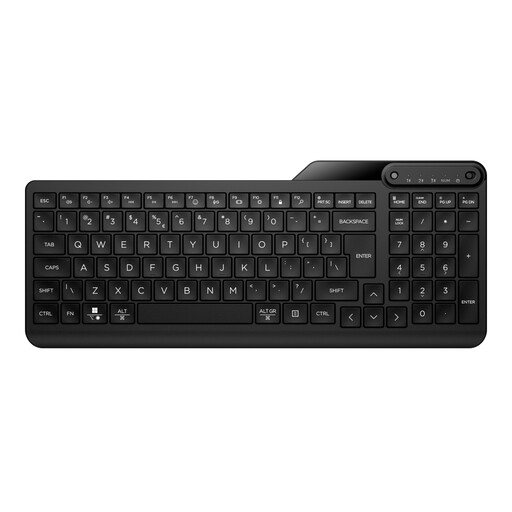 Image unavailable
Consider this model if you want to use a Bluetooth keyboard across work devices; confirm that each device supports the connection.
Check the exact keyboard layout and packed size against your writing preferences and train bag.
 Image unavailable
Consider a full-size keyboard if familiar key spacing matters more than minimising the space your kit occupies.
Check that this UK-labelled variant fits both your bag and the surface where you expect to work on the train.
 Image unavailable
This Bluetooth model is worth considering if wireless connection suits your planning setup and you have room to carry it.
Check the exact key layout and whether its key sound suits a shared carriage before relying on it during the journey.
 Image unavailable
Consider this keyboard for a device-led travel setup, while checking whether its key arrangement gives you enough room for writing a session plan.
The title lists computers, laptops, iPads and smartphones as compatible device types. Confirm support for your exact device and its operating system before buying.
A separate keyboard is most useful if you expect to write a substantial plan or prefer physical keys to typing on your device’s screen. Check its connection method and the space available before adding it to your travel kit.
It can, if the exact keyboard supports each device and the connections you intend to use. Logitech lists three-device switching for Pebble Keys 2 K380s, while HP lists switching among up to three devices for its 350 model; check the operating-system and connection requirements of the model you choose.
Pack it securely with the rest of your kit and make sure the complete bag is manageable to carry. National Rail gives that advice for luggage generally; check your train operator’s conditions for your journey.
Choose according to how you prefer to keep the keyboard powered during travel: charging calls for a compatible cable and opportunity to charge, while replaceable batteries call for the correct spares. HP states that its 350 keyboard uses two AAA batteries; check the power method of the exact model you are considering.
Use an appropriate electrical-waste collection route rather than putting the keyboard in general waste. GOV.UK says electrical products can be taken to a local household waste recycling centre; follow the product instructions and local arrangements for any removable batteries.